Forum Discussion

45 Replies
- Hi - I'm getting the exact same error as NukerDoggie. I'm behind a proxy server, and at first I thought this was the problem. But according to network traffic files are being downloaded. At first I see the Java 7 splash screen, after that a progress bar appears. It goes all the way to 80 - 95%, and then the error appears. Any solution?
 pandapContributorHi.
I downloaded and installed LOAD UI 2.0.0 without any issues, but when running LOADUI I am getting same issues reported in this thread,
Did the issue fixed if yes then can you post the sequence of things to be done. I tried all the option such as reinstalling, clearing cache etc.. but still unable to open the app.
Thanks,
Prashanthashishraj14 wrote: Hi Henrik,
I have tried the following
Reinstall Java
Cleared Jave cache
removed the eviware cert
uninstalled loadUI
downloaded a fresh copy and reinstalled loadUI
when I start loadUI it provides me a dialog box with cert info and I click accept it
Then it shows a dialog box with error message "Failed to validate the certificate and application will not be executed" and the following details are listed:
sun.security.validator.ValidatorException: PKIX path validation failed: java.security.cert.CertPathValidatorException: Untrusted certificate: CN=JavaFX Runtime, OU=Java Signed Extensions, OU=Corporate Object Signing, O=Sun Microsystems Inc
at sun.security.validator.PKIXValidator.doValidate(Unknown Source)
at sun.security.validator.PKIXValidator.doValidate(Unknown Source)
at sun.security.validator.PKIXValidator.engineValidate(Unknown Source)
at sun.security.validator.Validator.validate(Unknown Source)
at sun.security.validator.Validator.validate(Unknown Source)
at com.sun.deploy.security.TrustDecider.isAllPermissionGranted(Unknown Source)
at com.sun.javaws.security.AppPolicy.grantUnrestrictedAccess(AppPolicy.java:268)
at com.sun.javaws.LaunchDownload.checkSignedResourcesHelper(LaunchDownload.java:1825)
at com.sun.javaws.LaunchDownload.checkSignedResources(LaunchDownload.java:1508)
at com.sun.javaws.Launcher.prepareResources(Launcher.java:1232)
at com.sun.javaws.Launcher.prepareAllResources(Launcher.java:621)
at com.sun.javaws.Launcher.prepareToLaunch(Launcher.java:327)
at com.sun.javaws.Launcher.prepareToLaunch(Launcher.java:199)
at com.sun.javaws.Launcher.launch(Launcher.java:116)
at com.sun.javaws.Main.launchApp(Main.java:416)
at com.sun.javaws.Main.continueInSecureThread(Main.java:248)
at com.sun.javaws.Main$1.run(Main.java:110)
at java.lang.Thread.run(Unknown Source)
Caused by: java.security.cert.CertPathValidatorException: Untrusted certificate: CN=JavaFX Runtime, OU=Java Signed Extensions, OU=Corporate Object Signing, O=Sun Microsystems Inc
at sun.security.provider.certpath.PKIXMasterCertPathValidator.validate(Unknown Source)
at sun.security.provider.certpath.PKIXCertPathValidator.doValidate(Unknown Source)
at sun.security.provider.certpath.PKIXCertPathValidator.engineValidate(Unknown Source)
at java.security.cert.CertPathValidator.validate(Unknown Source)
... 18 more
I had the same error. I managed to solve it after seeing: http://www.mkyong.com/java/must-specify ... nder-java/.
The trick for me was to untick the "Enable online certificate validation' from Advanced->Security->General section of the Java Console. I am not sure this is a recommendable thing to do, but it does work and hopefully can help Smartbear support find the root cause of the issue.- What I did in Windows 7 to make it work...
1) Uninstall load ui 2.0
2) Go to settings > control panel > java. Click on "security" tab, click "certificates" button, select the "Smartbear" certificate and remove it. You don't need to remove all certificates, just this one.
3) Close the certificates window, and in the same "Java" window go to "General" tab, below "Temporary internet files" click on "Settings" and "Delete files" to remove all temporary files. Close this window then in the same "General tab", in "temporary internet files" click on "View..." and remove all applications, resourses, etc that you have in your cache viewer.
4) Reinstall load ui 2.0
Now it should work. Removing the cache files might be enough, without uninstalling/reinstalling load ui, but this I haven't tested.  jeffdafoeNew ContributorHello,
I'm having no luck getting LoadUI to start under WinXP 32 bit. SoapUI starts with no issues. I just downloaded LoadUI for the first time 2 days ago. I've tried the steps here viewtopic.php?f=10&t=12630&start=15#p31062 and also nekosan's Win7 steps, with no luck. When I start LoadUI I first get the Java7 splash screen, then the FX cert error, then "Unable to launch this application" with the following exception:
JNLPException[category: Launch File Error : Exception: null : LaunchDesc:
<jnlp spec="1.0+" codebase="http://dl.javafx.com/1.3/" version="1.3.1_b101" href="http://dl.javafx.com/1.3/javafx-rt.jnlp">
<information>
<title>JavaFX Runtime</title>
<vendor>Oracle Corporation</vendor>
<homepage href="null"/>
<offline-allowed/>
</information>
<security>
<all-permissions/>
</security>
<update check="background" policy="always"/>
<resources>
<jar href="http://dl.javafx.com/1.3/progressbar__V1.3.1_b101.jar" download="progress" main="false"/>
<jar href="http://dl.javafx.com/1.3/javafx-rt-windows-i586__V1.3.1_b101.jar" part="javafx-rt" download="eager" main="false"/>
<jar href="http://dl.javafx.com/1.3/javafx-rt-lazy-windows-i586__V1.3.1_b101.jar" part="javafx-rt" download="lazy" main="false"/>
<jar href="http://dl.javafx.com/1.3/javafx-rt-fonts-windows-i586__V1.3.1_b101.jar" part="javafx-rt" download="lazy" main="false"/>
<nativelib href="http://dl.javafx.com/1.3/javafx-rt-natives-windows-i586__V1.3.1_b101.jar" part="javafx-rt" download="eager" main="false"/>
<nativelib href="http://dl.javafx.com/1.3/jmc-natives-windows-i586__V1.3.1_b101.jar" part="javafx-rt" download="eager" main="false"/>
</resources>
<component-desc progress-class="com.javafx.progressbar.ProgressManager"/>
</jnlp> ]
at com.sun.javaws.security.JNLPSignedResourcesHelper.checkSignedResourcesHelper(Unknown Source)
at com.sun.javaws.security.JNLPSignedResourcesHelper.checkSignedResources(Unknown Source)
at com.sun.javaws.Launcher.prepareResources(Unknown Source)
at com.sun.javaws.Launcher.prepareAllResources(Unknown Source)
at com.sun.javaws.Launcher.prepareToLaunch(Unknown Source)
at com.sun.javaws.Launcher.prepareToLaunch(Unknown Source)
at com.sun.javaws.Launcher.launch(Unknown Source)
at com.sun.javaws.Main.launchApp(Unknown Source)
at com.sun.javaws.Main.continueInSecureThread(Unknown Source)
at com.sun.javaws.Main$1.run(Unknown Source)
at java.lang.Thread.run(Unknown Source)
I can try any additional steps and provide any other information that might help me get LoadUI to work. I'm eager to try out the software and see what it can do.
Thanks,
-Jeff- jeffdafoeNew ContributorI finally got this to work after screwing around with it forever. It turns out that the reason the steps were not working was that I had two dozen Java versions installed, some dating back to the prehistoric era. As a result, when I ran LoadUI, Java 1.7 would start - however, the control panel app was managing the 1.6 installation. Once I removed all older versions of Java I was then able access the 1.7 control panel and clear its cache. I did also have to turn off "Enable online certificate validation" from Advanced->Security->General section of the Java Console as fromano mentioned.
-Jeff - Hi,
Ah, so that was it! Glad you figured it out, we'll keep that in mind the next time someone has this problem.
Regards,
Dain
SmartBear Software  mani_taporiOccasional ContributorHi,
I've tried all steps listed in this thread. I've uninstalled java old versions, downloaded and installed Java 7 (build 1.7.0_03-b05). I've run javaws - uninstall and javaws - clearcache steps from commandline. I've removed the certificates from java console/ deleted all temp files and have also unchecked the "Enable online certificate validation". After doing all that, I've reinstalled loadUI but I'm still not able to launch loadUI 2.0
The error I'm getting is -
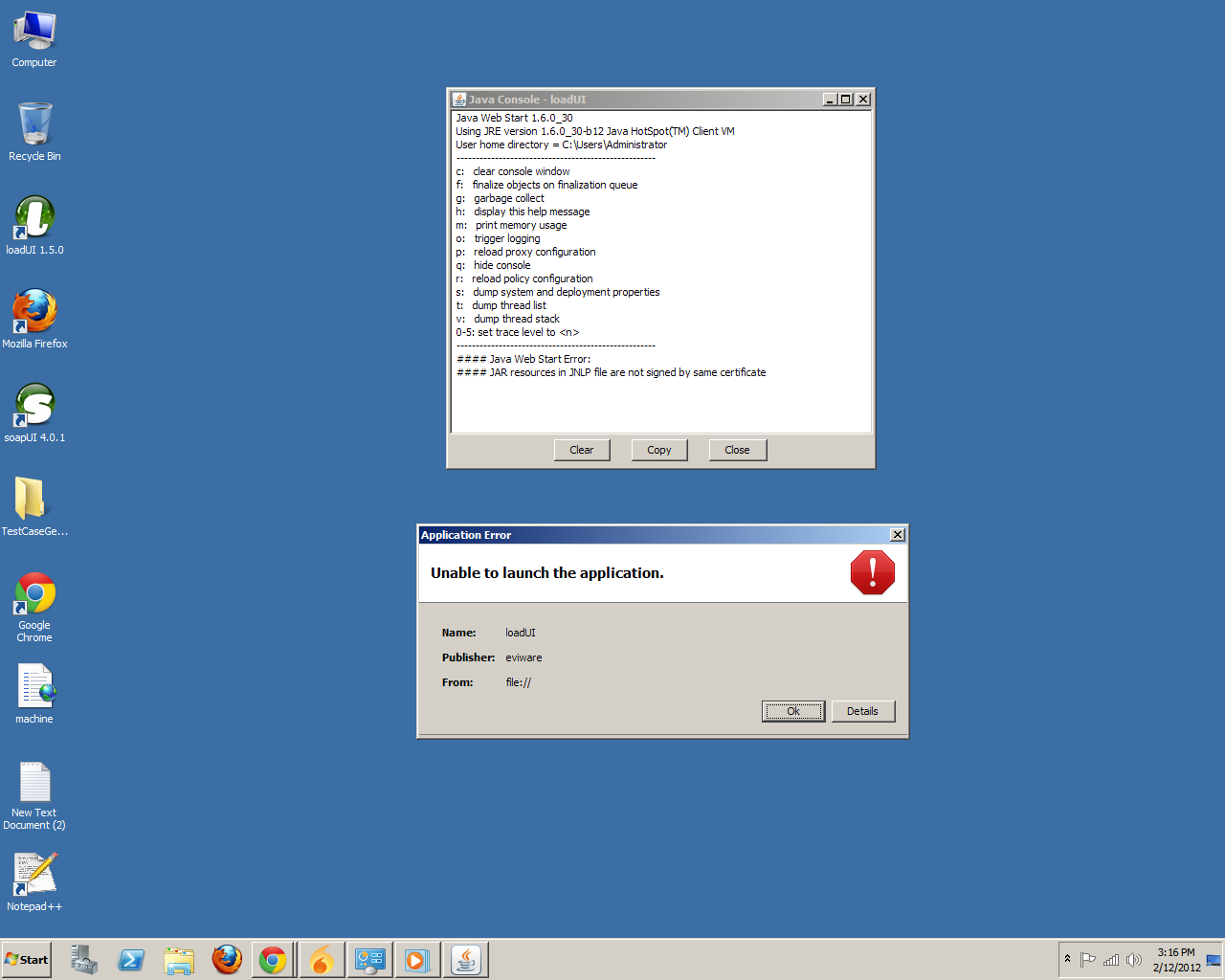
"Unable to launch the application."
On clicking Details I get -
"Error: JAR resources in JNLP file are not signed by same certificate"
Below that I have 3 tabs -
"Launch file" tab says -
<jnlp spec="1.0+" version="1.3.1_b101" codebase="http://dl.javafx.com/1.3/" href="javafx-rt.jnlp">
<information>
<title>JavaFX Runtime</title>
<vendor>Oracle Corporation</vendor>
<offline-allowed/>
</information>
<security>
<all-permissions/>
</security>
<update check="background"/>
<resources>
<jar href="progressbar__V1.3.1_b101.jar" size="10806" download="progress"/>
</resources>
<resources os="Windows">
<jar href="javafx-rt-windows-i586__V1.3.1_b101.jar" part="javafx-rt" size="1093346" download="eager"/>
<jar href="javafx-rt-lazy-windows-i586__V1.3.1_b101.jar" size="221698" part="javafx-rt" download="lazy"/>
<jar href="javafx-rt-fonts-windows-i586__V1.3.1_b101.jar" size="155269" part="javafx-rt" download="lazy"/>
</resources>
<resources os="Windows" arch="x86">
<nativelib href="javafx-rt-natives-windows-i586__V1.3.1_b101.jar" size="28970" part="javafx-rt" download="eager"/>
<nativelib href="jmc-natives-windows-i586__V1.3.1_b101.jar" size="550895" part="javafx-rt" download="eager"/>
</resources>
<resources os="Mac OS X">
<jar href="javafx-rt-macosx-universal__V1.3.1_b101.jar" size="1229513" part="javafx-rt" download="eager"/>
<jar href="javafx-rt-lazy-macosx-universal__V1.3.1_b101.jar" size="221529" part="javafx-rt" download="lazy"/>
<jar href="javafx-rt-fonts-macosx-universal__V1.3.1_b101.jar" size="155282" part="javafx-rt" download="lazy"/>
</resources>
<resources os="Mac OS X" arch="ppc">
<nativelib href="javafx-rt-natives-macosx-universal__V1.3.1_b101.jar" size="486786" part="javafx-rt" download="eager"/>
</resources>
<resources os="Mac OS X" arch="i386">
<nativelib href="javafx-rt-natives-macosx-i386__V1.3.1_b101.jar" size="224644" part="javafx-rt" download="eager"/>
</resources>
<resources os="Mac OS X" arch="x86_64">
<nativelib href="javafx-rt-natives-macosx-x86_64__V1.3.1_b101.jar" size="243787" part="javafx-rt" download="eager"/>
</resources>
<resources os="Linux">
<jar href="javafx-rt-linux-i586__V1.3.1_b101.jar" size="1089958" part="javafx-rt" download="eager"/>
<jar href="javafx-rt-lazy-linux-i586__V1.3.1_b101.jar" size="221638" part="javafx-rt" download="lazy"/>
<jar href="javafx-rt-fonts-linux-i586__V1.3.1_b101.jar" size="155272" part="javafx-rt" download="lazy"/>
</resources>
<resources os="Linux" arch="i386">
<nativelib href="javafx-rt-natives-linux-i586__V1.3.1_b101.jar" size="422337" part="javafx-rt" download="eager"/>
</resources>
<resources os="Linux" arch="x86">
<nativelib href="javafx-rt-natives-linux-i586__V1.3.1_b101.jar" size="422337" part="javafx-rt" download="eager"/>
</resources>
<resources os="SunOS">
<jar href="javafx-rt-solaris-i586__V1.3.1_b101.jar" size="1079380" part="javafx-rt" download="eager"/>
<jar href="javafx-rt-lazy-solaris-i586__V1.3.1_b101.jar" size="221687" part="javafx-rt" download="lazy"/>
<jar href="javafx-rt-fonts-solaris-i586__V1.3.1_b101.jar" size="155270" part="javafx-rt" download="lazy"/>
</resources>
<resources os="SunOS" arch="x86">
<nativelib href="javafx-rt-natives-solaris-i586__V1.3.1_b101.jar" size="189894" part="javafx-rt" download="eager"/>
</resources>
<component-desc progress-class="com.javafx.progressbar.ProgressManager"/>
</jnlp>
"Main Launch File" tab says -
<jnlp spec="1.0+" codebase="file:." href="loadUI.jnlp">
<information>
<title>loadUI</title>
<vendor>eviware</vendor>
<homepage href="http://www.loadui.org/"/>
<description>loadUI</description>
<offline-allowed/>
</information>
<resources>
<j2se version="1.7" java-vm-args="-Xms256m -Xmx768m -XX:MaxPermSize=128m -Dsun.java2d.noddraw=true"/>
<extension name="JavaFX Runtime" href="http://dl.javafx.com/1.3/javafx-rt.jnlp"/>
<jar href="lib/loadui-launcher.jar" main="true"/>
<jar href="lib/org.apache.felix.main.jar"/>
<jar href="lib/commons-cli.jar"/>
<jar href="lib/bndlib.jar"/>
</resources>
<security>
<all-permissions/>
</security>
<application-desc main-class="com.eviware.loadui.launcher.LoadUILauncher"/>
<update check="timeout" policy="always"/>
</jnlp>
"Exception" tab says -
JNLPException[category: Launch File Error : Exception: null : LaunchDesc:
<jnlp spec="1.0+" codebase="http://dl.javafx.com/1.3/" version="1.3.1_b101" href="http://dl.javafx.com/1.3/javafx-rt.jnlp">
<information>
<title>JavaFX Runtime</title>
<vendor>Oracle Corporation</vendor>
<homepage href="null"/>
<offline-allowed/>
</information>
<security>
<all-permissions/>
</security>
<update check="background" policy="always"/>
<resources>
<jar href="http://dl.javafx.com/1.3/progressbar__V1.3.1_b101.jar" download="progress" main="false"/>
<jar href="http://dl.javafx.com/1.3/javafx-rt-windows-i586__V1.3.1_b101.jar" part="javafx-rt" download="eager" main="false"/>
<jar href="http://dl.javafx.com/1.3/javafx-rt-lazy-windows-i586__V1.3.1_b101.jar" part="javafx-rt" download="lazy" main="false"/>
<jar href="http://dl.javafx.com/1.3/javafx-rt-fonts-windows-i586__V1.3.1_b101.jar" part="javafx-rt" download="lazy" main="false"/>
<nativelib href="http://dl.javafx.com/1.3/javafx-rt-natives-windows-i586__V1.3.1_b101.jar" part="javafx-rt" download="eager" main="false"/>
<nativelib href="http://dl.javafx.com/1.3/jmc-natives-windows-i586__V1.3.1_b101.jar" part="javafx-rt" download="eager" main="false"/>
</resources>
<component-desc progress-class="com.javafx.progressbar.ProgressManager"/>
</jnlp> ]
at com.sun.javaws.security.JNLPSignedResourcesHelper.checkSignedResourcesHelper(Unknown Source)
at com.sun.javaws.security.JNLPSignedResourcesHelper.checkSignedResources(Unknown Source)
at com.sun.javaws.Launcher.prepareResources(Unknown Source)
at com.sun.javaws.Launcher.prepareAllResources(Unknown Source)
at com.sun.javaws.Launcher.prepareToLaunch(Unknown Source)
at com.sun.javaws.Launcher.prepareToLaunch(Unknown Source)
at com.sun.javaws.Launcher.launch(Unknown Source)
at com.sun.javaws.Main.launchApp(Unknown Source)
at com.sun.javaws.Main.continueInSecureThread(Unknown Source)
at com.sun.javaws.Main$1.run(Unknown Source)
at java.lang.Thread.run(Unknown Source)
Can anyone please help?- jeffdafoeNew ContributorMani,
One thing I noticed, when I started digging into why the "fix" process wasn't working on my computer, was that I originally skipped step 4c below:
=====
4. Just to be sure:
a Also go to the General tab, click Settings..., then Delete Files..., check all items and click OK.
b Click Apply and then View....
c Make sure that the list is empty for all views (use the dropdown in the upper-left corner to change views). If there are items left, remove them by selecting them and clicking the red X.
=====
When I went into the "view" option, even after using "settings->delete files" several dozen times by this point, I saw that there were still files shown. I had to flip through each option in the "show" control, manually select the files, and remove them with the X .
-Jeff