Forum Discussion

45 Replies
- Hi,
Sorry about this. We are working hard to get this fixed 8and pushing Oracle regarding the certificates).
When I tested, it seems that it works exactly every third time that I start it (i.e. FAIL, FAIL, SUCCESS, FAIL, FAIL, SUCCESS...). That may be worth trying in the meantime.
Henrik
SmartBear Software  ALLSCRIPTS_HEALNew ContributorI am having no luck with any of these fixes. I have been running Load UI on several machines for several weeks now. Last week it bugged out with this error on several of the machines that I had been working with. Any fix or update on this issue would be very helpful since I am now working with deadlines and have come to depend on this software to get my load testing done. The most important set up is running on Windows Sever 2008 R2 if that helps.
- Hi!
We believe that doing this will fix the problem:
1. In a command line, enter these commands:
[list=a:xgm7z6nl]- javaws -uninstall
- javaws -clearcache
2. From the Control Panel, open Java.
3. In the Security tab, click Certificates.... Remove all Trusted Certificates. Then close this dialog.
4. Just to be sure:
[list=a:xgm7z6nl]- Also go to the General tab, click Settings..., then Delete Files..., check all items and click OK.
- Click Apply and then View....
- Make sure that the list is empty for all views (use the dropdown in the upper-left corner to change views). If there are items left, remove them by selecting them and clicking the red X.
5. Reinstall loadUI.
Please let us know if this works for you!
Thank you for your patience
Henrik
SmartBear Software - ALLSCRIPTS_HEALNew ContributorNo luck with this solution for me.
ALLSCRIPTS HEALTHCARE SOLUTION Support wrote: No luck with this solution for me.
I have modified the steps above. Could you try again?
If it still doesn't work, contact me (firstname.lastname@smartbear.com) so we could setup a screen-sharing session or something.
Regards
Henrik Olsson
SmartBear Software- This has worked for all the computers we've tried it on. It seems that there is a javafx-cache entry which usually isn't removed by following steps 1-4.a, but must be removed manully by step 4.c. The entry seems to appear in the System Resources view. Once this has been removed, reinstalling loadUI seems to work.
Regards,
Dain
SmartBear Software - The above solution did not work for me on Windows 7, using today's build of load UI.
The exception I get is listed below.
I believe the problem is that your installer does not have an option for people who need a pac script to connect to the internet. Therefore certain files do not get downloaded.
I had no problems installing SOAPUI, btw.
The above solution clear a lot of things, but LoadUI still fails on startup with the following exception:
java.lang.NullPointerException
at java.util.jar.JavaUtilJarAccessImpl.getCodeSource(Unknown Source)
at com.sun.deploy.cache.DeployCacheJarAccessImpl.getCodeSource(Unknown Source)
at com.sun.javaws.security.SigningInfo.getCommonCodeSignersForJar(Unknown Source)
at com.sun.javaws.security.SigningInfo.check(Unknown Source)
at com.sun.javaws.security.JNLPSignedResourcesHelper.checkSignedResourcesHelper(Unknown Source)
at com.sun.javaws.security.JNLPSignedResourcesHelper.checkSignedResources(Unknown Source)
at com.sun.javaws.Launcher.prepareResources(Unknown Source)
at com.sun.javaws.Launcher.prepareAllResources(Unknown Source)
at com.sun.javaws.Launcher.prepareToLaunch(Unknown Source)
at com.sun.javaws.Launcher.prepareToLaunch(Unknown Source)
at com.sun.javaws.Launcher.launch(Unknown Source)
at com.sun.javaws.Main.launchApp(Unknown Source)
at com.sun.javaws.Main.continueInSecureThread(Unknown Source)
at com.sun.javaws.Main$1.run(Unknown Source)
at java.lang.Thread.run(Unknown Source)  NukerDoggieOccasional ContributorI'm running Win XP SP3 and have the same issue with LoadUI not starting properly. I've tried all the steps suggested - no resolution. By the way, I think it's irresponsible to tell users to "remove all trusted certs" in your steps to fix the problem. I've got important certs for crucial apps that must not be removed or else new problems will arise.
Here's a description of certs I have NOT removed. Are any of these harmless to remove?
International Business Machines Corporation (VeriSign Class 3 Code Signing 2004 CA)
TradeTrek.com (Thawte Code Signing CA - G2)
Unless you can provide a clear and workable solution that doesn't endanger other crucial apps on my machine, I'm going to abandon LoadUI altogether. This is pretty discouraging. The entire installation process for LoadUI looks very unsophisticated to me. Does not bode well for the LoadUI app itself, I'm afraid.- Hi,
charlesdwm wrote:
I believe the problem is that your installer does not have an option for people who need a pac script to connect to the internet. Therefore certain files do not get downloaded.
As the loadUI installer does not offer any support for PAC scripts you will need to manually enter proxy connection details to be able to install. The PAC script itself should provide the required proxy details. If you are unable to extract them yourself you might want to try asking your network admin for help with this. Unforutnately we are unable to provide a means of installing loadUI without an Internet connection, due to licensing restrictions of the JavaFX 1.3 platform, which is currently used by the loadUI application.NukerDoggie wrote: By the way, I think it's irresponsible to tell users to "remove all trusted certs" in your steps to fix the problem. I've got important certs for crucial apps that must not be removed or else new problems will arise.
Here's a description of certs I have NOT removed. Are any of these harmless to remove?
International Business Machines Corporation (VeriSign Class 3 Code Signing 2004 CA)
TradeTrek.com (Thawte Code Signing CA - G2)
You're right, you shouldn't have to remove any custom certificates that you've manually added. Those two you've listed sound like they are unrelated to the issue. What error message (if any) are you getting? Are you having trouble during installation or application launch?
Regards,
Dain
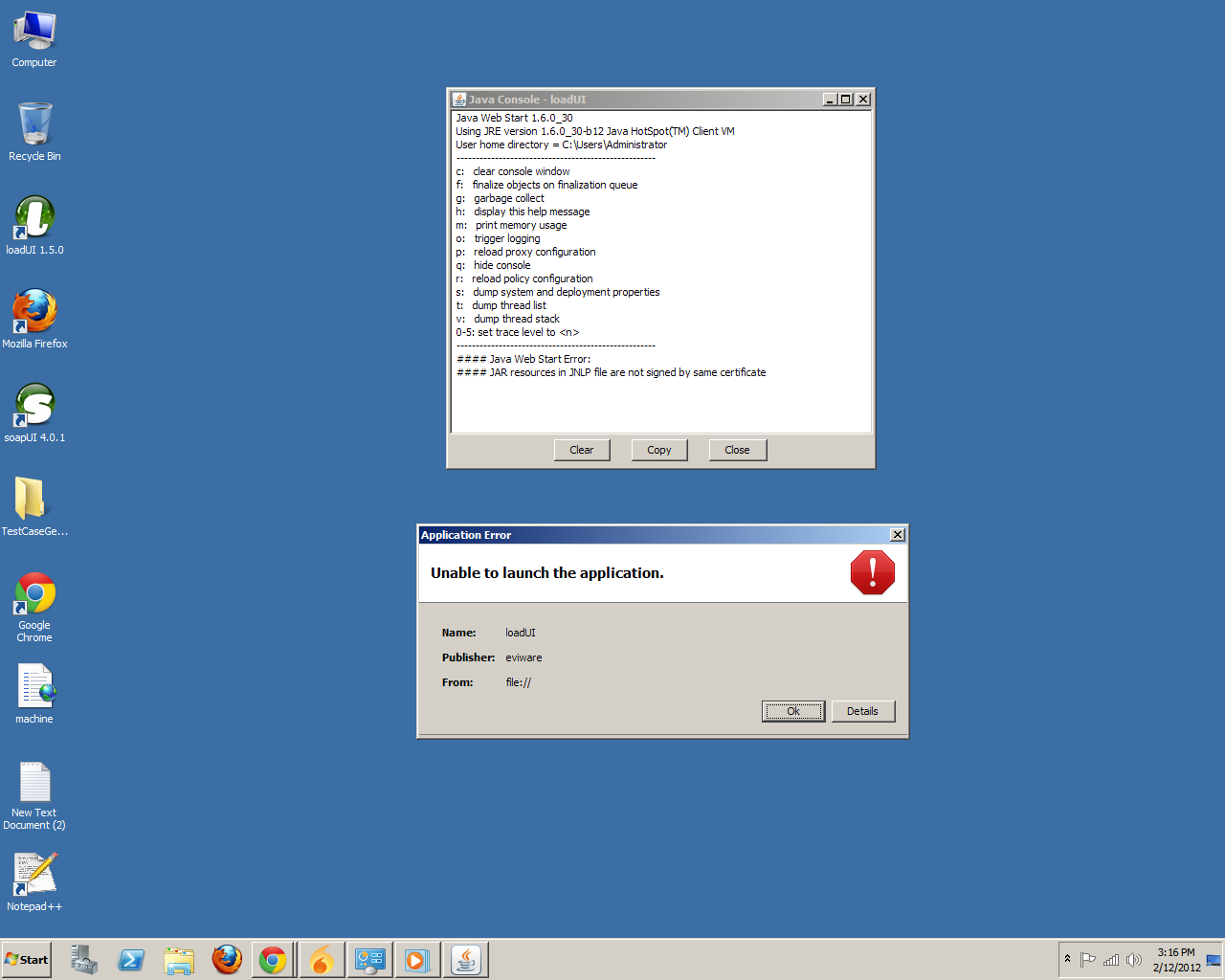
SmartBear Software - NukerDoggieOccasional ContributorHi - I'm getting the errors during attempt to start the application after it is installed, not during installation. It's the same error as noted above - "JAR resources in JNLP file are not signed by same certificate".
I saw the "Security Information" popup window (which appears for a second and then vanishes!) and was able to click on "Always Trust Content from this Publisher" and then "RUN", but that did not solve the problem. I've been thru every step recommended by your step-by-step process except I did not remove the two custom certs noted in my previous post.
I've removed and re-installed LoadUI 3 times - the result is always the same.