endoriumFrequent ContributorJoined 8 years ago106 Posts3 LikesLikes received1 SolutionView All Badges
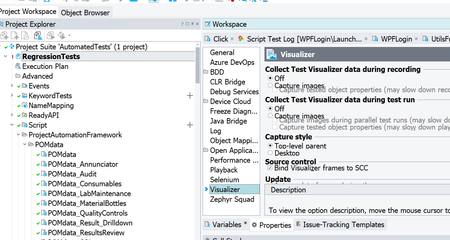
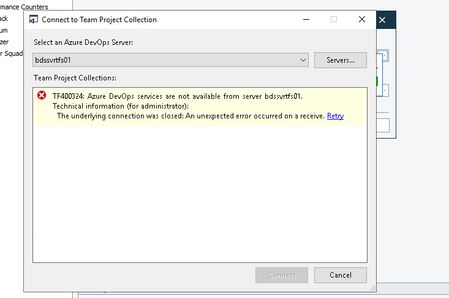
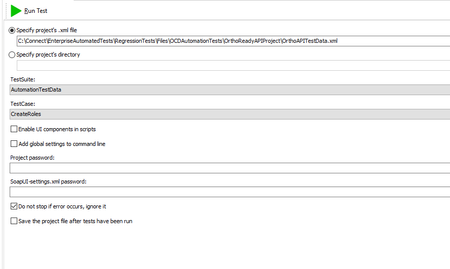
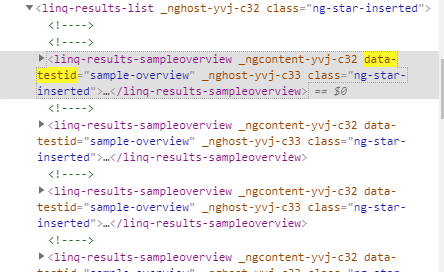
ContributionsMost RecentMost LikesSolutionsProject property not getting retrieved in header I have a project with a project property This gets set in one test and I want to use it in other tests. I create another test and in the header I put the following: It returns blank everytime though. In the second test if I put a groovy script to retrieve the project property, it does so correctly. So why can the header not seem to find/return the property? SolvedUnable to see checkbox inside a groupitem WPF We have a WPF app. One a page we have some items that are the 'System.Windows.Controls.GroupItem' type. Within these on the screen is a checkbox. But object spy cannot see any children of the GroupItem so cannot find the checkbox. ANy ideas how to srot this so testcomplete can see the checkboxs? ' SolvedTestComplete application running at low resolution I have had a box and running testcomplete for sometime now. Today I load it, and its running a very low resolution but only for the test complete app itself. Machine is set to 1920x1080. All other apps run at the right resolution. I load testcomplete and it looks like the below. Any ideas? The box is used to run nightly run via ADO which does update the resolution to 1920x1080. Just really confused why its onlt test complete running at this weird res Re: Issue with permissions and azure pipelines Hi, I have been through both of those previously and no joy. Any other ideas? Issue with permissions and azure pipelines So I am setting up pipelines to run testcomplete tests. Source control is setup as GIT in testcomplete. Agent configured but when I run the pipeline I get the below: vstest.console.exe "C:\Agent\_work\1\s\AutomatedTests\AutomatedTests.pjs" /logger:"trx" /TestAdapterPath:"C:\Agent\_work\1\s" Starting test execution, please wait... Failed to get a list of tests from the "C:\Agent\_work\1\s\AutomatedTests\AutomatedTests.pjs" file due to the following error: Unable to connect to TestComplete: The requested operation requires elevation. (Exception from HRESULT: 0x800702E4) No test is available in C:\Agent\_work\1\s\AutomatedTests\AutomatedTests.pjs. Make sure that test discoverer & executors are registered and platform & framework version settings are appropriate and try again. Results File: C:\Agent\_work\1\s\TestResults\snejad_W-TE-014_2022-11-15_11_36_41.trx Any help on this? I have tried disabling the windows store option. Also tried adding uiAccess="true" to the testcomplete manifest file on the agent machine but to no avail. Cannot work this out so help is really appreciated. Re: Devops setup/integration errorsYes, I have tried this. None of them work. In those scenarios this also can't clone in visual studio. But I can clone to visual studio on the same box just fine.Devops setup/integration errors I am trying to setup Test complete so it can run test from Devops. There is a video but it seems ot miss some bits out and the person clicks through everything so fats I am struggling. I have setup my devops server in test complete. I right click my project suite and go to sourcecontrol-> open from team foundation server. I select the server path and select the server I setup earlier. I then get the below message. Nothing I can see to get past this. Possible credentials? I at no pont have been asked to enter credentials entering details for the devops server? Cannot run API test from test complete I have setup a 'ReadyAPI' item in test complete. When I try to execute it I am getting the below. I dont know enough to work out what is wrong. Project file is specified in test complete. Any help in debugging is appreciated. cmd.exe /C testrunner.bat "-sAutomationTestData" "-cCreateRoles" -I -r -j -a "-fC:\Users\SNEJAD~1.BIO\AppData\Local\Temp\{AFCB2334-9706-4BB8-956D-3D26E47924ED}" "-PstartRow=81" "-PendRow=81" "-PPCName=PC417026" "-PprojectPath=C:\Connect\EnterpriseAutomatedTests\RegressionTests\" "C:\Connect\EnterpriseAutomatedTests\RegressionTests\Files\OCDAutomationTests\OrthoReadyAPIProject\OrthoAPITestData.xml" usage: testrunner [options] <project-file> -a Turns on exporting of all results -A Turns on exporting of all results using folders instead of long filenames -c <arg> Sets the testcase -d <arg> Sets the domain --D <property=value> Sets system property with name=value -e <arg> Sets the endpoint -E <arg> Sets the environment -f <arg> Sets the output folder to export results to -F <arg> The report format. Use this option with the -R argument. Possible values: PDF, XLS, HTML, RTF, CSV, TXT, and XML (comma-separated). --G <property=value> Sets global property with name=value -g Sets the output to include Coverage HTML reports -h <arg> Sets the host --H <property=value> Adds a custom HTTP Header to all outgoing requests (name=value), can be specified multiple times -i Enables Swing UI for scripts -I Do not stop if error occurs, ignore them -j Sets the output to include JUnit XML reports -J Sets the output to include JUnit XML reports adding test properties to the report -K,--accessKey <arg> Specifies the license access key. -M Creates a Test Run Log Report in XML format -O Do not send usage statistics -o Opens generated report(s) in a browser -p <arg> Sets the password --P <property=value> Sets or overrides project property with name=value -r Prints a small summary report -R <arg> Report to Generate -s <arg> Sets the testsuite -S Saves the project after running the tests -t <arg> Sets the readyapi-settings.xml file to use -T <arg> Runs only the test cases or test suites whose tags are specified. Format: -T"TestCase tag1[, tag2 ...]" or -T"TestSuite tag1[, tag2 ...]". -u <arg> Sets the username -U,--email <arg> Specifies the email of your SmartBear ID or SwaggerHub account. -v <arg> Sets password for readyapi-settings.xml file -V,--password <arg> Specifies the password of your SmartBear ID or SwaggerHub account. -w <arg> Sets the WSS password type, either 'Text' or 'Digest' -W <arg> Sets the Slack access token and channel -x <arg> Sets project password for decryption if project is encrypted No project file is specified. The test runner has exited with code 1. Bit more information. It seems to be the parameter 'projectPath' I am tryign to send in thats causing the issue. I remove this and it runs (but fails). Seems to be using this parameter to find the project file. This seems to be a genuine bug? testrunner.bat "-sAutomationTestData" "-cCreateRule" -I -r -j -a "-fC:\Users\SNEJAD~1.BIO\AppData\Local\Temp\{04199B9B-52A6-441D-87DD-A29916BCA941}" "-PstartRow=81" "-PendRow=81" "-PPCName=PC417026" "-PprojectPath=C:\Connect\EnterpriseAutomatedTests\RegressionTests\" "C:\Connect\EnterpriseAutomatedTests\RegressionTests\Files\OCDAutomationTests\OrthoReadyAPIProject\OrthoAPITestData.xml" SolvedTestComplete Restriction when searching html So I am writing a function for an app and TestComplete seems completely unable to the HTML level highlighted below. I thin its a limitation on custom tags/elements? If I use object spy it does not even show this level in the tree. If I use an xpath to find all 'data-testid' items or the 'linq-results-sampleview' items it does not find them. Any help or is it just not possible? With selenium it works straight away without issue but we use TestComplete only at work. Cannot get parameter to pass through I have a test shown in the screenshot. Its data driven and requires several API's to be hit to collect the right ID's to then make the final request. In the below code (From the parameters groovy step), I get the 'expectedMatchingValue' from the TestData step. I then get the response from the call made in the 'GetTest' step. I then try to look at this response and find the ID that matches the value of the 'expectedMatchingValue' ('TestName'). I cannot get it to work though. It always returns a blank value. I can make it work if I add an assertion step with the 'Gettest' call, but its not a true assertion so trying to split it out and put it into its own Groovy step. ANy help is really appreciated. /** * Script Assertion for REST Request test step **/ //Change the value for below statement as needed def name = context.expand( '${EditTestData#Name}' ) def expectedMatchingvalue = name assert context.'${GetTest#Response}', 'Response is empty or null' //def json = new groovy.json.JsonSlurper().parseText(context.response) def json = new groovy.json.JsonSlurper().parseText(context.'${GetTest#Response}' ) context.testCase.setPropertyValue('TESTIDNEW', json.value.find {it.TestName == expectedMatchingvalue}?.Id?.toString()) Solved