Feature Request: Alternative working directory for temp files and logs in TestExecute
Feature Request: Please provide an option to change the working directory for temporary test suite files from %PROGRAMDATA%\Smartbear\TestExecute to another directory location. Reason: No permissions in a customer project for any write processes to certain locations in the C partition while needing to maintain %PROGRAMDATA% as default settings. Because of this, the working directory where all the tcData files get extracted should be configurable to use a custom location.56Views0likes0CommentsEdge browser does not recognize Test Extension sometimes
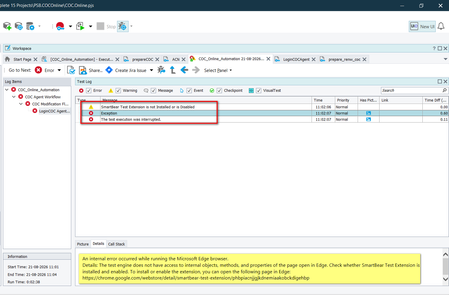
I have created a group in execution plan, where every keyword test has open browser at start and Close browser at end. When i run all keyword test together then sometimes browser opens but test extension not recognized, hence my group test gets failed many times in between. Notes: Using Latest Test Complete and Browser versions always. Same issue when run execution with Test Execute.130Views0likes4Comments
Upload file from WinExp don't work
I'm trying to upload a file with Windows Explorer using two different methods: 1) browser.dlgApri.OpenFile(Project.Variables.URLFileUpload); browser.dlgApri.btnApri.ClickButton(); 2) browser.dlgApri.cbxFileName.ComboBox.Click(); browser.dlgApri.cbxFileName.ComboBox.SetText(Project.Variables.URLFileUpload); browser.dlgApri.btnApri.ClickButton(); But the test crashes and fails in both cases: "The window with the 0x00140e06 handle exists but did not respond during the auto-wait timeout (10000 ms). Try increasing the 'Auto-wait timeout' project property. Tested object: Aliases.browser.dlgApri.cbxFileName.ComboBox (Sys.Browser("chrome").Window("#32770", "Apri", 1).Window("ComboBoxEx32", "", 1).Window("ComboBox", "", 1))" When we increase the "Auto-wait timeout" value to 40000, we get the same error. What can I try? Is there a configuration I should change? Thanks for the replySolved128Views0likes4Comments
Issue Running Project After Updating to Version 15.81 – NameError
I am currently using Test Complete version 15.76. After updating to version 15.81, my project encounters the following issues when running: Name Error: name 'Sys' is not defined Name Error: name 'Log' is not defined My project uses Python as the programming language. It runs correctly in version 15.76, but I would like to use the newer version to take advantage if its improvements. Could you please provide guidance or support to resolve this issue? Thank you for your help.Solved156Views0likes2CommentsPrevent TestExecute dialog to Confirm Save in silent mode
When a particular project is run via silent mode, if the tests completes successfully or if it fails, Test Execute in both UI mode and silent mode will ask to save changes. In the silent log the below entry is shown ". 05/03/2026 07:16:40:411 Tried to open the Save dialog. The default value: YES. When all test Pass, still the Jenkins job is s Fails as TE returns an exit code of -1/ This is only the case for a specific project, other projects don't have this issue.272Views0likes10Comments
Playback - On Error: Stop and Rerun Current Items Not Working.
Hello, can someone help me why Stop and Rerun Current Items on Errors is not working as before. When an error occurs, it is now continuing to run the whole test and then rerunning it, instead of stopping and then rerunning it. This is causing the execution to run very long and its very inconvenient. I have checked that my execution plan is using "Use project's On Error property" and that my project setting is set to "Stop and Rerun Current Items" when an error occurs. I have reinstalled test complete and it's still the same, how can I fix this?218Views0likes5Comments
Stop Skimming PDFs, Start Automating PDF Testing
On the surface, PDFs look simple, but testing them is a whole different story. Invoices, contracts, statements, compliance reports… they’re often the last thing that lands in a customer’s hands. That also means even the smallest issue, like a missing field or a misplaced decimal, can turn into something big. The challenge is that PDFs aren’t like web pages or apps where you can easily inspect elements. They’re containers packed with content, layout, images, and data from different systems. When you add in dynamic content that changes for every customer, formatting that has to stay perfect, and the regulatory risks in industries like finance or healthcare, you start to see why manual testing just doesn’t cut it. It’s slow, inconsistent, and doesn’t scale. This is where automation becomes essential. With automation, you can make sure data is always accurate, layouts stay consistent, and testing scales across thousands of documents without slowing down your team. Instead of spending hours opening PDFs by hand, QA can focus on higher-value work while still knowing that every report or statement going out the door is right. That’s exactly where TestComplete comes in. It’s built to handle the tough parts of PDF testing so you don’t have to. You can validate content down to the last character, run visual checks to keep layouts consistent, and plug it all straight into your CI/CD pipeline. The result is faster releases, fewer headaches, and a lot more confidence that the documents your customers see are exactly as they should be.128Views0likes0Comments
Execute keyword test case once with multiple test cases linked.
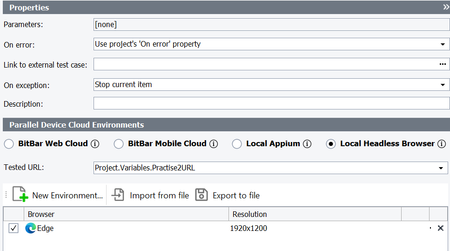
I want to execute keyword test once from Execution plan even if there is multiple manual test cases link to it and mark all linked manual test cases as passed/failed for all linked test cases. Is there any way to do same.100Views0likes1Comment
TestComplete Test Adapter
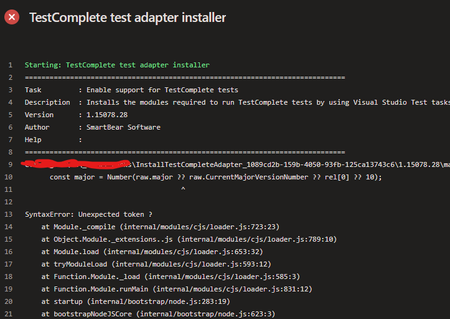
We are using this task 'InstallTestCompleteAdapter@1' in my pipeline. Version: 1.15078.28 Till 12/11, there was no issue. Nothing changed on our side, and starting from yesterday (13/11), the task execution failed with this error: Any suggestions on how to fix this? Thank you!Solved352Views0likes7Comments