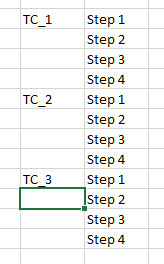
ContributionsMost RecentMost LikesSolutionsRe: Unable to recognize on chrome browser ver 132 and up Even when i try to upgrade to a newer version i get an error message. Any suggestions on how can i upgrade? Re: Unable to recognize on chrome browser ver 132 and up yes and extension is enabled Re: Unable to recognize on chrome browser ver 132 and up My other collegue has TC 15.45, chrome ver 132 and extnesion enabled - it works perfectly fine for him. I have the smae parameters but it doesnt recognize. Unable to recognize on chrome browser ver 132 and up Installed test complete 15.45 with chrome extension but test complete is unable to identity objects in the chrome browser. Object spy highlights the whole page. Anyone facing similar issue?Others in my team also have test complete installed in their system and are able to run script. plz provide your suggestions. CSV driver to count the rows with specific value Hi All, I have to loop through a csv file with multiple test cases and each test case has its set of test steps linked to it which i need to loop through also. The below pics shows the type of csv iam working with. Iam using csv driver to work with the csv data. Can anyone help me with the code to loop through this type of data. SolvedHow to close runtime error popup in testcomplete and continue execution I am designing a script using python in testcomplete. During overnight executions of around 100TCs the execution stops due to runtime error popup in testcomplete. How to close this pop-up and continue the execution by failing the test case and moving to the next? Code example: try: ------ ----- except RuntimeError as e: errorCode = e Log.Error(str(e)) Log.Error("Runtime error has occured") #custom message to be logged return str(e) finally: #Close browser before moving to the next test case close the browser Re: Keys method takes a very long time in Test Complete 15.45 Thanks rraghavni. Hoping for a solution for this drawback soon from smartbear. Re: Keys method takes a very long time in Test Complete 15.45 Yes it does. Sorry cudnt give a full screenshot. Its a bummer with such issues. Any suggestions on some alternatives instead of keys method? Re: Keys method takes a very long time in Test Complete 15.45 this is wat the popup looks like. So i use enter to click on "OK" button and it takes more than 10secs to click on this object. Keys method takes a very long time in Test Complete 15.45 Hi, I am trying to click a popup in a webapp which cannot be recognized by Test complete 15.45. Hence I turned to Obj.Keys("[Enter]") to click on the ok button in the popup. But the click takes almost 15secs to complete which is a huge time delay. Any suggestions on alternate methods? or to make the delay shorter? Thanks! Solved