We are building a new experience for our SmartBear Community.
This site is now read-only. You can still browse and search as usual. Learn More
This site is now read-only. You can still browse and search as usual. Learn More

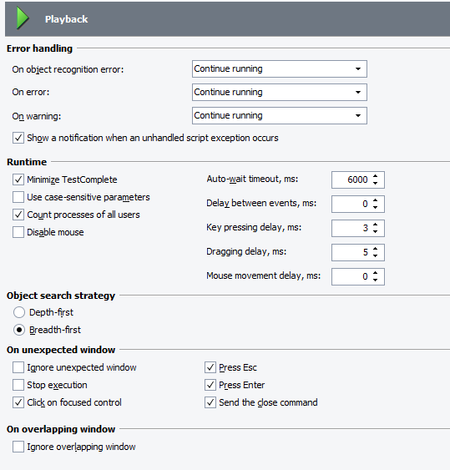

Thanks for the suggestions! I was able to get the necessary functionality working, unfortunately through different means then suggested. Prior to making the post I had tried checking to ignore overlapping windows, which made the problem worse, since the window I was trying to check was an expected overlapping window. I did not actually try to set the focus of Test Complete to the button on the page, since we had found a different solution. However, I will keep this in mind moving forward.
What we did do to solve the problem, was to create a function within Test Complete to wait for the object to refresh through the tree. It essentially starts from the parent object, and searches for the object again in the tree, while looking for the parameters I am expecting to be True, such as Exists, or VisibleOnScreen, and it will wait a pre-defined time at maximum, until it finds the object I am trying to interact with. It seems to work everytime!
Marsha, Alex, Thank you for the suggestions! I will definitly keep them in mind moving forward with TestComplete, and very glad to see that I had at least gotten a response from a post!
Thanks for the suggestions! I was able to get the necessary functionality working, unfortunately through different means then suggested. Prior to making the post I had tried checking to ignore overlapping windows, which made the problem worse, since the window I was trying to check was an expected overlapping window. I did not actually try to set the focus of Test Complete to the button on the page, since we had found a different solution. However, I will keep this in mind moving forward.
What we did do to solve the problem, was to create a function within Test Complete to wait for the object to refresh through the tree. It essentially starts from the parent object, and searches for the object again in the tree, while looking for the parameters I am expecting to be True, such as Exists, or VisibleOnScreen, and it will wait a pre-defined time at maximum, until it finds the object I am trying to interact with. It seems to work everytime!
Marsha, Alex, Thank you for the suggestions! I will definitly keep them in mind moving forward with TestComplete, and very glad to see that I had at least gotten a response from a post!

