We are building a new experience for our SmartBear Community.
This site is now read-only. You can still browse and search as usual. Learn More
This site is now read-only. You can still browse and search as usual. Learn More

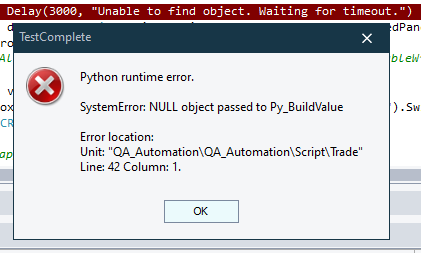

Refer to Using WaitNNN Methods in https://support.smartbear.com/testcomplete/docs/app-objects/common-tasks/waiting-process-or-window-activation.html . There are existing methods which you can use, to wait for an object to exist and timeout after a number of seconds.
Delay and aqUtils.Delay methods work fine.Without seeing your actual code, it's difficult to provide help

 Champion Level 3
As per https://support.smartbear.com/testcomplete/docs/keyword-testing/reference/misc/delay.html Scripting Analogue section hints to https://support.smartbear.com/testcomplete/docs/reference/program-objects/aqutils/delay.html method.
It should work as you have it; however, try using aqUtils.Delay(ms, Str)
Champion Level 3I have created a new project to try it out and in a long loop, and it worked properly.
I tried the following variations:
1. Delay(100, "Message")
2. aqUtils.Delay(100, "Message")
3. import time
time.sleep(100)
Perhaps it is failing due to your project sequence of events or state, and that would be hard to fix. I suggest you try the same and use what ever works for you starting with a reboot.

Same thing is intermittently happening with aqUtils
Champion Level 3As it is intermittent, this means syntax is correct and the function works.
I am not Python guy, but to help isolate the failure root cause, can you make it fail in a new empty project? or can you provide a routine that consistently demonstrate the problem.
def Test2():
    Var1 = 1
    Log.Message("Started")
    for Var1 in range(1, 100, 1):
        Delay(100, "Message")
    Log.Message("Finished")

def Test3():
    Var1 = 1
    Log.Message("Started")
    for Var1 in range(1, 100, 1):
        aqUtils.Delay(100, "Message")
    Log.Message("Finished")
If it fails contact support. If it succeed as I expect, it points to your project or the specific routine.