We are building a new experience for our SmartBear Community.
This site is now read-only. You can still browse and search as usual. Learn More
This site is now read-only. You can still browse and search as usual. Learn More


Hi Alex,
I´m sorry for the delay in my Answer, sure i can provide more information ad clarify.
how can I make test complete detect a click within a dropdown What type of detection you are talking about? Could you clarify please?
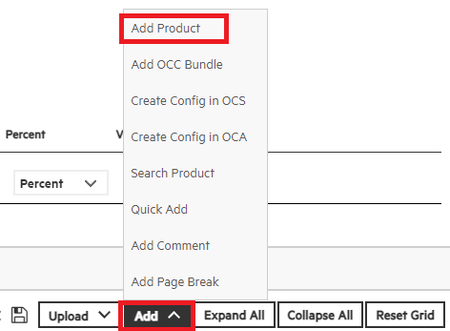
I´m trying to select one option from any dropdown within my test platform, for example:
I need to select within the Add drop down, the add product option
When I run the recorded steps it does not detect the Add product option and it does not click on this specific option and it marks an error that I could not find this option.
Can the dropdown be identified by the Object Spy / Object Browser?
When i select the Object Spy option:
select the entire screen and not the option I require
If I select Point and press the shortcut option, select the entire screen and not the option I require.
What type of the tested application you are working with? (Desktop, Web, .Net, ...)
I´m Working with Desktop, and with Chrome.
I want to take evidence it takes the complete frame inside the screen What evidence you are talking about? Screenshot of control / dropdown or something else?
dropdown, buttons, names, actions, specific sections.
Hope this clarifies a bit more what I'm trying to do.
Thanks

For doing object spy on the dropdown use Point and press the shortcut option in the Object spy window and provide the object properties information.
hi Anupamchampati,
I tried that too, but still is selecting the complete screen.
Thanks for your answer 🙂

