TypeError: Sys.WaitBrowser is not a function - Caused by DIsabled Extension
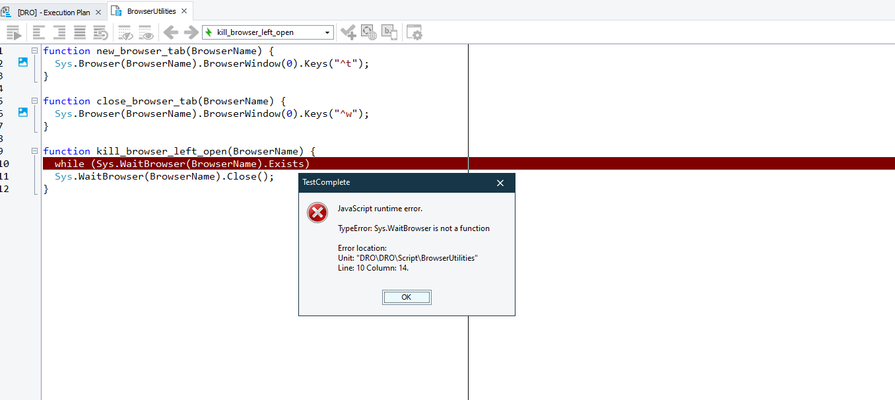
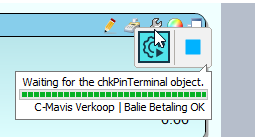
I had something odd happen, and I was able to resolve it, but I am not sure why it occurred. So, I thought I would share it with others who may run across the same issue, since I was not able to find any information in the forums. I restarted my computer, after fully closing out of TestComplete. After I opening TestComplete and my Project file, when I ran a test I had run earlier I got a "TypeError: Sys.WaitBrowser is not a function" dialog as shown here: This particular function has not been changed in years, so it was puzzling why it suddenly stopped working and would not identify my open browser window. Turns out, somehow in the restart of TestComplete or my computer that the Web Module was disabled. After an hour of wasted time, I finally figured out that was the issue. To resolve, go to File --> Install Extensions --> Enable the Web module... This occurred in Version:15.49.6.7 x64726Views4likes2Comments
Selecting an item from List box based on the name using
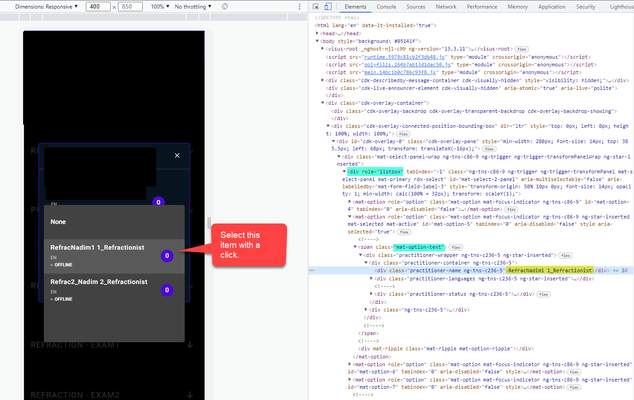
Hello, I am fairly new to Test Complete and just learning, can someone show me using my example I provided here on selecting the specific item (see screenshot) from the web List box that I show highlighted in the Element screen ? What is the best method to use to search and select (click) the item as the current item in the menu? I would also like once I get the basic to search the item in the list box that I have stored in the patient variable where I would get from another screen (another script test/keyword test) so I can look for it. Here are two methods I found; page.NativeWebObject.Find and aqObject.CheckProperty but not sure which is best to use in this case. If you know something better and please if you can provide it with this example. I would also like once I get the basic to search the item in the list box, I would like to reuse the patient variable where I would get from another screen (another script test/keyword test) and apply it to the search item on the list. Can someone show me how to apply it in JavaScript using the sample I provided? ELEMENT SCREEN: SPY TOOL:Solved752Views2likes2Comments
Remove the "improve your test performance" in test log
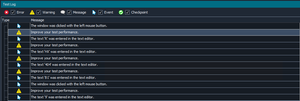
Hello, After the latest TestComplete update, the testlogs now show the message "Improve your test performance". In those logs TestComplete tells us that we can move our xPath selectors to increase the performance. We are aware of this but do not want to do this. Is there a way to deactivate these messages as we now only get warnings about performance? Kind regards, Luuk2KViews2likes7Comments
Unable to debug with Python 3.13
Hi guys, as anyone run into problems with the latest TestComplete when using Python scripts? I’m unable to debug certain files—they just won’t step through as expected. Additionally, TestComplete is generating .pyc files, which I haven’t seen in previous setups. This behavior only occurs when using Python 3.13 (older versions seem fine). Is this a known compatibility issue with Python 3.13? Or is there a setting in TestComplete that needs to be adjusted? Any advice or workarounds would be greatly appreciated!71Views1like3Comments
problem with dotNet.System_IO.File.WriteAllText
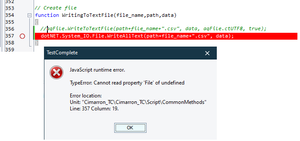
Hi folks, I'm using method dotNet.System_IO.File.WriteAllText to write some data to CSV. The thing is it started to fail with below JavaScript error... It definitely worked before. But I'm not quite sure, when it started to fail, because it's in a part of code, which is used only occasionally (to create new ref. data). Of course, I'm aware that I can use aqFile.WriteToTextFile function. But it creates a file with BOM, which I need to avoid. Therefore, I was using above dotNet method (as suggested here). Any idea what's wrong with my code? Thanks.86Views1like2Comments
Issue with Visible/VisibleOnScreen detection
I have a script where I want to assert an object is no longer visible on screen after an action. Both of these scripts pass when the object is humanly visible on screen: aqObject.CheckProperty(Aliases.browser.pageDashboard.headerRelatedMessages, "Visible", cmpEqual, true); aqObject.CheckProperty(Aliases.browser.pageDashboard.headerRelatedMessages, "VisibleOnScreen", cmpEqual, true); When the object becomes humanly invisible on the the screen, these scripts fail: aqObject.CheckProperty(Aliases.browser.pageDashboard.headerRelatedMessages, "Visible", cmpEqual, false); aqObject.CheckProperty(Aliases.browser.pageDashboard.headerRelatedMessages, "VisibleOnScreen", cmpEqual, false); This seems like it would be a very common use case so I assume I am just doing something wrong but not sure what..Solved454Views1like3Comments
How to reinstall test complete on your machine once uninstalled
Hi community I have been having numerous issues with test completes latest version and i was advised to uninstall if the issues persists. I have uninstalled test complete but now i have lost my way. How can I reinstall test complete on my machine? Kind Regards, TinaSolved7.3KViews1like18Comments
TestComplete and TestExecute does not support Chrome version 113
On wednesday May 3rd I reported a problem with TestComplete and TestExecute could not connect to Chrome version 113.0.5672.64 Case #00549796 Response from Support: "As a temporary solution, we suggest using a different browser such as Firefox instead of Chrome or Edge." As have been said by another member: We must test with the browsers most of our customers are using. As we are a large company that has high focus on security we have to use the newest version the browsers. SmartBear with TestComplete is still only supporting up to Chrome version 99. What is happening at SmartBear ? Customers are expecting more from a large company as SmartBear.378Views1like2Comments