mschoferOccasional ContributorJoined 4 years ago9 Posts1 LikeLikes received2 SolutionsView All Badges
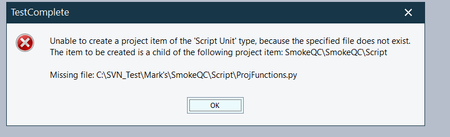
ContributionsMost RecentMost LikesSolutionsRe: Basic Question Is there a different User Name Required for Support Thanks I do have it figured out. Apparently I have two different emails. I will close this. Thank you very much. I Basic Question Is there a different User Name Required for Support I have not logged a case in a long time. Logged a case and have no response after 4 days. I am no longer able to log into support using the same credentials as here. SolvedRe: Migration Issue -Stubborn File I have tried this. The problem still exists when loaded. However the script file loads into Test Complete. (I altered the file to confirm it is the correct file) This script touches every other script (260 test cases 45 files) and they all run perfectly. It is just the error when loading the file from our Version Control software. I just moved to a completely new directory and got the same result. Re: Migration Issue -Stubborn File Alex Sorry that was a mis -ype.....The file name does not have two dots. Migration Issue -Stubborn File I have a project that works perfectly fine. I have a script called ProjFunctions.py =====Edited I added an unintentional dot. It does a lot of common things like verify breadcrumbs, titles, menus ect. And this file refuses to load when I load the project. I can add it from the directory system. However thats not what I want the testers to do. Re: Python Pointer I got it working def chechdetails(): browser = Aliases.browser page = browser.Page("*") CurrPage = browser.Page("*") PropArray = ["ObjectType","ContentText"] ValuesArray = ["Cell",aqConvert.DateTimeToFormatStr("12/1/2021", "%m/%d/%Y")]; myDateTable = page.FindChild(PropArray, ValuesArray,10) Log.Message(myDateTable.RowIndex) # for r in range(1, 999): # checkNum = currPage.FindElements("//form[@id='']/div/table/tbody/tr[" + str(r) + "]/td[1]") # if len(rowOfCells) == 0: # break # if checkNum.innerText == "CK" + marksCheckNumFromExcel: # targetRow = r # break # if targetRow == 0: # Log.Error("couldn't find check #") # else: myText21 = CurrPage.FindElement("//table[@border=1]/tbody/tr["+str(myDateTable.RowIndex + 1)+"]/td[3]/div/table/tbody/tr[2]/td[2]") if (myText21.Exists): Log.Message(myText21.contentText) myText22 = CurrPage.FindElement("//table[@border=1]/tbody/tr["+str(myDateTable.RowIndex + 1)+"]/td[3]/div/table/tbody/tr[3]/td[2]") if (myText22.Exists): Log.Message(myText22.contentText) myText23 = CurrPage.FindElement("//div[@id='amtDtl.0_2']/table/tbody/tr[4]/td[2]") if (myText23.Exists): Log.Message(myText23.contentText) myText24 = CurrPage.FindElement("//div[@id='amtDtl.0_2']/table/tbody/tr[5]/td[2]") if (myText24.Exists): Log.Message(myText24.contentText) myText25 = CurrPage.FindElement("//div[@id='amtDtl.0_2']/table/tbody/tr[6]/td[2]") if (myText25.Exists): Log.Message(myText25.contentText) myText26 = CurrPage.FindElement("//div[@id='amtDtl.0_2']/table/tbody/tr[7]/td[2]") if (myText26.Exists): Log.Message(myText26.contentText) # myText27 = CurrPage.FindElement("//div[@id='amtDtl.0_2']/table/tbody/tr[8]/td[2]") # if (myText27.Exists): # Log.Message(myText27.contentText) myText28 = CurrPage.FindElement("//div[@id='amtDtl.0_2']/table/tbody/tr[9]/td[2]") if (myText28.Exists): Log.Message(myText28.contentText) # myText29 = CurrPage.FindElement("//div[@id='amtDtl.0_2']/table/tbody/tr[10]/td[2]") # if (myText29.Exists): # Log.Message(myText29.contentText) Re: Python Pointer I am using Test Complete and Python and No Soup. I am just getting back to this. So I answered my original question. I can write to a variable or use RETURN making it a function. My challenge is getting the correct row. (The table has many rows, It is actually a table within a table. I will be going that in a FOR loop with logic to identify the row, def chechdetails(): browser = Aliases.browser page = browser.Page("*") CurrPage = browser.Page("*") myText21 = CurrPage.FindElement("//div[@id='amtDtl.0_2']/table/tbody/tr[2]/td[2]") if (myText21.Exists): Log.Message(myText21.contentText) myText22 = CurrPage.FindElement("//div[@id='amtDtl.0_2']/table/tbody/tr[3]/td[2]") if (myText22.Exists): Python Pointer Long time no posting. In Python what is the best way to extract information from tables. I am able to find the values quite easily and write to variables. Is beautiful soup the recommended route.? SolvedConsistency from Script to Script I am right non somewhat impressed by the product as well as disappointed to the last of real world tips and tools. Here is a simple little query, How do I maintain consistency from script to script. For example I have a fairly simple script reading from a spread sheet (purely using navigation) and the script works the first few times through and then I came back later and the script is off by a field or two. Solved