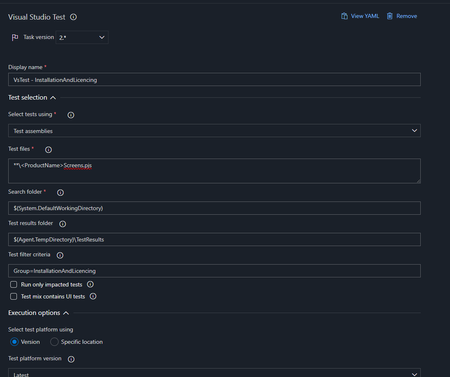
ContributionsMost RecentMost LikesSolutionsRe: Corrupted Project and Keyword Test variables Cross post from the other thread on this issue; https://community.smartbear.com/t5/TestComplete-Questions/TestComplete-v15-56-software-saving-string-variables-with-Base64/m-p/259472/highlight/true#M112787 TLDR - "On another note some initial testing of v15.57 on my side, it seems the Base64 encoding issue might be gone, or at least I couldn't recreate it like before, but this was only a quick test I had. We'll still be treading a bit carefully with the new version, with most testers sticking on v15.55 for now." Re: TestComplete v15.56 software saving string variables with Base64 encoding We ended up reverting the .mds file changes in our Git repo to get the original string values back, fortunately we'd not changed much else in there, that we couldn't quickly replace after downgrading the software. I'm not familiar with the software and wouldn't be as a DevOps Engineer, but we do help a bit on the integration/DevOps side for it, had maybe a year with it, our testers are much more familiar, but in my experience so far I feel the comms could have been better, been left in the dark a bit on the fix progress or confirmation of the issues. The Azure DevOps test adapter issues in August were much more impactful, had a very dirty fix/bypass for that. On another note some initial testing of v15.57 on my side, it seems the Base64 encoding issue might be gone, or at least I couldn't recreate it like before, but this was only a quick test I had. We'll still be treading a bit carefully with the new version, with most testers sticking on v15.55 for now. TestComplete v15.56 software saving string variables with Base64 encoding Hi, I've had a few reports from our testers, about persistent variables in the .mds file being saved as what appears to be a Base64 encoded string, in our case it affects our test process currently, as we're expecting them as plain text/we're not decoding Base64, we run the tests in Azure DevOps via the Visual Studio test task. I've determined this appears to have been a change in v15.56 as I wasn't able to replicate the same behaviour in v15.55, though I'm waiting for one of the testers to confirm the same results (to rule out any extension issues). The change/behaviour I've described above is not listed in the release notes though - https://support.smartbear.com/testcomplete/docs/general-info/whats-new.html Can it be clarified if this is an intended change or a bug? If it is an intended change is there anyway we can override this so string variables are saved as plain text in the .mds file? Whether that's via a program/GUI setting or a bit of code/scripting? Thanks Re: TestComplete Test Adapter (v15.53.9) issues running tests in DevOps Can confirm this latest version of the DevOps test adapter does resolve the issue we originally had. It works in combination with TE v15.48, our testers had to roll back to this version as having issues with anything v15.51+, but this is an issue prior to test adapter issue Re: TestComplete Test Adapter (v15.53.9) issues running tests in DevOps Bit of cross posting between threads, but managed to get a workaround with passing/working tests, did involve converting a Release pipeline to YAML, so we were able to use the prior TestComplete test adapter extension in Azure DevOps. See my post here for details - https://community.smartbear.com/t5/TestComplete-Questions/Azure-Pipeline-Visual-Studio-Test-Test-execute-fails-to-run-but/m-p/254463/highlight/true#M110846 Re: Azure Pipeline - Visual Studio Test - Test execute fails to run (but was working yesterday) As some background, hopefully the below helps, the YAML example further down is effectively what we're using as a workaround, to use the prior DevOps task version and latest TestExecute version. We're running the pipeline on a Windows build agent pool (a VMSS in Azure), those VMs are built using a VM image with TestExecute preinstalled (v15.53.2 in this case), hence our installExecutor and updateExecutor being set to false. This pool is setup in DevOps with the interactive tests option enabled, this option forces the need to preinstall TestExecute, as the build agent user runs unelevated so can't install/update - https://learn.microsoft.com/en-us/azure/devops/pipelines/agents/scale-set-agents?view=azure-devops#create-the-scale-set-agent-pool Anonymised example of one of the stages in the pipeline, I've added comments where tasks removed or info randomised. stages: - stage: SmokeTests displayName: 'Smoke Tests (PROJECTNAME)' jobs: - deployment: 'SmokeTests' environment: AutomatedTests variables: - group: AutomatedTest-PROJECTNAME-VariableGroup pool: name: 'UITestPool' displayName: 'Smoke Tests (PROJECTNAME)' strategy: runOnce: deploy: steps: - checkout: self ## Checks out our TestComplete project/tests - task: DownloadBuildArtifacts@1 displayName: 'Download Artifact 1' inputs: buildType: 'specific' project: '61b13bb3-6ba0-44a0-9d67-753c0a63752b' ## GUID replaced in this example pipeline: '1' ## The Build definition ID where published artifact is buildVersionToDownload: 'latest' downloadType: 'specific' itemPattern: '**' downloadPath: '$(System.DefaultWorkingDirectory)\_Licensing' ## Download build artifact 2, same as task above ## Powershell task modifying Licensing installer name - task: SmartBearSoftware.install-testcomplete-adapter-task.install-testcomplete-adapter-task.InstallTestCompleteAdapter@1.15040.421 displayName: 'TestComplete test adapter installer' inputs: installExecutor: false updateExecutor: false accessKey: '$(TestExecuteAccessKey)' logsLevel: 0 - task: ms-autotest.screen-resolution-utility-task.screen-resolution-utlity-task.ScreenResolutionUtility@1 displayName: 'Set Screen Resolution' inputs: displaySettings: specific width: 1920 height: 1080 ## Installation and Licensing tests, same task as below, running different tests - task: VSTest@2 displayName: 'Smoke Tests' inputs: testAssemblyVer2: '**\<PROJECTNAME>.pjs' testFiltercriteria: 'Group=SmokeTests' testRunTitle: 'Smoke Tests (PROJECTNAME)' timeoutInMinutes: 60 Re: Azure Pipeline - Visual Studio Test - Test execute fails to run (but was working yesterday) We're having to work on getting one of our projects back into active testing, as we can't await this fix. Have got this running in a YAML pipeline, example below, believe you have to specify the full task name/reference - task: SmartBearSoftware.install-testcomplete-adapter-task.install-testcomplete-adapter-task.InstallTestCompleteAdapter@1.15040.421 displayName: 'TestComplete test adapter installer' inputs: installExecutor: false updateExecutor: false accessKey: '$(TestExecuteAccessKey)' logsLevel: 0 TestComplete Test Adapter (v15.53.9) issues running tests in DevOps Hi, We're currently seeing issues running our tests via TestExecute, we believe this is being caused/coincided with the update to the TestComplete test adapter yesterday as our tests were completely fine on the evening of the 25th July, we run tests daily, with tests on the 26th July failing after the new version of the test adapter was released. I've listed a snippet of the build log as below; "2023-07-27T08:49:29.7207073Z ##[error]Failed to get a list of tests from the "C:\a\r1\a\<REPONAMERemoved>\<FileName>.pjs" file due to the following error: Cannot start process because a file name has not been provided. 2023-07-27T08:49:29.7214527Z No test matches the given testcase filter `Group=InstallationAndLicencing` in C:\a\r1\a\<REPONAMERemoved>\<FileName>.pjs 2023-07-27T08:49:29.7950327Z Results File: C:\a\_temp\TestResults\AzDevOps_UIMCUKP0002RD_2023-07-27_08_49_29.trx 2023-07-27T08:49:29.8173580Z ##[error]Test Run Failed." In an attempt to rule out any issues our side, we've updated to the latest version of TestExecute that we can download, v15.53.2 and installed this on the VM image that gets installed on our VMSS, but not change. Is there some other modification we're required to do? Or is there an issue within the test adapter within DevOps - https://marketplace.visualstudio.com/items?itemName=SmartBearSoftware.install-testcomplete-adapter-task&ssr=false#overview Thanks Solved