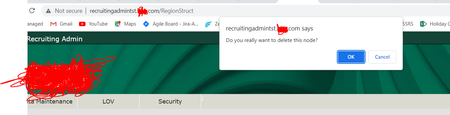
ContributionsMost RecentMost LikesSolutionsRead data from Excel Hi, I want to read data from excel. I need to fetch the email address from excel. For each run the email id should be read from next row so that i can enter different email address for login into the application. How can we do that? Reading data from excel Hi, I want to read data from a different cell each time my script runs. I have created a variable and set its mode as LastOperationResult however it is reading the data from the same cell specified in the cell fields while creating the readexcel variable. How can we achieve this? SolvedRe: How to verify if a PDF file is opened successfully Hi rraghvani It will not be the case that everytime user opens the same pdf so that we can do image comparison. Different pdfs will be opened up depending upon the availibility. Manually how we do is Just open it and verify yes there is no error thrown and we can see that pdf has opened up How to verify if a PDF file is opened successfully Test Case Navigate to the application Click on the PDF button Verify if the pdf is rendered successfully. How can we verify if the pdf is successfully opened and user is able to view it? Thanks & Regards, Monica Re: Unable to Select OK on browser confirmation pop up Thank you very much for sharing this. It was helpful Unable to Select OK on browser confirmation pop up Hi, In my application, when i click on delete button a browser confirmation pop up is displayed with Ok and Cancel buttons however I am not able to select either ok otr cancel options on the pop up. I used below code function Confirm_Demo() { var url = "myapplicationurl"; Browsers.CurrentBrowser.Navigate(url); var page = Sys.Browser().Page("*myapplicationname/"); var link = page.FindElement("//a[contains(text(),'Show Confirm')]"); link.Click(); Log.Message("Message text: " + page.Confirm.Message); page.Confirm.Button("OK").Click(); } For me it fails to locate the element ("//a[contains(text(),'Show Confirm'). I am unable to inspect and write the locator for OK button on the pop up. Please suggest how to locate it Or is there any other way of handling the confirmation pop up SolvedRe: verifying if a file is downloaded Thank you very much. It worked for me!!!! 🙂 Re: verifying if a file is downloaded Hi Marsha, Thank you so much for providing the solution however it doesn't seems to be working. For now I have manually saved the file in the path mentioned in spath. I have written below code function FileExistsExample() { var sPath; sPath = "C:\TestCompleteFileStore\TestCompleteQueries.txt"; if (! aqFileSystem.Exists(sPath)) Log.Message("File is not downloaded") } But the if condition is getting true even when the file is present at the specified path. Could you please correct me if i am wrong? Also it is possible to download the file at my desired location instead of it getting downloaded in the default Downloads folder? If yes, please suggest how can we do that as well Thank you! verifying if a file is downloaded Hi Team, On click of download button an excel file is downloaded in my application. How can I verify whether the file has been downloaded? SolvedVerify if column is sorted in test complete Hi, There is a table grid in my web application. It has a column which can be sorted in ascending / descending order. How do i verify whether the sorting is working using test complete? Which check point should be used for this verification. Please suggest Thanks, Monica