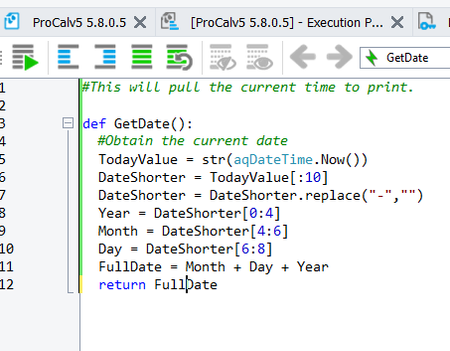
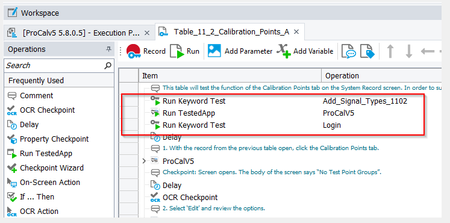
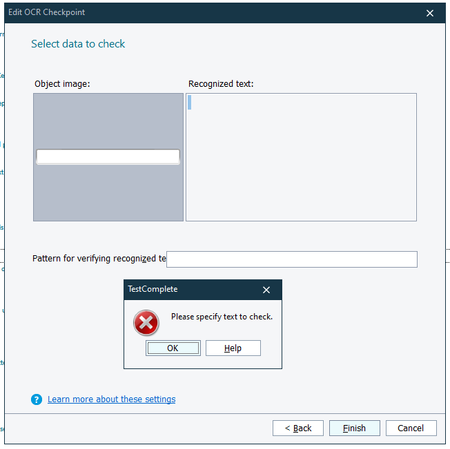
ContributionsMost RecentMost LikesSolutionsReturn a string in a script I wrote a small script in Python that generates a string of 8 digits. I am trying to set this up so that I run the script in a KeyWord test and the value gets typed in as an action. For example: 1. I run the script below which generates a string which, as an example, would be "04172028" (Screenshot 1) 2. I would need to take an action in my KeywordTest a simply would type the value of "04172028" in the application I'm testing (Screenshot 2) Any ideas? Screenshot 1 for Script Routine Screenshot 2 OCR showing different text when recording vs. running it Currently I'm setting up an OCR check to see if everything I expect in my Edits dropdown shows up. When I record the drop down I use the following text in my OCR check (screenshot 1) and when I run this test it fails and the text is now in a different order and fails (screenshot 1). Any idea why these get different results between recording the test and running it? Nestled KeyWord Tests Is it possible to nest keyword tests within another keyword test and have the images for the nested KeyWord tests not show up on the final report? In this screenshot you will notice that I have the KeyWord tests ‘Add_Signal_Types_1102’ and ‘Login’ under ‘Table_11_2_Calibration_Points_A’. Is it possible for Keyword Test ‘Add_Signal_Types_1102’ and ‘Login’, which are nested, not to capture images on the final report when I run Keyword Test ‘Table_11_2_Calibration_Points_A' ? Might there be another solution to this problem? OCR recognition of a Blank Field Does anyone know if there is a way using OCR, or any other method, to check to make sure that a field in blank? Currently I get a message which says "Please specify text to check". OCR Checkpoint incorrect recognized text I ran into a problem testing an application where the Recognized text never matches the Object Image when it did last week and nothing has changed in TestComplete or my application. Has anyone run into this problem before? Solved