huabingOccasional ContributorJoined 3 years ago12 Posts2 LikesLikes received1 SolutionView All Badges
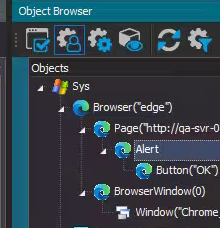
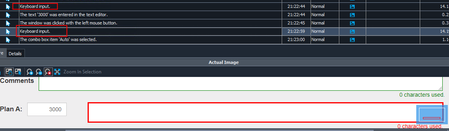
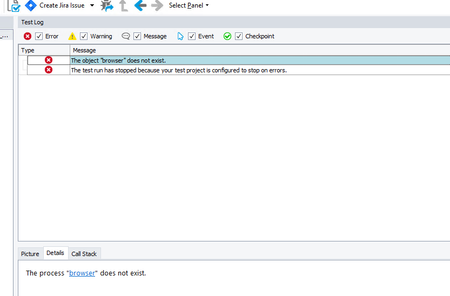
ContributionsMost RecentMost LikesSolutionsRe: can not identify prompt by using Object Spy The former, browser dialog. When I use Object Spy to drag the mouse to point to the object, it just keeps loading and shows "Searching for the object that is under the mouse cursor. Please wait..." When I navigate to Object Browser and use "MGRTEST" role to run Edge and identify the alert, it displays But when I use "SYSOPTEST" role to run Edge and identify the same alert, it displays The "SYSOPTEST" role cannot identify the alert. But it can identify the normal element(id, class, etc.) So I'm confused. Re: can not identify prompt by using Object Spy Object Spy is able to identify standard web elements (such as those with IDs, classes, etc.) when using SYSOPTEST. It only fails to recognize elements like confirm, alert, and other prompts. So I So I don't think the issue lies with the TestComplete extension—it might be related to the object namemapping or something like configuration. can not identify prompt by using Object Spy run Edge as manager(administrator) role can identify prompt by Object Spy, but run Edge as sysoptest(administrator) role can not identify prompt( can identify normal elements), how to solve this? confirm. alert or other prompt can not be identified by Object Spy. TestComplete version 14.93, edge version 87, tescomplete extension are all installed and enabled,web settings are all the same. SolvedHow to rerun all failed scripts after using execution plan? Hi, I ran scripts by tags. When I update failed scripts and want to rerun these failed scripts, I have to create a new folder in execution plan, and add failed script one by one. Are there any easier way to rerun after fix failed scripts? Please help me. thanks! Re: Sometimes .Keys action doesn't work when input long text Problem solved but I really don't know failed reason. 1. The failed action always occurs in specific script, although not reproduce when single run the script. 2. So I think maybe the script executing right before the failed script get something wrong. 3. And I find out the last sheet of former script used is next to last in Excel. 4. I reordered the sheet and make it move forward. Problem solved! Anyway, thank you for your help! Re: Sometimes .Keys action doesn't work when input long text "#commentText1", the box id. And the value is 300 characters quoted by triple-quotes """""". Re: Sometimes .Keys action doesn't work when input long text When I input text, I get data from excel: fullpath = aqFileSystem.ExpandUNCFileName(filepath) sheetname = Excel.Open(fullpath).SheetByTitle[sheet] for column in range(2,(sheetname.ColumnCount+1)): id = sheetname.Cell[column,2].Value value = sheetname.Cell[column,3].Value item = Aliases.browser.page("*").WaitElement(id,3000) item.Click() item.Keys(value) Does it any problem? Sometimes .Keys action doesn't work when input long text When execute a lot of scripts one by one, the .Keys action not always valid. It works in log but actually not input any text. It never occurs when execution single script. Text input about 300 characters. I tried to click the box before input text, but this problem still there. I also tried to delay 3s or use .Keys() action twice once check the first input not valid. but the second still not valid. What should I do? Please help me, thanks! SolvedRe: Close prompt action I tried but could not find any object after the prompt displayed, including page elements that can be previously located. Can not record the close prompt action either. TestComplete version:14.93.312.7 x64 Edge version:100.0.1185.50 TestComplete cannot find the object browser Hello! There's an exception when running TestComplete (not run any testcases), I close the exception and restart TestComplete(I forgot catch image). After that, TestComplete cannot find the object browser and cannot relate any browser/page methods(ToUrl.etc). I find out web testing and web checkpoint plugin not installed, so according Help doc, install TestComplete by repair mode and start TestComplete again. But these plugins still not installed. So I install plugins manually and restart TestComplete again. Still not work. The browser launched and in an active url page. Aliases.browser.ToUrl(url) log: