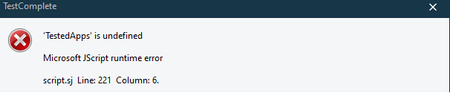
ContributionsMost RecentMost LikesSolutionsRe: How could disable dialog box show when finished running testing case with TestExecute yes , you are right , but It maybe a little special for our project, to Simplify handling some caching problem for Testing. I need to new add test app when run the project. this cause the project files will be changed when integrated with jenkins using TestExecute. At least that's my problem right now, Maybe i have some wrong undestanding for some configuration with Jenkins i also don't want to handle this problem in other ways, i will review the project and user guide , to find if we have another better way to fix it. Thanks,Peng Re: How could disable dialog box show when finished running testing case with TestExecute Hi rraghvani, I just write a py script as Polling monitoring , i think it could kill this dialog when i met it, It seems work for me so far 😀 import win32gui,win32api,win32con import time wdname = ['Confirm'] hWndChildList = [] def CheckHwnd(): hwnd = 0 for k in range(len(wdname)): _tp = win32gui.FindWindow(None, wdname[k]) hwnd = _tp + hwnd return hwnd def Get_Child_Windows(parent): if not parent: return hWndChildList = [] win32gui.EnumChildWindows(parent, lambda hWnd, param: param.append(hWnd), hWndChildList) return hWndChildList def Get_Parent_Hwnd(wdname): hwnd = 0 for k in range(len(wdname)): _tp = win32gui.FindWindow(None, wdname[k]) hwnd = _tp + hwnd return hwnd if __name__ == '__main__': wflag = True while wflag: time.sleep(3) if CheckHwnd() == 0: wflag = True print("watch dog working...") continue else: wflag = False break hWndChildList = Get_Child_Windows(Get_Parent_Hwnd(wdname)) BtnNoHW = hWndChildList[-4] BtnNotitle = win32gui.GetWindowText(BtnNoHW) Btnclassname = win32gui.GetClassName(BtnNoHW) win32api.SendMessage(BtnNoHW, win32con.BM_CLICK, 0, 0) time.sleep(3) Re: How could disable dialog box show when finished running testing case with TestExecute Thanks rraghvani, If so , i think i need another way to deal with this problem. Thanks,Peng How could disable dialog box show when finished running testing case with TestExecute Hi, I just run some testing case from Jenkins using TestExecute. but I have a problem, If the project have be finished, there will be a confirm dialog box appears , Probably because of I added Some Test app dynamically, changed some of the files in Original Project. The trouble is if i don't close the dialog box manually , I see the jenkins cannot be stopped. I am not sure if i could handle this problem In the following script?? Does anyone have a good idea ... IF ERRORLEVEL 1001 GOTO NotEnoughDiskSpace IF ERRORLEVEL 1000 GOTO AnotherInstance IF ERRORLEVEL 127 GOTO DamagedInstall IF ERRORLEVEL 4 GOTO Timeout IF ERRORLEVEL 3 GOTO CannotRun IF ERRORLEVEL 2 GOTO Errors IF ERRORLEVEL 1 GOTO Warnings IF ERRORLEVEL 0 GOTO Success IF ERRORLEVEL -1 GOTO LicenseFailed ... SolvedRe: Calling common function for all the scripts HAHA, Great, it could work!! Re: Calling common function for all the scripts Hi Tanlak, I just add the common js as new item in js. and use the common js by var comomon = require("comomon"); must use (" "), not [""] it works for me. Re: Dynamically add TestedApps in Script Extensions Yes, I think i have to create a new project to dealt with this on the recommendation of you. Thank you very much!. Re: Dynamically add TestedApps in Script Extensions Hi rraghvani,Do you know if there is any way to call the method in script in cross project in one TestSuite. TestSuite -Project A --scipt ------- Function A(){} -Project B --scipt ------- Function B(){} -Project C --scipt ------- Call Function A() in Project C ?? Re: Dynamically add TestedApps in Script Extensions I have multiple projects need to run in sequence, and also need to start different clinet testapp for different project. My first thought I wanna add the TestedApps in the script extension. then some project could start some testapp from script extension when it is executed. if this could be implemented, i think i may not need to add the Testapp for some projects, and those project could be call the common method directly from script extension. It seems that I'll have to go the other way. Thanks rraghvani for your quick reply!!🙂 Dynamically add TestedApps in Script Extensions Hi, I create a Script Extensions and introduced themethod which i could add TestedApps Dynamically. I could run successfully in debug mode but failed in Script Extensions. I am not sure if we could add TestedApps in Script Extensions dynamically ,Did I miss something here? Code like this: function AddCharApplication(){ var AppPath = "a.exe" var index = ""; TestedApps.Clear(); if ( aqFile.Exists( AppPath ) ) { var index = TestedApps.Find( AppPath ); if ( -1 == index ) index = TestedApps.Add( AppPath ); } else { Runner.Stop( false ); Log.Error( "" ); } var apprun = TestedApps.Items( index ).Run(); } Error Message: Thanks,Peng Solved