We are building a new experience for our SmartBear Community.
This site is now read-only. You can still browse and search as usual. Learn More
This site is now read-only. You can still browse and search as usual. Learn More

 Alumni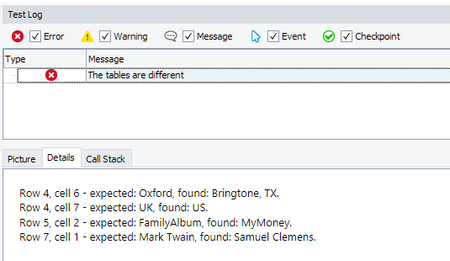

Task: Create a script that will compare the values of an HTML table and an Excel file cell by cell and log the difference between them.
This is a solution created for [TechCorner Challenge #5]
Hi All,
my 2 cents to this challenge 🙂
I've attached the Excel file, I'm working in the code. The code is written in JavaScript and it uses the new Excel object (which is really great!). Here is what you can see in the test log after executing the script:
//JavaScript
function CompareTables()
{
  //obtain the path to the web table
  var table = Sys.Browser("chrome").Page("http://secure.smartbearsoftware.com/samples/testcomplete12/weborders/").Form("aspnetForm").Table(0).Cell(0, 1).Panel(1).Panel(2).Table("orderGrid");

  //let's save a web table to the TestComplete table
  if(!Project.Variables.VariableExists("MyTable"))
    Project.Variables.AddVariable("MyTable", "Table");
  SaveTreeTableToVariable(Project.Variables.VariableByName("MyTable"), table);

  //obtain the Excel file
  var excelFile = Excel.Open("C:\\Book1.xlsx "); //specify the path to your excel file here
  var excelSheet = excelFile.SheetByTitle("Sheet1");

  //Compare the web table with the Excel table
  var compResults = "";
  compResults = CompareTableWithExcel(Project.Variables.VariableByName("MyTable"),excelSheet)

  //Post comparison results to the test log
  if (compResults !="")
     Log.Warning("The tables are different", compResults);
  else
    Log.Message("The tables are the same");

}

function SaveTreeTableToVariable(TableVariable, ATable)
{
  TableVariable.RowCount = ATable.RowCount;
  for (var k = 0; k < ATable.ColumnCount(0); k++)
      TableVariable.AddColumn();

  for (var i = 0; i < ATable.RowCount; i++)
  {
    // Goes through cells
    for (var j = 0; j < ATable.ColumnCount(i); j++)
    {
      // Obtains a cell and save it to a variable
      var cell = ATable.Cell(i, j);
      TableVariable.$set("Item",j,i, cell.innerText);
    }
  }
}

function CompareTableWithExcel(TableVariable, excelSheet)
{
  var compResults = "";
  //iterate through all cells
  for (var i = 0; i < TableVariable.RowCount; i++)  {
    for (var j = 0; j < TableVariable.ColumnCount; j++)
    {
      //compare values
      if (excelSheet.Cell(j+1, i+1).Value !=  TableVariable.Item(j,i))
        compResults += "Row " + i + ", Column " + j + " -- Expected: " + TableVariable.Item(j,i) + ", Found: " + excelSheet.Cell(j+1, i+1).Value + "\r\n";
    }
  }
  return compResults;
}
AlumniTask: Create a script that will compare the values of an HTML table and an Excel file cell by cell and log the difference between them.
This is a solution created for [TechCorner Challenge #5]
Hi All,
my 2 cents to this challenge 🙂
I've attached the Excel file, I'm working in the code. The code is written in JavaScript and it uses the new Excel object (which is really great!). Here is what you can see in the test log after executing the script:
//JavaScript
function CompareTables()
{
  //obtain the path to the web table
  var table = Sys.Browser("chrome").Page("http://secure.smartbearsoftware.com/samples/testcomplete12/weborders/").Form("aspnetForm").Table(0).Cell(0, 1).Panel(1).Panel(2).Table("orderGrid");

  //let's save a web table to the TestComplete table
  if(!Project.Variables.VariableExists("MyTable"))
    Project.Variables.AddVariable("MyTable", "Table");
  SaveTreeTableToVariable(Project.Variables.VariableByName("MyTable"), table);

  //obtain the Excel file
  var excelFile = Excel.Open("C:\\Book1.xlsx "); //specify the path to your excel file here
  var excelSheet = excelFile.SheetByTitle("Sheet1");

  //Compare the web table with the Excel table
  var compResults = "";
  compResults = CompareTableWithExcel(Project.Variables.VariableByName("MyTable"),excelSheet)

  //Post comparison results to the test log
  if (compResults !="")
     Log.Warning("The tables are different", compResults);
  else
    Log.Message("The tables are the same");

}

function SaveTreeTableToVariable(TableVariable, ATable)
{
  TableVariable.RowCount = ATable.RowCount;
  for (var k = 0; k < ATable.ColumnCount(0); k++)
      TableVariable.AddColumn();

  for (var i = 0; i < ATable.RowCount; i++)
  {
    // Goes through cells
    for (var j = 0; j < ATable.ColumnCount(i); j++)
    {
      // Obtains a cell and save it to a variable
      var cell = ATable.Cell(i, j);
      TableVariable.$set("Item",j,i, cell.innerText);
    }
  }
}

function CompareTableWithExcel(TableVariable, excelSheet)
{
  var compResults = "";
  //iterate through all cells
  for (var i = 0; i < TableVariable.RowCount; i++)  {
    for (var j = 0; j < TableVariable.ColumnCount; j++)
    {
      //compare values
      if (excelSheet.Cell(j+1, i+1).Value !=  TableVariable.Item(j,i))
        compResults += "Row " + i + ", Column " + j + " -- Expected: " + TableVariable.Item(j,i) + ", Found: " + excelSheet.Cell(j+1, i+1).Value + "\r\n";
    }
  }
  return compResults;
}