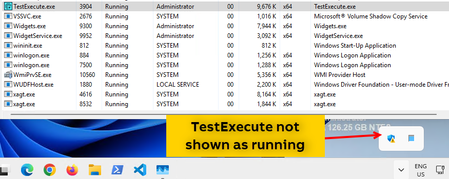
Windows 11 O.S. - Test Execute not correctly running


 Champion Level 3
Check that you are not running TestExecute in silent mode. Which prevents the system tray icon from appearing.
TestExecute might be running as a non-interactive session, which also prevents the system tray icon from appearing. Check your pipeline is set up correctly and is set as interactive.
Ensure Windows 11 is not hiding the system tray icon for TestExecute.
Finally, ensure the same account is used for everything i.e. Azure Pipeline, active session etc. UAC is disabled.

Hi,
TestExecute in not runned in silent mode. As per issue description, the issue happens also by running manually TestExecute, and not only through a release pipeline.
Windows 11 configuration is not hiding the system tray icon for TestExecute.
The same account is used for everything. The machine has got only an account.
UAC is disabled.
Regards,
Simona