We are building a new experience for our SmartBear Community.
This site is now read-only. You can still browse and search as usual. Learn More
This site is now read-only. You can still browse and search as usual. Learn More

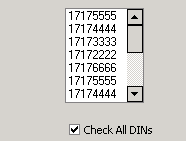

I did not see a method for it, and this is kind of sloppy looking by the way the control draws, but it is one way of handling it.
Where List_XLS would be your userform, and lstXLS would be your TcxListBox, and chkAll would be your checkbox with the OnClick handler of function "checkedall":
function checkedall(sender) {
    /*
      make sure multiselect is enabled
    */
    UserForms.List_XLS.lstXLS.MultiSelect = true;

    /*
      if checked then set selected of each item in the listbox
    */
    if (UserForms.List_XLS.chkAll.Checked){
      for (var c = 0; c < UserForms.List_XLS.lstXLS.Items.Count;c++) {
        UserForms.List_XLS.lstXLS.Selected(c) = true;
      }
    }

    /*
      if checked then remove selected of each item in the listbox
    */
    if (!UserForms.List_XLS.chkAll.Checked) {
      for (var c = 0; c < UserForms.List_XLS.lstXLS.Items.Count;c++) {
        UserForms.List_XLS.lstXLS.Selected(c) = false;
      }
    }
}
I did not see a method for it, and this is kind of sloppy looking by the way the control draws, but it is one way of handling it.
Where List_XLS would be your userform, and lstXLS would be your TcxListBox, and chkAll would be your checkbox with the OnClick handler of function "checkedall":
function checkedall(sender) {
    /*
      make sure multiselect is enabled
    */
    UserForms.List_XLS.lstXLS.MultiSelect = true;

    /*
      if checked then set selected of each item in the listbox
    */
    if (UserForms.List_XLS.chkAll.Checked){
      for (var c = 0; c < UserForms.List_XLS.lstXLS.Items.Count;c++) {
        UserForms.List_XLS.lstXLS.Selected(c) = true;
      }
    }

    /*
      if checked then remove selected of each item in the listbox
    */
    if (!UserForms.List_XLS.chkAll.Checked) {
      for (var c = 0; c < UserForms.List_XLS.lstXLS.Items.Count;c++) {
        UserForms.List_XLS.lstXLS.Selected(c) = false;
      }
    }
}

Hi Ryan,
UserForms.List_XLS.lstXLS.Selected(c) = true;
was the key i was looking for. Because Selected returns true and false, i don't know for some reason, i couldn't think of assigning true and false to it.
It worked, many Thanks for your timely help.
Regards,
Vik
No prob :)