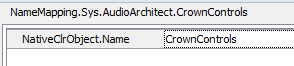
Thanks for the reply, I'm not sure this is the same issue.
I have mapped some objects (they have been mapped to 'wndCrownControls' (from the example) then at a later time when I load the project and right click the object in the mapping editor to 'highlight on screen' or 'view in object browser' it says the object does not exist (although it does). If I then find the object in the object browser and map it again it will map it to 'CrownControls' (from the example) which forces me to have to map all the objects again. At a later time the mapping seems to revert back to the original mapping and I have to go through the process again for any objects that I have mapped in the meantime.
It seems that either 'wndCrownControls' or 'CrownControls' only exists at any one time. I suppose the question is - What is the sensible way to get around this and why does this happen?