We are building a new experience for our SmartBear Community.
This site is now read-only. You can still browse and search as usual. Learn More
This site is now read-only. You can still browse and search as usual. Learn More

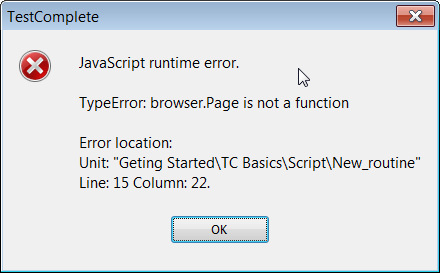

Ah, I see it...
Your browser variable is storing the browser item from the Browsers object... it's not actually referencing the running web browser because... you haven't actually run it yet.
EDIT:
Misspoke. So, you are running the browser. What you need to do then is assign your variable to the running system process.
let browser = Sys.Browser('iexplore')
Then you can call the page object all you want.

Hi Robert
Thanks for stopping by. I do not use NameMapping at all. But I checked it anyways to make sure there was nothing unexpected.
My trouble started yesterday as I was working on a new test.
Ah, I see it...
Your browser variable is storing the browser item from the Browsers object... it's not actually referencing the running web browser because... you haven't actually run it yet.
EDIT:
Misspoke. So, you are running the browser. What you need to do then is assign your variable to the running system process.
let browser = Sys.Browser('iexplore')
Then you can call the page object all you want.
Okay, I tried
let browser = Sys.Browser("iexplore");
and it worked.
I am still wondering why Browsers.Item failing. I have used that numerous time!
I'm not sure why it worked for you before. Basically, what that line is doing is returning a BrowserInfo object, not the actual Browser process running in Windows. So, the fact that it used to work is what is the mystery to me.
Oh, well... it works now. :)
Yes I am glad it is working. Thank you. :)