We are building a new experience for our SmartBear Community.
This site is now read-only. You can still browse and search as usual. Learn More
This site is now read-only. You can still browse and search as usual. Learn More

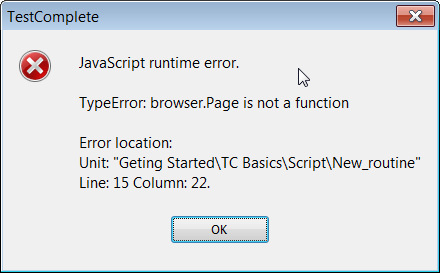

Ah, I see it...
Your browser variable is storing the browser item from the Browsers object... it's not actually referencing the running web browser because... you haven't actually run it yet.
EDIT:
Misspoke. So, you are running the browser. What you need to do then is assign your variable to the running system process.
let browser = Sys.Browser('iexplore')
Then you can call the page object all you want.
MY guess is that you have an object mapped as just straight "page" in your NameMapping. Probably something like NameMapping.Sys.browser.page. This is confusing TestComplete when you try and call the "Page" method of the actual browser object.

Hi Robert
Thanks for stopping by. I do not use NameMapping at all. But I checked it anyways to make sure there was nothing unexpected.
My trouble started yesterday as I was working on a new test.
Ah, I see it...
Your browser variable is storing the browser item from the Browsers object... it's not actually referencing the running web browser because... you haven't actually run it yet.
EDIT:
Misspoke. So, you are running the browser. What you need to do then is assign your variable to the running system process.
let browser = Sys.Browser('iexplore')
Then you can call the page object all you want.
Okay, I tried
let browser = Sys.Browser("iexplore");
and it worked.
I am still wondering why Browsers.Item failing. I have used that numerous time!