We are building a new experience for our SmartBear Community.
This site is now read-only. You can still browse and search as usual. Learn More
This site is now read-only. You can still browse and search as usual. Learn More


I made a small Workaround now and my Problem is done with it.
function Excel_Loop()
{
//Runs the "EXCEL" tested application.
TestedApps.EXCEL.Run(1, true);
Project.Variables.csv2207.Reset();
for(; !Project.Variables.csv2207.IsEOF();)
{
csvimporttest = Project.Variables.csv2207.Value("F5");
test123 = String(Project.Variables.csv2207.Value("F5"));
laengecsv = test123.length;
if (laengecsv < 8 {
csvimporttest = "kleiner 8" + " 0" + Project.Variables.csv2207.Value("F5") + " " + laengecsv
}
else {
csvimporttest = "größer 7" + " " + Project.Variables.csv2207.Value("F5") + " " + laengecsv
}
//csvimporttest = Project.Variables.csv2207.Value("F5") + " " + laengecsv
//csvimporttest = "Test123" + Project.Variables.csv2207.Value("F5")
Aliases.EXCEL.wndXLMAIN.XLDESK.Mappe1.Keys(csvimporttest);
Aliases.EXCEL.wndXLMAIN.XLDESK.EXCEL6.Keys("[Enter]");
Project.Variables.csv2207.Next();
}
}
I imported the data as before but then i watched at the length of the importet value and added a leading 0 when the length is 7.
Thanks for your Replys
Hey,
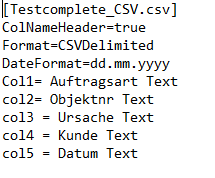
thanks for the respond but this is not working for me because the data is converted while Import.
As you can see in the Field F5 the Dates are converted to numbers.
The normal data is:
01.01.2020
12.01.2020
Thanks

 Champion Level 3
If you already have a string, then you can use aqString methods to pick the string apart and rebuild it in the format you want.
https://support.smartbear.com/testcomplete/docs/reference/program-objects/aqstring/methods.html