We are building a new experience for our SmartBear Community.
This site is now read-only. You can still browse and search as usual. Learn More
This site is now read-only. You can still browse and search as usual. Learn More


Use a "*" (wildcard) for the index of the part that changes.
Assuming you have them mapped.
And you're using that index as an idenfication property.
https://support.smartbear.com/viewarticle/76034/

Hi Colin,
Thanks for suggestion.
Will try it out and let you know.
Hi Colin,
I tried with the way you suggested, but my test failed on both the apps.
Error Details :- Object does not exists.
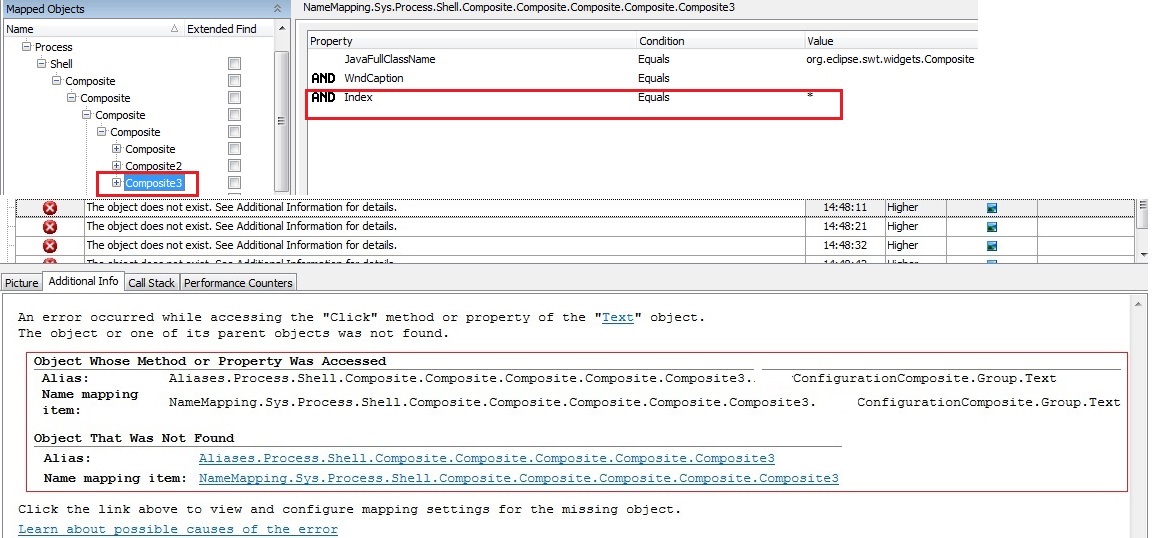
Attaching screenshot here which contains - 1) Name Mapping 2) Error Details
I may be wrong in implementing. Can you please help me?
Thanks in Advance.
Without actually seeing the application, it's kind of hard to say.
I presume all the mapping conditions were met? (ie. ClassName was what you set it to and WndCaption was blank? - have you checked that the caption is definitely blank, length is zero, it doesn't contain invisible control characters or something?)
Although, I have seen a few people mention they've had problems with the conditional mapping you're using? I've never set them up that way (with specific AND and OR statements .... mine are just a plain old set of properties) myself so never had any bother with it.
Give that yours are all AND ... do you need to use conditional? Or is this the way it does it by default with KeyWord tests?
Hi,
I have not changed anything in name mapping, only change I made is of Index (*).
And that name mappimg change, it takes AND by default. I have not changed it.
Option B:-
I would like to know more about mine are just a plain old set of properties, So I can try it out for my applications.
Please let me know if you need more info.
Thanks in Advance.
I've just had a quick look at a mapped object. If you open the mapped object, there should be a button in the bottom left of the panel. Your mapping is conditional, so the button should say "Basic Mode". Click that and then you'll use just a plain old list of properties. Yours are all ANDs so I don't see that you need to use conditional mode?
Try it in basic mode and see if it identifies OK. If it does, that would suggest there is a problem with conditional mode. (As I say, I have seen a couple of people mention problems with it on here recently ...)