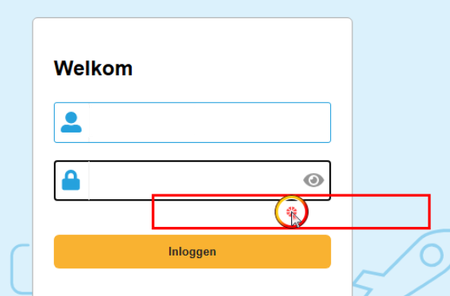
Elements detected, clicked in wrong location with Chrome


 Champion Level 3
It's relating to Windows Scaling, it needs to be set to 100%.
See Testing With Various DPI Settings for more information.

I forgot to mention, that scaling is already set to 100%.
It was the first thing we checked.
The behavior seems to appear only when we run Chrome from TestComplete via Browsers.Item[btChrome].Run().
If I start Chrome manually every is fine.
It also only happens on one machine. We are not able to reproduce it on other machines.
Champion Level 3Try remaining the folder %LocalAppData%\SmartBear\TestComplete (TC user settings), and then launch TestComplete
Launch Chrome via Browsers.Item[btChrome].Run(), and reset all your settings.
If the above fail to resolve your issue, then I can only suggest opening a support ticket.