Edge browser does not recognize Test Extension sometimes
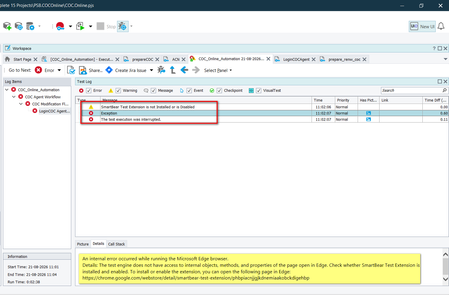
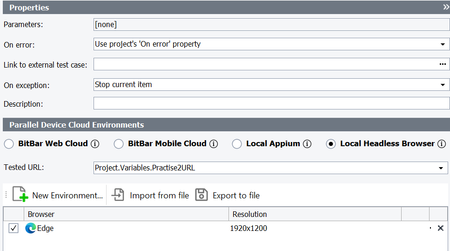
I have created a group in execution plan, where every keyword test has open browser at start and Close browser at end. When i run all keyword test together then sometimes browser opens but test extension not recognized, hence my group test gets failed many times in between. Notes: Using Latest Test Complete and Browser versions always. Same issue when run execution with Test Execute.125Views0likes4Comments
Upload file from WinExp don't work
I'm trying to upload a file with Windows Explorer using two different methods: 1) browser.dlgApri.OpenFile(Project.Variables.URLFileUpload); browser.dlgApri.btnApri.ClickButton(); 2) browser.dlgApri.cbxFileName.ComboBox.Click(); browser.dlgApri.cbxFileName.ComboBox.SetText(Project.Variables.URLFileUpload); browser.dlgApri.btnApri.ClickButton(); But the test crashes and fails in both cases: "The window with the 0x00140e06 handle exists but did not respond during the auto-wait timeout (10000 ms). Try increasing the 'Auto-wait timeout' project property. Tested object: Aliases.browser.dlgApri.cbxFileName.ComboBox (Sys.Browser("chrome").Window("#32770", "Apri", 1).Window("ComboBoxEx32", "", 1).Window("ComboBox", "", 1))" When we increase the "Auto-wait timeout" value to 40000, we get the same error. What can I try? Is there a configuration I should change? Thanks for the replySolved125Views0likes4Comments
Issue Running Project After Updating to Version 15.81 – NameError
I am currently using Test Complete version 15.76. After updating to version 15.81, my project encounters the following issues when running: Name Error: name 'Sys' is not defined Name Error: name 'Log' is not defined My project uses Python as the programming language. It runs correctly in version 15.76, but I would like to use the newer version to take advantage if its improvements. Could you please provide guidance or support to resolve this issue? Thank you for your help.Solved152Views0likes2CommentsPrevent TestExecute dialog to Confirm Save in silent mode
When a particular project is run via silent mode, if the tests completes successfully or if it fails, Test Execute in both UI mode and silent mode will ask to save changes. In the silent log the below entry is shown ". 05/03/2026 07:16:40:411 Tried to open the Save dialog. The default value: YES. When all test Pass, still the Jenkins job is s Fails as TE returns an exit code of -1/ This is only the case for a specific project, other projects don't have this issue.263Views0likes10Comments
Playback - On Error: Stop and Rerun Current Items Not Working.
Hello, can someone help me why Stop and Rerun Current Items on Errors is not working as before. When an error occurs, it is now continuing to run the whole test and then rerunning it, instead of stopping and then rerunning it. This is causing the execution to run very long and its very inconvenient. I have checked that my execution plan is using "Use project's On Error property" and that my project setting is set to "Stop and Rerun Current Items" when an error occurs. I have reinstalled test complete and it's still the same, how can I fix this?211Views0likes5Comments
Execute keyword test case once with multiple test cases linked.
I want to execute keyword test once from Execution plan even if there is multiple manual test cases link to it and mark all linked manual test cases as passed/failed for all linked test cases. Is there any way to do same.97Views0likes1Comment
TestComplete Test Adapter
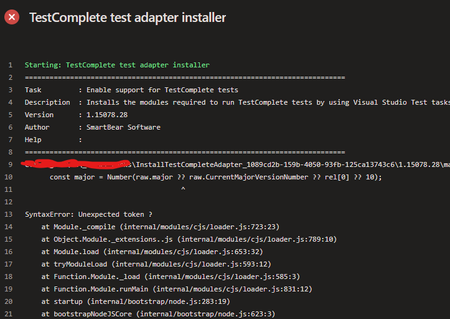
We are using this task 'InstallTestCompleteAdapter@1' in my pipeline. Version: 1.15078.28 Till 12/11, there was no issue. Nothing changed on our side, and starting from yesterday (13/11), the task execution failed with this error: Any suggestions on how to fix this? Thank you!Solved344Views0likes7CommentsTestExecute logs out before tests run
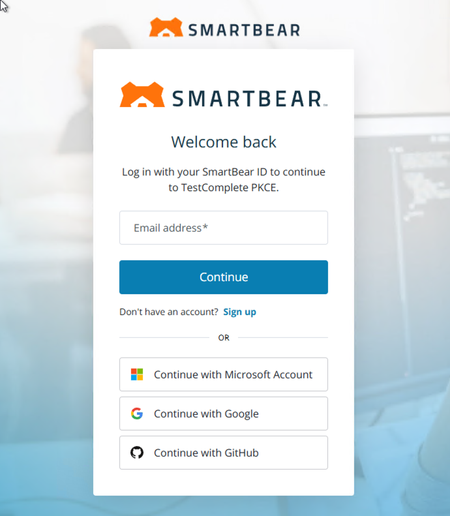
Running our tests on Azure Pipelines using VMs that we disconnect from for the tests to run at night. Sometimes when tests run at night they cannot because TE needs to get logged back in. Is there a way to make sure it stays logged in or to have the pipeline sign in? I'm guessing this is just a standard login time out but this affects our nightly runs when it does time out. When they run and it logs out it just has this login page open when we check them.112Views0likes2CommentsBasic actions taking significantly longer when run as part of ADO pipeline
Our nightly CI/CD ADO pipeline runs tests on a dedicated VM solely for running these tests. We have ~140 tests which run over a period of 6-7 hours. When we execute tests as part of the release pipeline via ADO, the tests take on average 20% longer than they do when they are run manually via TestExecute on the exact same machine. Regardless of whether we run just 1 or all ~140 tests through the pipeline, the result is the same. The tests are executed using the tscon disconnection method to run headless, and the same script is run before the comparisons so it isn't related to that. Investigating further into the details, the execution time difference seems to come from extremely basic actions. An action that would take 1 second, can often take 15 seconds when the test is run as part of the pipeline. Some examples of these actions are: A click with no key pressed. Tested object: Aliases.Application.MainForm.buttonMenu.wItems.Item["Browse"].Items.Item["Search"] (Sys.Process("Application").WinFormsObject("MainForm").WinFormsObject("buttonMenu").wItems.Item["Browse"].Items.Item["Search"]) A click at point (10, 10) with no key pressed. '^[F4]' was sent as a keyboard input to the following window or control. Selecting values in combo boxes takes up to 7 seconds. Even just giving focus to Edge takes 10 seconds: 'The window got focus' -Tested object: Aliases.browser.BrowserWindow (Sys.Browser("edge").BrowserWindow(0)) I've tried searching the community for similar threads but have had no luck. Any suggestions or help would be greatly appreciated.143Views0likes2Comments