Make it possible to create different URI's in 1 environment
For each environment (TEST and UAT) we have different URI's for particular API's. This is not convenient as is, to create so much environments for each API. e.g.: environment TEST has an api that is used for - customs https://hbatna80.ad-my.domain/Headbird.Ferry.App.Customs.1.0.1.00.13 webbook https://hbatna80.ad-my.domain/Headbird.Ferry.App.Webbook.2.0.01.06 WebTop https://hbatna80.ad-my.domain/Headbird.Ferry.App.Webtop.1.1.01.15 etc... this means that for each webservice that contains 15 API's it can be that I need different endpoints. At this point (ReadyAPI v3.66.0) you need to declare them all seperately and select them all seperately. That makes a very long Environment list to select from....and this give more chance on mistakes and info losses. Make it possible that each Environment can contain different URI's to select from in the testcase itself please.91Views1like1Comment
Refer to JSON payload in multipart/form-data
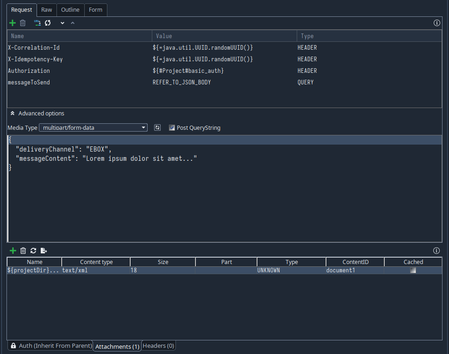
I need to test an endpoint accepting multipart/form-data. The endpoint expects a required part with content id "messageToSend" and optional parts with content id's "document[1-x]". The documents are to be file attachments and I want to send the "messageToSend" as a JSON payload. The attachments are working without issue, but using the query parameter value to input my JSON is not great UX. Ideally I would be able to refer to the body below from the query param so the content id is set correctly. You can imagine if the JSON content were much larger it would be painful to use the query parameter as the text box. As you can see in the screenshots above, the JSON payload has the correct Content-Type but no Content-Disposition. Functionally the two parts need to be merged. I either need to be able to: Refer to the JSON from the query parameter where placeholder "REFER_TO_JSON_BODY" (similar to file:fileName). Set the "content id" in the large text box with the rest of the JSON. Kind regards101Views0likes1Comment
How do I add a REST query string without the 'name='
Hi, I'm trying to build a REST query, but my issue is that the service I'm calling only requires a value following the '?' and I'm struggling on how to define this. If I blank out the name in the settings, it still generates the '=', so my query string ends up as'?=value', which the service rejects. So, how do I add a query without the 'name=' or '='. Thanks94Views0likes1Comment
Rest step assertions written in SoapUI 5.5.0 are failing in SoapUI 5.8.0
I am using SoapUI 5.5.0 and we are in the process of migrating our scripts to SoapUI 5.8.0.But after migrating to SoapUI 5.8.0 many rest step assertions are failing because json path libraries in SoapUI 5.8.0 are enforcing stricter compliance/parsing when validating assertions. Some of my assertions with indices are failing only in SoapUI 5.8.0 like for example jsonpath count assertion $..id[0] is failing in 5.8.0, but working fine with SoapUI 5.5.0. I would like to know 1.Is there any SoapUI preference or a property or flag in settings.xml with which I can revert to a more lenient compliance check with schema like in SoapUI 5.5.0? 2.Is there any patch or plugin by using which my rest step assertions written in 5.5.0 will pass? 3.Or any other solution or groovy script If I have this solution, i can save time in modifying all assertions which will take daysSolved157Views0likes1Comment
Improve searching in the navigation panel
Search in the navigation panel could also support searching for test steps based on API endpoints. This means that if an endpoint is entered into the search field in ReadyAPI, it will find all test steps where the given endpoint is used.94Views0likes1Comment
Improve searching in the navigation panel
Search in the navigation panel could also support searching for test steps based on API endpoints. This means that if an endpoint is entered into the search field in ReadyAPI, it will find all test steps where the given endpoint is used.236Views2likes4Comments
How to set different Content-Types in multipart/form-data POST Request?
I have a REST API, that I can curl correctly, but I can not get it done in ReadyApi. I have to upload a picture and a json string, which has the content-type "type=application/json": curl -X 'POST' 'http:/localhost:12345/rest/add' -H 'Content-Type: multipart/form-data' -F 'picture=@/home/my.jpg' -F 'criteria={"personId":"string"};type=application/json' I ticked "Post QueryString" and selected multipart/form-data. When I look up in the RAW tab, I see, that for criteria no content-type is set. The error message in ReadyApi says: Content type 'application/octet-stream' not supported It is necessary for me to set the content-type of my criteria JSON Object to "application/json". Otherwise I will get this error. I am on ReadyApi 3.45. Does anyone have a clue, how to solve the problem?Solved394Views0likes1CommentHow to change the API of a REST test step
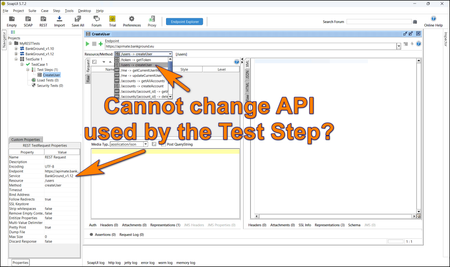
Hi guys, If you test REST APIs in SoapUI, you may encounter an issue where you cannot change the API attached to the REST test step. I am not aware of any standard way to do it, so I prepared a simple Groovy script to change the test step's API programmatically: testRunner.testCase.getTestStepList().each(){ step = it service = step.getService() log.info("TestStep: ${step.getName()}") config = step.getRequestStepConfig() log.info "Before: ${step.getService()}" config.setService("BankGround_v1.12") log.info "After: ${step.getService()}" } I thought this may help those of you who work with REST APIs, which get changed over time (new versions). For a longer story, you can visit the following article: https://www.linkedin.com/pulse/soapui-what-rest-api-changes-karel-husa-7vb2e101Views2likes0CommentsProperty transfer version 5.7.2 not removing double quotes.
I am doing property transfer by using the setup script through sql. My request has something which should be in []. I have created the propert transfer like below For the Target i have given like below. $.dispositionIds In the setup script I am giving like below. String dispositionIds = rows.DISPOSTN_ID //Set Property value testRunner.testCase.setPropertyValue( "DISPOSTN_ID", dispositionIds ) After runng the script I am getting the value in double quotes "" like shown below. "dispositionIds":"[1282678]" ---But becasue of the double quotes, My request is thrownig an error saying invalid json. My Colleagesue have a differnt verison soap 5.6.0 and it is working fine for them.Solved162Views1like1CommentSet Authorization Method defaults in Auth Manager which can be inherited by environments
Each of my Ready API projects have dozens of tests and 10+ environments each. The authorization methods for each API request/test is the same across all environments, but any time I need to make changes, or add new requests/tests, I have to open up the environment configuration window. and then for each environment I have to: select the api > Edit > Authorization > Configure > Auth Manager > expand out all of the requests/test steps > make any changes (which is like 3 mouse clicks each plus some scrolling) > close > save And then repeat the exact same steps 10+ more times. Even using inheritance within an environment as much as I can, it's incredibly tedious, and often leads to developers making quick one-off changes in the request/test itself which gets applied inconsistently across environments and then wonder why our automated tests start failing I propose being able to use Auth Manager in the "No Environment" to set the authorization methods in one place, which can then be applied to all environments (unless overridden). Basically, in addition to Inherit From Parent, there could be an Inherit From Default Environment. That way, if an environment will be using all the defaults I only need to touch the environment level auth manager once, set Inherit From Default Environment at the project level for each environment, and then apply that to all dependencies. Any time changes need to be made, I could open up the No Environment Auth Manager, make my changes there, and know it will apply to all all environments inheriting from the default.154Views2likes0Comments