How to distribute the iOS/Android builds to the multiple access group through Jenkins pipeline
We have used the Jenkins pipeline for releasing the iOS builds and android builds to the bitbar using the "runInCloud" plugin method. We need to distribute the build to multiple access groups in an automated way. How to automatically distribute the build to the access group from Jenkins "runInCloud"? Which parameter do I need to use in the runInClound?664Views0likes0Comments
Reboot PC during test execution and retain Jenkins connection
Hi, I am currently working on a desktop application upgrade testing which requires multiple reboots of the environment (VM) during test execution. I am planning to schedule this using Jenkins. The test script works well when run manually. However, when run using Jenkins, because of the reboot, the connection is lost and Jenkins reports it as a failure with the message. 20:12:10 [TestComplete] Test runner exit code: 1073807364 May I know if anyone has come across such a problem and any viable solutions please. Thank you1.3KViews0likes2Comments
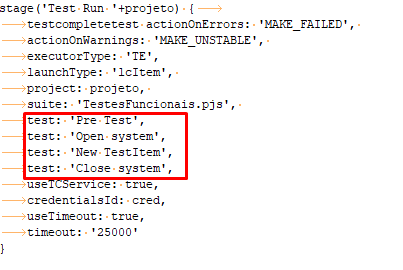
How can I run two or more testitems by jenkinsfile?
Hello! What I'm trying to do is to test the new tests that my team is creating before integrating them to the production test branch. So I'm thinkink in, when a tester do a pull request, jenkins will run the new test in the pull request branch to see if it's working. So, in short, instead of running the full test project in those cases, I want to run only the test step that opens the system, the new test which the tester is resquesting to pull and the test step that closes the system. Is there a way for me to, when I call the testcomplete by jenkinsfile, set as parameters more than one test item of a project? Something like this: ,1.5KViews0likes4Comments
Tests are failing on Jenkins
Tests are failing on Jenkins with error Please specify endpoints and restart your test. I have added endpoints in <con:service type="SOAP" name="xyz"> <con:endpoint authProfile="No Authorization">https://foo</con:endpoint> </con:service> Tests are running fine on my local machine616Views0likes2Comments
Jenkins TestComplete remote audio testing
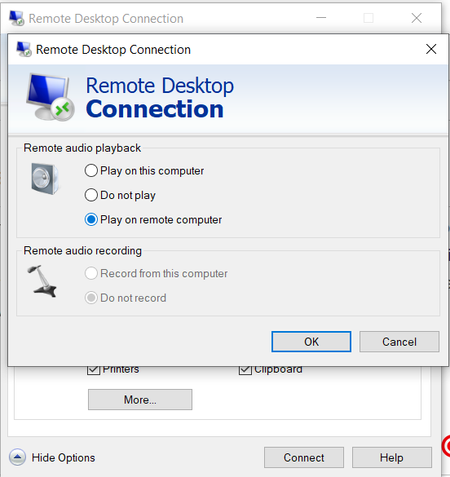
I'm using TestComplete plugin in Jenkins to run automated testing on Jenkins-Slave machine. I'm running TestComplete in interactive mode. But I need to execute audio tests in the slave machine and need to run an interactive session with Remote audio playback option (Play on remote computer) as in RDP settings. Currently, in TestComplete plugin there's only option to set the screen resolution. Is there any way to select remote audio playback?Solved1.3KViews0likes1CommentTest runner exit code: -10 (Unable to create a user session).
Hello! I have a CI environment with jenkins where I'm trying to configure TestExecute to run functional testes. I have three machines that I want to use as jenkins slaves. I had succes in prepare one of those machines and in this case, the tests are running fine, but, in the other ones, I'm getting the error message "Test runner exit code: -10 (Unable to create a user session)." and I have no more ideas how to proceed. Additional informations: The jenkins is configured by jenkinsfile. The test stages are defined like this: def cred = 'TESTECOMPLETE_CRED' if ("${env.NODE_NAME}" == "SkyOne_QA"){ cred = 'TESTECOMPLETE_CRED_SKYONE' } stage('Test Run Persona') { testcompletetest actionOnErrors: 'MAKE_FAILED', actionOnWarnings: 'MAKE_UNSTABLE', launchType: 'lcProject', project: 'nsjPersona', suite: 'TestesFuncionais.pjs', useTCService: true, credentialsId: cred } In one of those 3 machines, the tests are running perfectly. In both the jenkins slave agents are installed as a service and the testcomplete service have permissions to run in interactive session. Finally, I saw the document with instructions about how to prepare a machine to run tests. I tried to cunfigure those two machines like the document says, but I had no success. I hope you can help-me with this. Thanks a lot!4KViews0likes10CommentsJenkins Jobs and Code Source Management with GIT - G drive
Hi everyone , Is someone can help about Code Source Managemement in my Jenkins / TestComplete jobs that are running on a windows server 2016 ? We (our team) are about to add a GIT Code source Management on our Jenkins Jobs. We set the "TestComplete Service 14" requiered for Jenkins. -> Running fine. We test adding a GIT Code source Management and see that Jenkins use a G Drive for that. In my project , I use parameters that are set to run for D Drive. By this way our Test can launch other objects like powershell commands. - I have no G drive on my computer - I create my test with the D drive. So we are wondering how to go further and manage this ? We have some ideas of solutions and wants to find the good way before going further : - Should we have to do a .ini file with different Settings ? ...if running with D or G ? - adding a G drive on my computer , .... it's seems strange for me to do that. Maybe there are others way to do .... ? asking you to have the best practice for this. Thanks you for helps Regards. Nicolas1.9KViews0likes9CommentsThe operation cannot be performed, because the user session is disconnected.
I'm running Test Complete tests using Jenkins from master to slave node. When i RDP to the slave machine and run the job test will succeeds. But if the RDP is closed and when i try to exectute tests it shows an error in every test cases: The operation cannot be performed, because the user session is disconnected. I need to run Test Complete test from master node unattended. I configure slave node as Java web start. Jenkins runs as User in slave. I configured Test complete job to run an interactive session and i specified username and password for the interactive session. Is there anything i'm missing or is it must to have a slave RDP connection opened during the tests.Solved3.1KViews0likes6CommentsJenkins test failure on test execute 14.40.1658.11
Hello, Since the installation of Test Execute 14.40.1658.11 I can no longer launch tests via Jenkins. I have the following log message : [TestComplete] The test execution started (mhp-tests-gui/mhp-tests-gui/AUTO_PE_000997_932/AUTO_PE_000997_932). [TestComplete] Found TestComplete/TestExecute installations: Type: TE, Version: 12.60.5545.11, Path: "C:\Program Files (x86)\SmartBear\TestExecute 12\bin\TestExecute.exe" Type: TE, Version: 14.40.1658.11, Path: "C:\Program Files (x86)\SmartBear\TestExecute 14\x64\bin\TestExecute.exe" [TestComplete] Selected TestComplete/TestExecute installation: Type: TE, Version: 14.40.1658.11, Path: "C:\Program Files (x86)\SmartBear\TestExecute 14\x64\bin\TestExecute.exe" [TestComplete] Launching the test runner. $ "null\SessionCreator.exe" ExecuteProcess '/c:""C:\Program Files (x86)\SmartBear\TestExecute 14\x64\bin\TestExecute.exe"" "C:\Jenkins\workspace\STAGO\Lancement_Test_Unitaire_PCFixe\mhp-tests-gui\mhp-tests-gui\mhp-tests-gui.pjs" /run /SilentMode /ForceConversion /ns /exit "/ExportLog:C:\Jenkins\workspace\STAGO\Lancement_Test_Unitaire_PCFixe\1592322644023.tclogx" "/ExportLog:C:\Jenkins\workspace\STAGO\Lancement_Test_Unitaire_PCFixe\1592322644023.htmlx" "/ErrorLog:C:\Jenkins\workspace\STAGO\Lancement_Test_Unitaire_PCFixe\1592322644023.txt" "/ExportLog:C:\Jenkins\workspace\STAGO\Lancement_Test_Unitaire_PCFixe\1592322644023.mht" "/project:mhp-tests-gui" "/unit:AUTO_PE_000997_932" "/routine:AUTO_PE_000997_932" /DoNotShowLog /JenkinsTCPluginVersion:2.4' [TestComplete] [ERROR] An exception occurred: java.io.IOException: CreateProcess error=2, Le fichier spécifié est introuvable. [TestComplete] Marking the build as FAILED. [TestComplete] [WARNING] Unable to publish test results (xml data is empty). [TestComplete] The test execution finished (mhp-tests-gui/mhp-tests-gui/AUTO_PE_000997_932/AUTO_PE_000997_932). Build step 'TestComplete Test' changed build result to FAILURE Finished: FAILURE Can you help me please ? it's pretty urgent ! thank you in advance cordially SalimSolved2.6KViews0likes5Comments