TestComplete Plugin 2.11 not working with Jenkins 2.581
The TestComplete Support Jenkins plugin (TcTestBuilder) requires the Apache Commons Lang 2.x library (class org.apache.commons.lang.StringUtils) at runtime. Unfortunately, since our Jenkins installation was updated to the latest version, our tests no longer run because this library was deprecated and has now been removed. The call stack then shows, for example: 13:10:18 FATAL: org/apache/commons/lang/StringUtils 13:10:18 java.lang.ClassNotFoundException: org.apache.commons.lang.StringUtils 13:10:18 Caused: java.lang.NoClassDefFoundError: org/apache/commons/lang/StringUtils 13:10:18 at PluginClassLoader for TestComplete//com.smartbear.jenkins.plugins.testcomplete.TcTestBuilder.makeCommandLineArgs(TcTestBuilder.java:1299) When can we expect the new version of the TestComplete plugin? I hope very soon... Downgrading Jenkins is out of the question for us.92Views0likes1Comment
Azure Pipeline cannot detect test item in Group under Execution Plan
How to identify the test item in Group under Execution Plan. I built a Group in Execution Plan for the purpose of regression testing scenario. In Group, I associated every Keyword Test as "test item" and flagged "test case" matching with Azure Devops's test case under test suites in test plan. But when pushing to Git and pipeline running, above test item cannot be detected. Why? In [search for test cases], it sets to "search for test cases"98Views0likes5Comments
TestComplete hanging during iOS automation with background script execution
Hi everyone, I’m currently running into an issue while trying to automate a series of regression tests on physical iOS devices using TestComplete. My project requires me to validate how our application handles high-load scenarios while secondary script executors are active in the background, but I'm seeing consistent session timeouts that I can't quite pin down. Specifically, I’ve been trying to run these tests while an exploit ios environment is processing tasks on the same device. Every time TestComplete attempts to record a new user action or play back a keyword test while that environment is active, the TestComplete agent on the device seems to lose connection or becomes completely unresponsive. I’ve already checked the "Object Search" timeout settings and tried increasing the project’s playback delay, but the hang seems to happen at the OS level rather than within the app itself. Has anyone else experienced TestComplete crashing or hanging when the iOS device is under heavy load from third-party script injectors or executors? I’m curious if there are specific iOS "Background App Refresh" settings or developer mode configurations I should be tweaking to ensure TestComplete maintains its hook even when other scripts are running. If anyone has a workaround for keeping the automation stable during these types of complex execution scenarios, I’d really appreciate the help!131Views0likes2Comments
Automate Cookie Security Flag or Security Header
Are there any possible ways to check Cookie Security or Security Header Flag like below with TestComplete tool? HttpOnly Secure SameSite Server Version Content-Security-Policy Strict-Transport-Security X-Frame-Options X-Content-Type-Options Referrer-Policy Permission Policy Cross-Site Scripting Protection161Views0likes3CommentsTest Execution Summary Not Visible on Jenkins
I’m no longer able to view the Test Execution Summary on Jenkins. My test suite completes successfully, and I can still see the brief “failed test” overview under the Tests tab. However, the usual detailed summary within the TestComplete Test Results view is no longer visible. When I try to open the log from that view, the page loads but remains blank. This issue began occurring recently. My current workaround is to download the log file from the TestComplete Test Results tab, then upload and view it manually in TestComplete. Since I review multiple different test suites daily, this workaround is becoming inefficient. any advice? thanks in advance!175Views1like3Comments
On-premises Azure build agents running TestExecute with ID-based licensing
We recently migrated our self-hosted Azure DevOps Build agents from HASP based licensing to the ID based licensing. We use a test adapter via the COM integration to execute and pull test data back into Azure Pipelines. Through the sales and renewal teams, we were instructed that exporting the licenses to the On-Premises License Server was the appropriate mechanism. Now, we are seeing that the access token expires regularly and we have to manually access every build agent in the pool and open either TestComplete or TestExecute, log-out, and then generate the auth code again. This article says however, that an access key should be generated and provided via CLI execution. https://support.smartbear.com/testcomplete/docs/licensing/id-based/automated-builds.html This doesn't work with the COM integration, or in any way that I can find in the interface. It also doesn't seem to be possible to create an access key with the On-Premises server, as it always states "Failed to generate an Access Key". Years after releasing ID-based licensing, there still seem to be major disconnects in the implementation. The HASP system was simpler and more reliable. What is the proper solution to using ID-based licensing with Azure DevOps build agents?Solved235Views0likes5CommentsTestComplete Allure Jenkins Integration
Did any one tried TestComplete Allure Jenkins Integration. I am unable to see Test steps when using /exportsummary.Its working fine but showing basic detail and when using /exportlog then its unable to parse xml file. I want to see TestLog also in Allure html file.156Views0likes1CommentUse Variables in the sql connectionstring
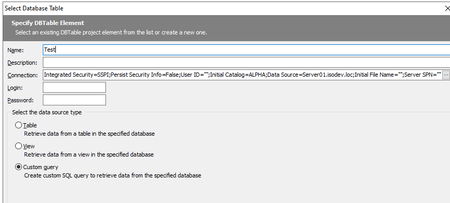
Hi there, I'm using 2 environments and 2 databases: 1 to create the testcases and 1 to execute them I want to check the results with DBTables Custom queries (SSMS) and I have i.e. next connectionstring: How CAN I make this string Variable ? When I login at the ALPHA-environment I want in the string ALPHA and server01 When I login at the BETA-environment I want in the string BETA and server02 Greetings, Sjef van IrselSolved1KViews0likes6Comments
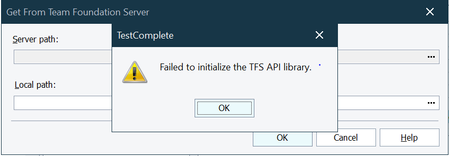
VS 2019 - Failed to initialize the TFS API Library
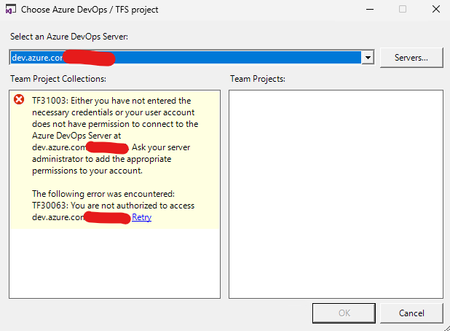
When we try to access the Server Path and add a Server location to access the Online Repo getting an error as Steps to reproduce: 1) Navigate to Tools -> Options -> Source Control and select 'Current Source Control Plugin ' as 'Microsoft Visual Studio 2019' [already installed locally and Source path / Workspace is set] 2) Navigate to File -> Source Control -> Open From Team Foundation Server... 3) Click on the ... button at the 'Server Path:' section.1.2KViews0likes11Comments