Portal my.smartbear.com error time-out
Hello team, We are migrating the floating licenses from one server to another, but there are failures during activation. Also, when trying to access the portal my.smartbear.com, we are getting the attached error. Do you know if there is any maintenance currently happening on SmartBear's network?109Views0likes3Comments
Breakpoints in external files with python 3.13?
With the recent upgrade to python 3.13 I have been working to update my project, which uses a lot of external files. As of right now, I have been adding the absolute path to external files as mentioned at the bottom of this page: Migrating to Python 3.13 | TestComplete Documentation This has allowed my tests to progress much further than the NameErrors I was getting initially, but my issue now is that any breakpoint put in an external file no longer functions. I can see that the code is being executed, but breakpoints are being ignored. Are breakpoints in external files no longer supported with the update to python 3.13?102Views0likes1CommentUnable to debug with Python 3.13
Hi guys, as anyone run into problems with the latest TestComplete when using Python scripts? I’m unable to debug certain files—they just won’t step through as expected. Additionally, TestComplete is generating .pyc files, which I haven’t seen in previous setups. This behavior only occurs when using Python 3.13 (older versions seem fine). Is this a known compatibility issue with Python 3.13? Or is there a setting in TestComplete that needs to be adjusted? Any advice or workarounds would be greatly appreciated!177Views1like3Comments
getting "FindAll is not a function" error
Hi folks, Any idea why I'm getting error "FindAll is not a function"? Below code successfully returns parentElement object, But when I try to call FindAll with the obtained object, it fails with the above error. The interesting point is, that if I call FindAll directly on inputElement object, it works OK. There seems to be a problem only with the parentElement-based object. Do I need to somehow convert the localParent before calling FindAll? ... else if (inputElement.className.includes('mat-mdc-chip-input')) { var localParent = inputElement.parentElement; var getAllChips = localParent.FindAll("tagName","mat-chip-row",10); for (let j = 0; j<=getAllChips.length - 1; j++) { getAllChips[j].FindElement("//mat-chip-row//*[contains(@class,'mat-mdc-chip-remove')]/parent::span").Click(); } } ...474Views0likes15Comments
TestExecute save log every ... minutes
Is it possible to let TestExecute, similarly as the functionality in TestComplete, save the log every ... minutes? We're occasionally running into the situation where a test hangs, and is killed by a timeout set in a Jenkins pipeline, making TestExecute end ungracefully; does a functionality to be able to still access a log file to help diagnose exist?Solved440Views0likes9Commentsproblem with dotNet.System_IO.File.WriteAllText
Hi folks, I'm using method dotNet.System_IO.File.WriteAllText to write some data to CSV. The thing is it started to fail with below JavaScript error... It definitely worked before. But I'm not quite sure, when it started to fail, because it's in a part of code, which is used only occasionally (to create new ref. data). Of course, I'm aware that I can use aqFile.WriteToTextFile function. But it creates a file with BOM, which I need to avoid. Therefore, I was using above dotNet method (as suggested here). Any idea what's wrong with my code? Thanks.158Views1like2Comments
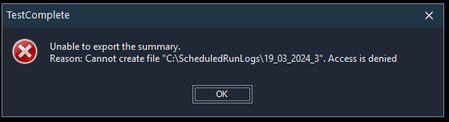
Log.SaveResultsAs() Unable to export the summary
Hi, I've been using the Log.SaveResultsAs() method to assist in creating summary htm files to be emailed out showing if our scheduled test runs have passed / failed. I've had no issue previously doing so, the tests had been running for several weeks with no issue until today. My project creates a new folder for logs to be stored in, runs any scripts as desired, then saves the results (Using Log.SaveResultsAs()) into the created folder, then emails out a summary report of the scheduled run test summary. When I run my scripts now, when the Log.SaveResultsAs() code is hit (I did code stepthrough to check this is the point the error is triggered), I get the below error. Nothing has changed in my environment setup - the only difference is today we updated TestComplete to the latest version. I did some snooping on the TC Documentation to check if the method has changed, but as far as I saw it shouldn't be any different? Despite what the error above states, files are created when the Log.SaveResultsAs() code is hit, and the subsequent code I have does allow the email to be sent with a summary.htm attachement, but the TestComplete error is causing my tests to freeze until the error is dealt with. Below is the code I am using (Using Python!) - I would normally have the following as my execution plan - Create New Log folder My project test scripts Save results and then email summary Below is the Create New Log folder code Below is the Save results and email summary code (Some details are censored for obvious reasons) Any advice on how to resolve this would be much appreciated. Jacob.Solved554Views0likes10CommentsDBTableVariableObj.Reset() not working as expected
Hi guys, I'm experiencing a weird problem with DBTableVariableObj.Reset(), which is supposed to reset the iterator back to the first row. Well, it seems it does not reset the iterator at all :) Here is a simple function to demonstrate the issue... //dbTableToRead is a DB Table variable diefined in keyword test //columnToRead is a name of column function testDBTableReset(dbTableToRead, columnToRead) { var targetWord, i=1; // Obtains a DB Table variable var dbTable = dbTableToRead; // Initializes the iterator dbTable.Reset; Log.Message("Iteration - Start"); // Iterate through rows while(!dbTable.IsEOF()) { targetWord = dbTable.Value(columnToRead); Log.Message("Row number: " + i.toString() + " Value: " + targetWord); // Forward the iterator to the next row dbTable.Next(); i++ } Log.Message("Iteration - End"); } Basically, it should iterate over the items in DB Table variable and write them to log. I'm calling this function two times in the same keyword test... And here is the result: Basically, the second run of the function jumps over the while(!dbTable.IsEOF()) block, as if the dbTable is not reset? But it should be or am I doing something wrong? It seems it's not possible to attach the sample project here, so if you are interested, you can get it here (zipped and inspected for viruses): https://drive.google.com/file/d/1TiRh50vKP6mguNRgvT13-vnyL-eP8rp1/view?usp=sharing Thank you in advance for any suggestion.Solved198Views0likes6Comments