Portal my.smartbear.com error time-out
Hello team, We are migrating the floating licenses from one server to another, but there are failures during activation. Also, when trying to access the portal my.smartbear.com, we are getting the attached error. Do you know if there is any maintenance currently happening on SmartBear's network?99Views0likes3Comments
Breakpoints in external files with python 3.13?
With the recent upgrade to python 3.13 I have been working to update my project, which uses a lot of external files. As of right now, I have been adding the absolute path to external files as mentioned at the bottom of this page: Migrating to Python 3.13 | TestComplete Documentation This has allowed my tests to progress much further than the NameErrors I was getting initially, but my issue now is that any breakpoint put in an external file no longer functions. I can see that the code is being executed, but breakpoints are being ignored. Are breakpoints in external files no longer supported with the update to python 3.13?94Views0likes1CommentUnable to debug with Python 3.13
Hi guys, as anyone run into problems with the latest TestComplete when using Python scripts? I’m unable to debug certain files—they just won’t step through as expected. Additionally, TestComplete is generating .pyc files, which I haven’t seen in previous setups. This behavior only occurs when using Python 3.13 (older versions seem fine). Is this a known compatibility issue with Python 3.13? Or is there a setting in TestComplete that needs to be adjusted? Any advice or workarounds would be greatly appreciated!170Views1like3Comments
getting "FindAll is not a function" error
Hi folks, Any idea why I'm getting error "FindAll is not a function"? Below code successfully returns parentElement object, But when I try to call FindAll with the obtained object, it fails with the above error. The interesting point is, that if I call FindAll directly on inputElement object, it works OK. There seems to be a problem only with the parentElement-based object. Do I need to somehow convert the localParent before calling FindAll? ... else if (inputElement.className.includes('mat-mdc-chip-input')) { var localParent = inputElement.parentElement; var getAllChips = localParent.FindAll("tagName","mat-chip-row",10); for (let j = 0; j<=getAllChips.length - 1; j++) { getAllChips[j].FindElement("//mat-chip-row//*[contains(@class,'mat-mdc-chip-remove')]/parent::span").Click(); } } ...441Views0likes15Comments
TestExecute save log every ... minutes
Is it possible to let TestExecute, similarly as the functionality in TestComplete, save the log every ... minutes? We're occasionally running into the situation where a test hangs, and is killed by a timeout set in a Jenkins pipeline, making TestExecute end ungracefully; does a functionality to be able to still access a log file to help diagnose exist?Solved436Views0likes9Comments
Name Mapping not working on remote browser
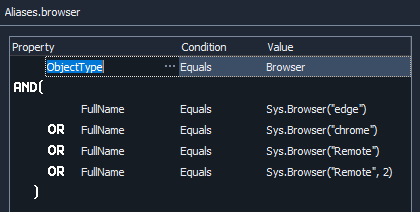
The name mapping and test cases work fine on local browsers, but would complain about page or object not found when running headless remote browsers and in parallel testing. I have the following setup for browser name mapping: For headless setup I have: server = "localhost" capabilities = { "browserName": "chrome", "headless" : "true", "screenResolution": "1920x1080", "platform" : "Headless", "record_video": "true" } Browsers.RemoteItem[server, capabilities].Run(url) Is this the correct way to work with name mapping on headless browser?1.3KViews0likes15Comments
TestComplete cannot find chrome webdriver
Hello, I am trying to get TestComplete to run headless tests. I am following this guide https://support.smartbear.com/testcomplete/docs/app-testing/web/supported-browsers/headless.html#local and I am running into the issue that TestComplete cannot download/see the needed WebDriver. This is the JavaScript used in the guide. function Test_Chrome_Headless() { var server = "localhost"; var capabilities = { "browserName": "chrome", "screenResolution": "1920x1080" }; var url = "myurl"; Browsers.RemoteItem(server, capabilities).Run(url); } I downloaded the chrome driver manually and created the path as shown above. But even with the driver in the correct location he cannot seem to open it. When I try to open the driver myself, it works. Does anyone have an idea what I am doing wrong? Kind regards, Luuk856Views0likes4Commentsproblem with dotNet.System_IO.File.WriteAllText
Hi folks, I'm using method dotNet.System_IO.File.WriteAllText to write some data to CSV. The thing is it started to fail with below JavaScript error... It definitely worked before. But I'm not quite sure, when it started to fail, because it's in a part of code, which is used only occasionally (to create new ref. data). Of course, I'm aware that I can use aqFile.WriteToTextFile function. But it creates a file with BOM, which I need to avoid. Therefore, I was using above dotNet method (as suggested here). Any idea what's wrong with my code? Thanks.152Views1like2Comments