jaward916Occasional ContributorJoined 5 years ago19 Posts11 LikesLikes received4 SolutionsView All Badges
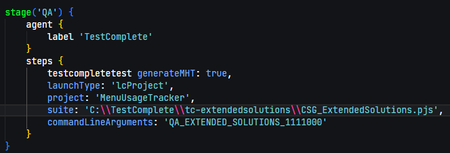
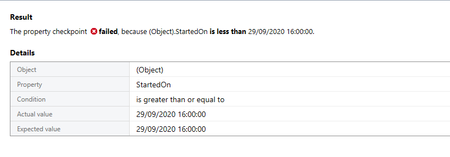
ContributionsMost RecentMost LikesSolutionsRe: Jenkins Integration - Command Line Argument Thank you for this, your approaches should work for me, I'm not sure how I've missed the /pv: params this is likely the solution I need, as I'm assigning to project variables anyway! I agree the position thing is a little restrictive but has worked for nearly 2 years until I tried to be clever and sort all our pipelines out!! Jenkins Integration - Command Line Argument Hi, I am running TC 15 latest version, Jenkins Latest version and the plugin. I have my TC machine set up as a Jenkins Slave node and can see my QA step starting to execute, but it is failing with: [TestComplete] Test runner exit code: 3. [TestComplete] [WARNING] Error: Unable to create a project item of the 'Tested Applications' type, because the specified file does not exist. The item to be created is a child of the following project item: CSG_ExtendedSolutions\MenuUsageTracker Missing file: C:\TestComplete\tc-extendedsolutions\MenuUsageTracker\TestedApps\TestedApps.tcTAs.~$tcUnsaved$. I think what is happening is I currently pass in an "environment name" parameter which is read as a variable which forms part of the tested application's path, however, the plugin is adding an additional command/parameter at the end of the string, and my test code reads the last parameter sent to the command line, can you see the issue here... I can see from the Jenkins log that the command run includes this extra param (JenkinsTCPluginVersion) which means my environment name variable is now that string, rather than 'MyQAEnvironment' - I don't really want to change the test code, as this would break my manually run PowerShell scripts (and I do similar for 5 products in total). I would like to use the TestComplete Jenkins plugin so test results are published in my pipeline. So the question is, can we suppress or move this additional parameter, so I can ensure that my Jenkinsfile included 'commandLineArguments' are in fact passed as the very last item in the command? Some images to help explain, hopefully: This shows the Jenkinsfile pipeline commands for QA Stage with my commandLineArguments This shows the error and full command that was input (not the additional plugin version param) This shows the code I use to set up the TestedApp "dynamically" based on the last param being the environment name, which I think was code someone on these forums helped with a while ago! Open to ideas on how to get around this? Re: Javascript String Interpolation Wait a minute... I did some digging, and it would seem this project is in fact JScript and not JavaScript (which also explains another issue I nearly put on here). I have just run the Javascript conversion (a great feature) and I can now write as I expect. at least I've only wasted 2 hours 🙃 Re: Javascript String Interpolation Thanks, Wamboo, so I just pasted this straight into my test script, and straight away it has the red x with a syntax error: Javascript String Interpolation Is Javascript string interpolation allowed/recognized in TestComplete (14.70 fully patched)? The reason I ask is when I'm logging some values I much prefer interpolation to concatenation. i.e. I would like to use: Log.Message(`Found match, group ${i}: ${m[i]}`); instead of: Log.Message("Found match, group " + i + ":" + m[i]); both are valid JS and work on online prototypers, however the former (interpolation) results in Syntax Errors on the ` (backtick). Does anyone know if this is a limitation in TestComplete or whether there's a syntax difference I need to be aware of, I couldn't find any documentation for this! SolvedRe: GreaterThanOrEqual to on Dates no longer working Hello all, so yes, some back and forth with support on this, some of it down to my specific application, some down to my own understanding. In short, DateTimes are very clever but quite complex. The issue stems from the line: dotNET["System"]["DateTime"]["Now"]["UtcNow"]["OleValue"]; Where this is a FULL timestamp, down the beyond the seconds level... However, the one in my grid I am comparing against only goes to the seconds, and therefore I'm in a situation where: Timestamp = 12:05:55:xxxx Grid = 12:05:55 without the .xxxx And therefore it likely assumes .0000 which is, therefore, LESS THAN xxxx and not greater or equal. So when timestamp values appear to be "equal to" in a UI sense they are not, as underneath one has a deeper level of accuracy! What's more frustrating for me is when they appear "equal" it's a reflection of great performance on my tested application, usually there is a good second or 2 between the dates, so my update of TC was irrelevant, my apps were just running better last week! Re: TC doesnt map object names automatically I have noticed this change too, I didn't see it as a major issue, but definitely a change in the last week or so. I guess update related, maybe a setting got reset, or mapping itself has been "improved". I wonder if having the Update Mappings option disabled will make this better or worse? GreaterThanOrEqual to on Dates no longer working Hi there, since upgrading to 14.61 this week my tests are failing on comparison of a date time. I have a timestamp set as: var timestamp = dotNET["System"]["DateTime"]["Now"]["UtcNow"]["OleValue"]; this is then compared to a value extracted from a grid: aqObject.CheckProperty(Grid.DataSource.DataSource.Item(RowId).Row, "StartedOn", cmpGreaterOrEqual, timestamp); last week this worked absolutely fine, however today I get: As you can see it is equal to, not less than, and I am using greater or equal as my qualifier!! Help, please?! SolvedRe: validate wValue against Project Variable in UltraGrid I did say it was one of those days, so previously I've done everything in script form, for this project I'm doing Keyword tests/recordings and so my options were not as obvious (to me) the compare properties option works just great for this. And I think that article is what I was trying to find, but clearly my search criteria wasn't up to scratch! Thank you! validate wValue against Project Variable in UltraGrid Hi there, I have an UltraGrid with one row, I want to make sure a column in that row is the JobNumber I created earlier on and is stored as a Project Variable. I have the Property Checkpoint setup as wValue(0,2) equals Project.Variable.JobNum but it want's an explicit value (which I don't know before the test, hence variable) how can I get this to work? Checkpoint Setup: Error: I'm having one of those days, I'm sure this is an easy one for the gurus! Solved