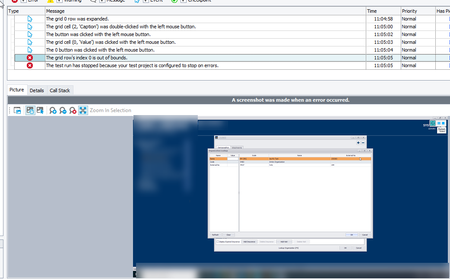
ContributionsMost RecentMost LikesSolutionsLogin for Zephyr is through Microsoft 365 and TestComplete can't complete login Our company changed our login for JIRA (Zephyr) to be through Microsoft 365. When I try to link a TestComplete test with a Zephyr Test, I get a log in error. I used to be able to connect the two BEFORE they changed our JIRA log in to be through Microsoft 365. Is there a way to fix this? I've attached a screenshot of the error I receive. Re: Keyword test steps suddenly stopped recording It ended up being the setting for Enable Windows support for testing Store applications. Once I disabled that and rebooted, I no longer had the issue. Re: Keyword test steps suddenly stopped recording I did have Dark theme running but even when changing that, nothing. Keyword test steps suddenly stopped recording I'm on version 15.68.8.7. I'm trying to record keyword tests on a .net desktop application. I've been doing this for years with TestComplete but suddenly it's not working. It appears to be recording but then when I click stop, nothing shows on the screen. I've rebooted, uninstalled TestComplete, re-installed. Still the same issue. See attached screenshot of what it shows after recording. SolvedRe: The grid row's index 0 is out of bounds Yes it does. Re: The grid row's index 0 is out of bounds Yes they did have values. I changed them both to -1, reran the test, and got the same error. Any other suggestions? Re: The grid row's index 0 is out of bounds I've tried a double click or just leaving the row highlighted and clicking OK. The Details say total number of rows is 0. What would cause that? The grid row's index 0 is out of bounds For some reason I keep getting this error even though the row is actually there. Any suggestions? I've tried clicking the field and using the enter key on the field when recording the keyword test. Same thing happens each time. SolvedUnable to find object keeps happening when running a test I've recorded a keyword test, tabbing between fields and then filling in info as I go. When I run the test, I keep getting an object not found error. I've even tried clicking each field instead of tabbing when recording the test but I get the same result when I run it. It seems to lose the parent object of TextEdit each time. Is there a work around for this? I've attached screenshots of the error and the field setup. SolvedTest Execute to report to Zephyr I have my tests set in Test Complete to report to Zephyr. Is there a way to get Test Execute to do the same? I have some virtuals that have only Test Execute installed and would like them to report executions to Zephyr. Solved