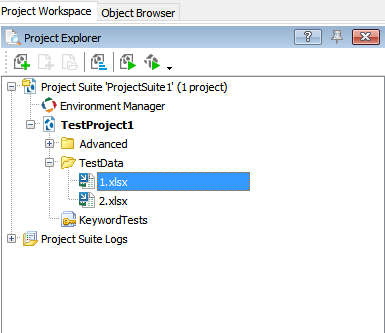
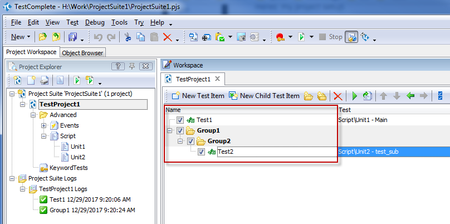
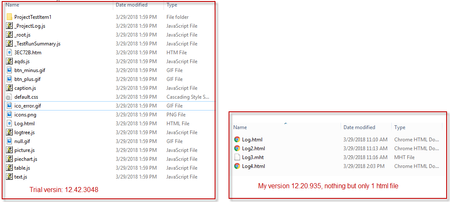
ContributionsMost RecentMost LikesSolutionsHow to add Excel files into project? Hi, Does TestComplete support edit Excel data from project panel without open Excel process? Page I referred: https://support.smartbear.com/testcomplete/docs/testing-with/data-driven/organizing-storages.html https://support.smartbear.com/testcomplete/docs/testing-with/data-driven/excel-storages.html Thanks. Snie. Re: Export log to a html file via command line, get mess format Thank you Shankar, I got it. This is the feature we want, so we may consider to have an upgrade. Re: Export log to a html file via command line, get mess format I just downloaded the new trial 12.42.3048, it works. (My version is 12.20.935) And I also found some difference btw the log folders: Is it because my version not support yet? Export log to a html file via command line, get mess format I am using TC v12 right now, when I tried to export log to html file via command line, I got mess message which is not unreadable, while I expect the same log index as in TC log tree. I tried to export to mht it works well, but that is not the format I want. I reference from this page: https://support.smartbear.com/testcomplete/docs/testing-with/log/working-with/exporting/about.html#CommandLine And use the same command like: TestComplete.exe "C:\My Projects\MySuite.pjs" /run /p:MyProj /exportLog:"C:\TestLogs\Log.html" Is there anything or format settings I missed? Thanks. SolvedRe: How to merge Namemapping and Test Items? Thanks for your replying, I will have a look and see if helps. Re: How to merge Namemapping and Test Items? Thanks for replying, we are using git now, found it's difficult... How to merge Namemapping and Test Items? Hi There, I am facing problems with merging Namemapping and Test Items in my project. Currently there are 3 Auto QAs in my team, and we are all working with the same projects. It's hard for us to find out the difference between namemapping and test item, and also hard for merging too. We are trying our best to avoid to modify these 2 places at the same time, but, this is not the working way. Is there any suggestions for my situation? How does TestComplete work with multi people? Thanks, snie. SolvedRe: How to run a specific test item with command line? Is there any workaround? Re: How to run a specific test item with command line? Thanks for your trying. It's weird why it doesn't work for us... I checked again this morning in both TC9 and TC12, no fortune neither...have no idea now... Re: How to run a specific test item with command line? Hi Robert, I have created a new project in TC12, and then try the command again, still not work... Now I'd like to attach my project and command here, could you please have a look for me see if there is any problem in my MDS file? As it's not working in my colleague's machine neither, thanks. Project: see the attachment Command: TestComplete.exe "H:\xxx\ProjectSuite1\ProjectSuite1.pjs" /run /p:TestProject1 /test:"Group1|Group2|Test2"