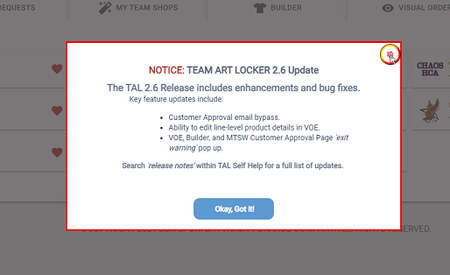
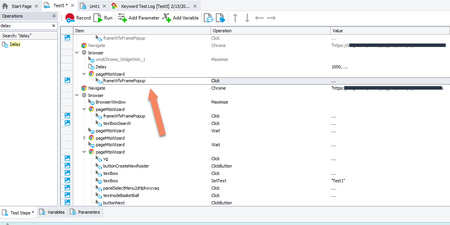
ContributionsMost RecentMost LikesSolutionsRe: How to capture specific text from screen and than display it via log message. Thank you I was able to figure it out. really appreciate. How to capture specific text from screen and than display it via log message. Hi I am trying to capture on screen CartID and just need to display the cart number not the text saying SAP Cart ID: I tried using set variable value and creating a variable under the project and than used the code expression to get the value and used log message to display the variable value but nothing is displaying when I run the keyword test. can anyone please share any video or steps they use to get that and to display exact value rather than just displaying the whole thing. I really appreciate it. or if there is a video anyone have it'll be so much helpful. Solvedhow to use Random Data every time you run a TC Hi, I am trying to search for school names when I log in to my login page and then add products for those schools, how can I use a new school whenever I run the test, can anyone guide me, please? I have an Excel sheet that has about 20 names I want to use. so if I run the test 1 time I want it to pick any random name or 1st from the list, then next time when I run the same scenario I want it to use a different name. if someone can share an example I appreciate it, I am not using any scripting just simple test cases using record options. thanks, Gill Re: I am having issues with Popup the issue is when it gets to the popup screen it doesn't let me select the X to close it, it treats the whole popup dialog box as an object, so I need to find a way to be able to click on X or Ok button to close the popup. I tried the Frame script thing, but it doesn't even work. Re: I am having issues with Popup Version: 15.61.1.7 x64 And yes I am using on chrome browser, I don't think I am using any keyword tests. I am having issues with Popup I am running a test where a popup opens when I loin, when I close the popup screen and logout and when I run the test it gives me an error message and I am not able to select the popup X button when I take my cursor on it, and it don't give me the red square, it highlight the whole Popup window which is not what I am looking for, anyone know how to deal with this issue, I don't have dev background and I am not using any scripting. I really appreciate if someone can help me with this issue. How to increment a variable value when using Genarte Data to test I am trying to create a test scenario for creating a new account. Whenever I run the test case I want to use a new name value for the account I create, so I am using Generate data and use the Name option and first name. Still, whenever I run the test, it only shows the 1st name in that column; when I run the test 2nd or 3rd time, it uses the same name every time. can anyone help me with this issue, I don't know programming or how to use VB script or Java script. appreciate your help and support. thanks, Gill