johnsskiOccasional ContributorJoined 2 years ago9 Posts5 LikesLikes received1 SolutionView All Badges
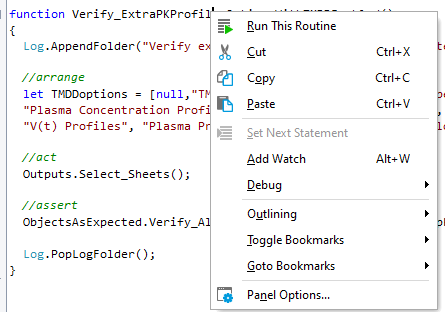
ContributionsMost RecentMost LikesSolutionsRe: v 15.75.22.7: 'Go to declaration' & 'Find usages' are missing rraghvani Thanks but too late - we've already un-installed & installed 15.74 Re: v 15.75.22.7: 'Go to declaration' & 'Find usages' are missing rraghvani Thanks but as Sejal said below, I also have all the Panel options ticked as you suggested. v 15.75.22.7: 'Go to declaration' & 'Find usages' are missing Hi We've just downloaded the latest but now we find we have limited right click options in the script editor, see screen shot below. Do we need to now turn something on or is it a bug? Thanks SolvedRe: How to use wildcards for a WPFControlText property checkpoint? Thanks, really appreciated! How to use wildcards for a WPFControlText property checkpoint? I searched for Testcomplete wildcards & found '?' & '*' so I used ' aqObject.CheckProperty(Aliases.simcyp.SimulationStatus.Status, "WPFControlText", cmpStartsWith, "*complete."); ' to have the checkpoint pass when the WPF Control Text = 'Simulation complete.' or 'Outputting complete.' It fails so is it that the 'CheckProperty' action doesn't support wildcards or something else is wrong? Thanks, John SolvedRe: 2 For loops to run through 2 arrays - how?! rraghvaniThanks for the clues(!) After some minutes I've done it! function Verify_ContextMenuOptionsOnAllEyeLensSubtabsTEST() { Log.AppendFolder("Verify the context menu options on all the Eye subtabs"); //arrange let eyeTabs = [ ["Tear Film", tearFilm], ["Cornea", cornea], ["Nasolacrimal Duct", nasolacrimalDuct], ["Conjunctiva", conjunctiva], ["Aqueous Humor", aqueousHumor], ["Retina", retina], ["Choroid", choroid], ["Sclera", sclera], ["Iris", iris], ["Vitreous Humor", vitreousHumor], ["Lens", lens] ]; for (let i = 0; i < eyeTabs.length; i++) { Log.AppendFolder("Verify the context menu options on the: " + eyeTabs[i][0] + " tab"); Actions.Select_TabByName(Aliases.simcyp.MainWindowInstance.RadTabControl, eyeTabs[i][0]); MenuToolBars.ClearAllSelections(); Verify_GenericEyeSubTabContextMenuOptions(eyeTabs[i][1]); Log.PopLogFolder(); } Log.PopLogFolder(); } 2 For loops to run through 2 arrays - how?! Hi. I'm trying to create a test that clicks on each tab (via an array of tab names) then runs a parameterised test using an array of tab mappings as below. It runs for the 1st tab then tries to run the parameterised test again, but it hasn't moved onto the next tab yet, so it fails. Am I trying something impossible? Thanks. function Verify_ContextMenuOptionsOnAllEyeLensSubtabsTEST() { Log.AppendFolder("Verify the context menu options on all the Eye subtabs"); //arrange let eyeTabs = ["Tear Film", "Cornea", "Nasolacrimal Duct", "Conjunctiva", "Aqueous Humor", "Retina", "Choroid", "Sclera", "Iris", "Vitreous Humor", "Lens"]; let eyeTabMaps = [tearFilm, cornea, nasolacrimalDuct, conjunctiva, aqueousHumor, retina, choroid, sclera, iris, vitreousHumor, lens]; for (let i = 0; i < eyeTabs.length; i++) { for (let j = 0; j < eyeTabs[i].length; j++) { Verify_GenericEyeSubTabContextMenuOptions(eyeTabMaps[j]); } Log.AppendFolder("Verify the context menu options on the :" + eyeTabs[i] + " tab"); Actions.Select_TabByName(Aliases.simcyp.MainWindowInstance.RadTabControl, eyeTabs[i]); MenuToolBars.ClearAllSelections(); Log.PopLogFolder(); } Log.PopLogFolder(); } SolvedRe: Test Complete: why does the auto-wait timeout value change by it's self? Thanks for the answers. Checking things I find it's the fault of a script routine that has to be like that. Case closed. Test Complete: why does the auto-wait timeout value change by it's self? Hi I'm using v 15.55.53.7 or at least the latest/almost latest version for a year now. I notice many times the auto-wait time changes from 300 to 100 or even 0 by it's self & with no notification. Why does this happen? Is this a bug? Thanks, John Solved