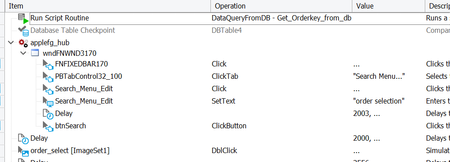
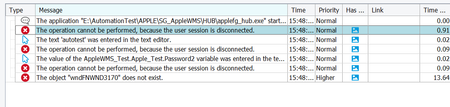
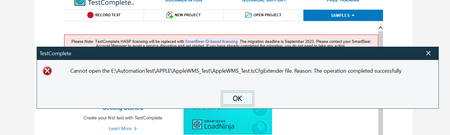
ContributionsMost RecentMost LikesSolutionsConfirm Remote Desktop when we run testcomplete Hi , when we run test complete by remote computer and use task schedule to trigger ,we find that : Scheduler Option RDP Connection Status Run only log on active Succeed Run only log on disconnect failed Run whether log on or not active failed Run whether log on or not disconnect failed so , we want to confirm that if we use task schedule we can not choose use Run whether log on or not ? from the guide document we can see this "Enable the Run only when user is logged on option for scheduled tests. These tests cannot be run with the Run whether user is logged on or not option selected, because in this case, they run in a non-interactive session and cannot interact with the GUI." but we still want to confirm it . And we need to use one computer to connect to remote computer when we choose the method about "running test via remote desktop", if we have set the task schedule but do not use one computer to connect to the remote computer , test still failed . error pop up when want to close windows Hi , when I want to close testcomplete it will pop up these error : I want to know why ? and how can I resolve it ? Re: confirm about error :The operation cannot be performed, because the user session is disconnect Hi , yes, so we use the image to do double click, our system like bellowing : we try to double click the middle's link ,when double click , it can enter into the system .we when use spy tool, we can just get all the item can not focus to this link , so we use operations about image based action to do it Re: confirm about error :The operation cannot be performed, because the user session is disconnect Hi rraghvani, Thank you for answering me ,Because we need to double click some element, so I create image repository and do double click Re: confirm about error :The operation cannot be performed, because the user session is disconnect Hi even I change the screen size , still can not find the image and the test still failed(I have change the screen size as 1920*1080 which can run successful without disconnect) , and change method is according from Solved: Screen Resolution - SmartBear Community without disconnect with disconnect Re: confirm about error :The operation cannot be performed, because the user session is disconnect Hi I have test it the screen size is different between pass and failed test ,so how can I set the screen size before disconnect test ? Re: confirm about error :The operation cannot be performed, because the user session is disconnect Hi, when I run which you mentioned about 1,2,3 it all can work , but now we find that, when disconnect the remote desk, the test complete still run ,but can not click button find that it still meet some failed part: I create image repository and try to double click it to enter into our system , but failed , it show can not find image and can not do double click when I run under disconnect mode, but when do not under this mode, testcase can pass. I am not sure why ? Re: confirm about error :The operation cannot be performed, because the user session is disconnect Hi rraghvani I use my computer (machine_1) remote to remote machine(machine_2) then I write python script to call all progress which I need , the scripts step as following : 1)change to admin to run disconnect def is_admin(): try: return ctypes.windll.shell32.IsUserAnAdmin() except: return False if not is_admin(): ctypes.windll.shell32.ShellExecuteW(None,"runas",sys.executable,"",None,1) 2) disconnect (call bat file which is show above) disconnect_remote() 3) run test case run_testcomplete()--->subprocess.call(["E:\\AutomationTest\\APPLE\\launchTest.bat", launch_html, launch_xml]) the bat file config : @echo off "c:\Automation\x64\Bin\TestComplete.exe" "E:\AutomationTest\APPLE\AppleWMS_Test\AppleWMS_Test.pjs" /run /project:"Apple_Test" /ExportLog:"%1" /ExportSummary:"%2" /SilentMode /exit if I do not do step 2 disconnect, the test can pass , if I add the step2, test will failed Re: confirm about error :The operation cannot be performed, because the user session is disconnect Hi rraghvani Thank you for you kindly answer I think the different is that I use testcomplete.exe to run test, not set the screen size, am not sure whether it is impact and I find the root cause is that : when disconnect function is open, the windows application about company can not connect to database automationally. Re: confirm about error :The operation cannot be performed, because the user session is disconnect Hi rraghvani PREVIEW I have tried the method, but still failed, because we need to call other windows app for test E:\AutomationTest\APPLE\AppleWMS_Test\Script>for /F "skip=1 tokens=3" %s in ('query user hlcla02') do (C:\Windows\System32\tscon.exe %s /dest:console ) E:\AutomationTest\APPLE\AppleWMS_Test\Script>(C:\Windows\System32\tscon.exe 9 /dest:console ) E:\AutomationTest\APPLE\AppleWMS_Test\Script>(C:\Windows\System32\tscon.exe 29 /dest:console ) I have run the bat file before the test, but it still failed my test steps is ,run the bat to disconnect then run the test scripts the bat file as following : for /f "skip=1 tokens=3" %%s in ('query user %USERNAME%') do ( %windir%\System32\tscon.exe %%s /dest:console ) if I comment the bat file ,the test can run pass, I am not sure why ?