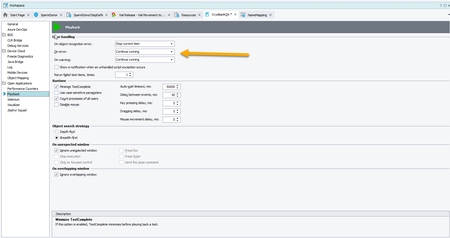
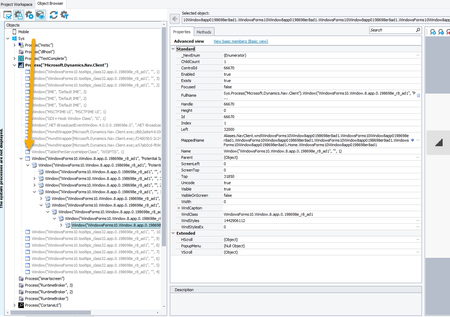
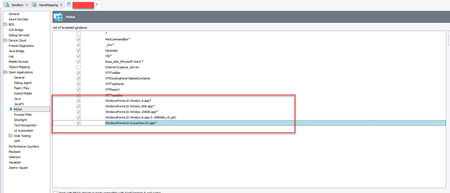
ContributionsMost RecentMost LikesSolutionsScenarios sent to trash eeeek Well, I selected some scenarios to send to trash by selecting them in the folder, then clicking Trash. I get a message that they will be saved for x number of days before deletion. Well Cucumber Studio deleted everything in folder. How do I retrieve these scenarios please? Differentiate between a runtime error and a checkpoint error Given this ability to determine test complete behavior on error: I would like to differentiate a runtime error as with an error in test creation and a test failure or checkpoint error. Something similar to many unit test frameworks assert fail so that I can have different playback behavior and a failure specific event Re: objects previously recognized on desktop app Aha! Makes sense. Thanks for the follow up. Re: objects previously recognized on desktop app In theory, our AUT does not require elevated permissions. Because I am opening the AUT under a different user, which uses windows auth, I needed this. Which ... I honestly do not know why. When I test manually, I do not open my AUT with elevated permissions. Re: objects previously recognized on desktop app I have found the issue. At one point, I changed the user logged in to the application under test (AUT). To do so, I needed to run TestComplete as administrator. When I performed the upgrade, the shortcut which I had set to run as administrator was overwritten. I had no knowledge that object recognition required this as I had changed it for a different reason. I also had no visual indication that the shortcut was changed. Admittedly I did not notice the absence of the dialog box I was accustomed to seeing when opening TestComplete for administrator priveledges. When I updated the shortcut to tun TC as administrator, the recognition appears to have resumed. Re: objects previously recognized on desktop app This is the weirdest behavior I have ever seen. In order to answer the question you posted, Marsha, I used the object spy this morning (after letting it lie for the weekend). When spied, the object showed the mapped names. I checked again a couple of times. Thought weird weird weird. Ran a test. And the object not found again. A few things to note. One, I speak about this one object which is the object that first caught my attention. MANY (all?) objects are not identified. The object I am referring to is a menu item within a tree. A data grid which I could formerly identify individual rows no longer shows these individual rows, columns, etc.. When I say that the spy cannot identify, when I point the spy at an object, only the container object is highlighted. No longer are the items within the container individually accessible. Upon further research, the object that I first observed this behavior (an item within a tree) is within a "home window" object that previously could be identified with WinFormsControlName. This object is not found in this manner anymore. When I attempt to map it, it's auto mapped property is WndClass = WindowsForms10.Window.8.app.0.198698e_r8_ad1. When I map the object that contains the desired menu item (example object as I say all objects are not working) It also maps with WndClass WindowsForms10.Window.8.app.0.198698e_r8_ad1. In the object browser window, objects that were previously uniquely identified with different icons are now showing as just window: Re: Using Excel Sheet for Data Driven Loop with Empty Cells WHat kind of test is this? Keyword? Script? What error are you receiving? Re: Trying to access the objects on Appeon's Ribbon Menu. I have never worked with PowerBuilder before. But poking around I see this: https://support.smartbear.com/testcomplete/docs/app-testing/enterprise-apps/power-builder/classic.html#ConfiguringPBApplication This mentions adding the class name (and how/which class) to MSAA and also something that needs to be done in the PowerBuilder project. Wish I had more info. objects previously recognized on desktop app When beginning this project, I went through the exercise of getting objects to be recognized by test complete. I have a number of objects whose class is reported as WindowsForms10.Window.8.app.0.198698e_r8_ad1 or some variation. I was able to get recognitions with: adding appropriate the class names to Project/Properties/Open Applications/MSAA. I then began happily writing my test and enjoying every happy minute. What changed, you asked? I don't know. I make no changes to code or project properties. Immediately before observing this behavior, I had accepted the TestComplete dialog to update to the new version. Of course that is it, thought I. So I downgraded to TC 15.54.3.7 (which is the only version I have around. Waiting on SmartBear to tell me why my TC licenses are not showing up in the license manager.) I am experiencing the same problem in this previous version of TC. The only other thing I can think of that changed is that the AUT's database was restored. But the behavior that I am seeing in TC began before this. And in no way did this change the user interface. I looked at installed extensions, they are all installed except HP something something which I don't have. Any ideas from anyone on what might be going on? Thanks SolvedRe: TC 15.56 - Here we go again Thank you