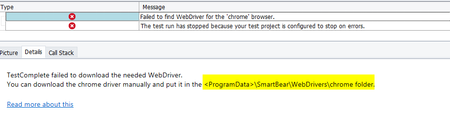
ContributionsMost RecentMost LikesSolutionsLog some message at start or end of the execution plan I want to print some message at start of execution plan or at the end of the execution plan. How can we do this in TC? Re: Not able to start chrome in headless rraghvani How can we enable this - We do have required subscription of TestComplete. Re: Not able to start chrome in headless rraghvani - Yes we do have Intelligent Quality add-on, but TC is not downloading chromedriver and we have kept the chromedriver.exe on given path but still script is showing the same error. Not able to start chrome in headless We have followed the steps from below link - https://support.smartbear.com/testcomplete/docs/app-testing/web/supported-browsers/headless.html 1. How to check if 'Headless Web Browser support' this support is enabled or not? 2. Once we execute script it is giving error. Update: I manually created below folder structure and placed chromedriver.exe. But still facing the same issue. 3. Does TestComplete auto downloads the latest/compatible chromedriver? Code which starts the browser Re: Not able to access the web elements for chrome. Chrome version - 120.0.6099.130 and TestComplete - 15.58.9.7 Not able to access the web elements for chrome. Hi, Whenever I am trying to highlight the webelements from NameMapping it is not getting highlighted. When I try to add any new element I can only see the outer page, not able to access elements inside it. I get below when I try to add new element Aliases.browser.loginWindow.Window("Chrome_RenderWidgetHostHWND", "Chrome Legacy Window", 1) loginWindow - is of type BrowserWindow and rest other are Page Can someone please help? Perform some operations when Test is failed When test case fails I would like to perform some actions in. How can we do this with TestComplete? SolvedGetting error while running script - window handle does not exist. I am getting below error when I execute test case - The window with the handle 0x00000000 does not exist. This error occurred when the tested window (or control) or its parent object was deleted or recreated right before the method call. For example, you stored a window reference to a variable and then called a method through this variable. If the object has been recreated, then to avoid the error, get the new object before the method call. Same script works without issue on my other teammate's machine. Can someone please help. Trigger TestExecute from local machine. I want to trigger TestExecute on remote machine from my local machine. How can I do that ? I do not want to use NetworkSuite. SolvedRe: Accessing Print dialog on chrome browser. This setting is already Turned On in my project but I am not able to 'Add Objects' in NameMapping for print dialog or if I record script am not able to record any actions performed on print dialog