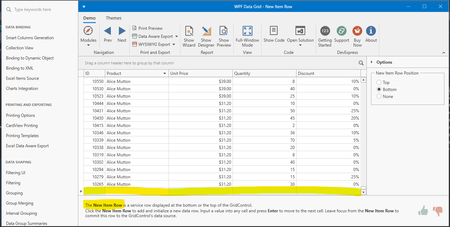
ContributionsMost RecentMost LikesSolutionsRe: Latest TestComplete/Execute should support DevExpress 22.2.7.0 I would also appreciate better support concerning Devexpress versions (WPF). This upgrade is also much needed for my company to continue working with TestComplete. Re: Can't access GridControl NewRowCell Thank you for your reply. The version is indeed not supported. The last supported devexpress WPF version is 18.1.3 from May 2018... This means that testComplete is unusable for WPF applications using versions of devexpress released after 2018! Can't access GridControl NewRowCell Hi, I'm trying to test my .NET 4.6.2 WPF application developed with Devexpress 21.2.4. I need to populate a Devexpress GridControl component with data to verify the functionality. When I'm trying to access the grid's new row using the appropriate methods (TC support: Devexpress under Action paragraph), it can never be found. I've tried several methods such as ClickNewRowIndicator ClickNewRowCell HoverMouseNewRowCell ... Nothing is working here, I'm always reaching the timeout. I'm wondering what defines a NewRow in the TestComplete environment. To be sure that the problem is not related to my application specifically, I tried to use the devexpress demo center tool to test those methods on another gridControl instance: same result... I added a screenshot of the demo center in the attachment for you to visualize the newRow I was targeting. Even when using the record functionality of TC, the test can never be repeated because the clicks on the newRow are translated into clicks on the ColumnHeader. I've read several documentation articles on the TestComplete support center without finding the proper example. TC Version: 15.59.7.7 x64 I really appreciate any help you can provide. Re: Find method cache in TreeListControl rraghvani TC version 15.59.7.7 x64 The parameters I gave to the Find function are Find("DisplayText","Single Elements", 100, true); Re: Find method cache in TreeListControl Thanks for your reply, I also figured that this method was working. I wonder if the refresh attribute is meant to refresh the actual content of the object (data) or the mapping... Find method cache in TreeListControl Hi, Problem description I'm using test complete to test my WPF Application. I need to identify a row in a DevExpress.Xpf.Grid.TreeListControl using the field 'DisplayValue'. I'm currently using the .Find() method as follows: <SPAN class="token punctuation">.</SPAN><SPAN class="token function">Find</SPAN><SPAN class="token punctuation">(</SPAN><SPAN class="token string">"DisplayText"</SPAN><SPAN class="token punctuation">,</SPAN> <SPAN class="token string">"Single Elements"</SPAN><SPAN class="token punctuation">,</SPAN> <SPAN class="token number">5</SPAN><SPAN class="token punctuation">,</SPAN> <SPAN class="token boolean">true</SPAN><SPAN class="token punctuation">)</SPAN> After the app startup, everything works fine and the row can be found properly but when change is performed on the TreeListControl (for example a new row is added), the find function always returns the same object. Since the TreeListControl has changed, the row containing "Single Elements" no longer has the same RowControl index. Screenshots illustrating the problem Before the changes in the TreeListControl In this scenario, the RowControl containing the "Single Elements" is N°5 (see screenshot). The Find method returns an object which path contain a reference to RowControl N°5 as expected. Everything works fine. After the changes in the TreeListControl Now an element has been added to the TreeListControl. The "Single Elements" row has index N°6. The Find method still returns an object which path contain a reference to RowControl N°5. Question What can explain this behavior? Is there a way to force the cached TreeListControl to be cleared? Thank you in advance ! SolvedClick on devexpress gridControl's new row Item Hi, Desktop App developed in C# .NET Framework WPF. TestComplete version : Version: 15.52.2.7 x64 Script langugage: Javascript I'm trying to access the new row item on a Devexpress (v21.2.4) GridControl. My goal is to populate all columns in the new row item before pressing enter to validate the input. I tried several ways to access the new row item. I used the ClickNewRowCell to access the desired column for edition but I get the following error at runtime: Possible reasons: 1. The application stopped responding. 2. The application was compiled incorrectly (see the Open Applications topic in the help system). 3. An error occurred in TestComplete/TestExecute. Technical information: 195 0x8007139f (The group or resource is not in the correct state to perform the requested operation.) Edit. I also tried to edit the desired cell using the devexpress SetCellValue with the rowHandle of the new row item (which is -2147483647), but the row handle is not recognized... For information: all testComplete methods with "NewRow" are not working here. The method 'TableView.AddNewRow(true)' is working and triggers the InitNewRow callback from my C# WPF code. My question is the following: How can I access and populate the cells of the new item row of my grid? Can you please provide a Javascript code snippet ? Thanks in advance! BG