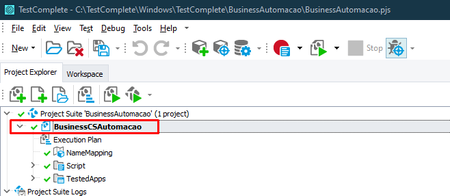
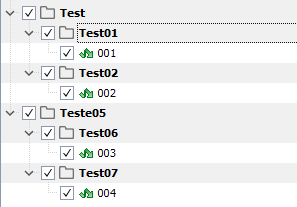
ContributionsMost RecentMost LikesSolutionsError when executing Devops pipeline I'm trying to run a pipeline that runs a test by test execute, when running the pipeline it opens testExecute but it's not opening the project. Here is the path where my project is: C:\agent_work\1\s\TestComplete\BusinessAutomacao\BusinessAutomacao.pjs Project name: BusinessCSAutomacao Now follow the Pipeline I created: trigger: - master pool: name: TesteAutomatizado steps: - task: VisualStudioTestPlatformInstaller@1 inputs: packageFeedSelector: 'nugetOrg' versionSelector: 'latestPreRelease' - task: InstallTestCompleteAdapter@1 inputs: accessKey: 'keyfake' logsLevel: '0' - task: VSTest@2 inputs: testSelector: 'testAssemblies' testAssemblyVer2: '**\TestComplete\BusinessAutomacao\BusinessAutomacao.pjs' searchFolder: '$(System.DefaultWorkingDirectory)' testFiltercriteria: 'Project=BusinessCSAutomacao' vsTestVersion: 'toolsInstaller' In this example I didn't pass the accessKey I'm using But when running the pipeline, the following error occurs: Does anyone know how to resolve? Re: How to run more than one testname on a single command line? It worked, thanks for your help. 😁 Re: How to run more than one testname on a single command line? Hello, I've already read the documentation, but I haven't found practical examples, would you have any examples with two different folder tests? How to run more than one testname on a single command line? I'm trying to run more than one test on a single command line through power shell. Example: TestExecute.exe /run /exit "C:\TestComplete\Windows\TestComplete\BusinessAutomacao\BusinessAutomacao.pjs" /r /p:BusinessCSAutomacao /test:"Test|Test01" Would it be possible to run more than one test on a single line? For example run tests Test01 and Test05. Solved