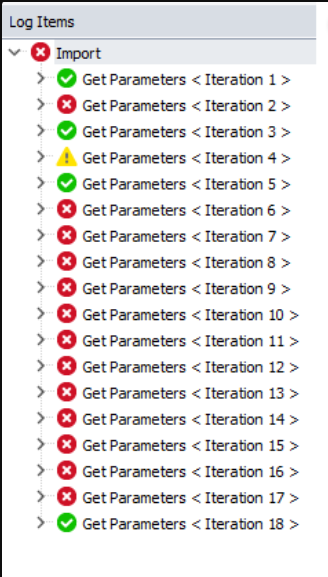
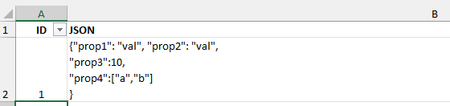
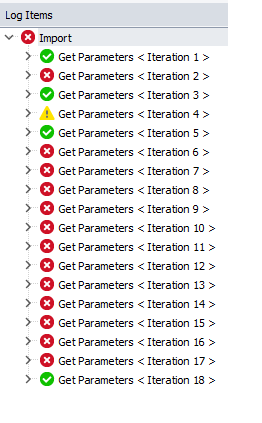
ContributionsMost RecentMost LikesSolutionsRe: Count number of test cases in Execution Plan I have several projects and it takes >16 hours for each to run. So unfortunately, that's not an option for me. Count number of test cases in Execution Plan Hello Community, I want to count the test items in the project's execution plan that are marked as test case and print their names. Any suggestion? function CountTestCasesRecursive(testItem) { let count = 0; if (testItem.TestCase) { //there's no property called TestCase count++; } for (let i = 0; i < testItem.ItemCount; i++) { count += CountTestCasesRecursive(testItem.TestItem(i)); } return count; } For Tests run in iterations, support naming the Test Item written to the log file When a test item run is in multiple iterations, the log file writes the Iteration number, as you can see in the picture below. This compromises readability of the log because I will need to peek into the log to know what values were used for an iteration. Provide a way to change the text from "<Test Item> <Iteration number>" to a text of choice, for example, to a variable that is used inside the iteration. Re: External table is not in the expected format I haven't seen the issue often, but it does pop now and then and it causes the long running tests to stop. Yes, this is data driven by matching the iteration number with the ID value. You are right about the slowness of the logic. Please do share your thoughts on better ways to do data driven. Re: External table is not in the expected format Here's the XLSx file. I have replaced actual data with mock data. There are 25 rows. params is the variable defined in the project Here's the complete code: const sheet = Project.Variables.params; sheet.Reset(); while (!sheet.IsEOF()) { id = sheet.Value("ID"); if (id == Project.TestItems.Current.Iteration) { obj = JSON.parse(sheet.Value("JSON")); break; } sheet.Next(); } sheet.Disconnect(); Please note that this is a very intermittent issue. Re: External table is not in the expected format I have a variable defined on the project of Type 'DB Table'. Here's the code snippet am using, let sheet = Project.Variables.params; sheet.Reset(); while (!sheet.IsEOF()) { id = sheet.Value("ID"); . . . } sheet.Disconnect(); Re: External table is not in the expected format Am running from within the IDE that is installed in Program Files (x86). Because it's in the (x86) folder, I assumed it is 32 bit, but Task Manager clearly shows it's 64 bit. External table is not in the expected format I use a DB Table / Excel worksheet that has the parameters for my test that are run in iterations. Lately, I get this randomly. External table is not in the expected format Has anyone seen this error? Thanks in advance, Madhu SolvedRe: Log from tests run in multiple iteration The Log Items shown on the left panel is the one am trying to get control of, so I can write my own text instead of the default "Test Item name <Iteration no>". This test item has several test items under it. I did try your suggestion of making a new function from all the steps under Get Parameters. But I lose all the hierarchy in the log. I guess this is a limitation. Log from tests run in multiple iteration Dear Community, When I have a test item run in multiple iterations, the log file writes the Iteration number, as you can see in the picture below. This compromises readability of the log because I will need to peek into the log to know what values were used for an iteration. Is there a way I can change it to a variable that is used in the iteration? Thanks in advance, Madhu