TC extension frequently disappears from chrome
Platform - Windows (Airgapped, no web access) Testcomplete Version 15.61. Chrome Version - 144.0.7559.110. BLUF - TC extension frequently disappears from chrome Has anyone encountered this issue and found a workaround? Hello - I am experiencing issues with the Testcomplete extension in Chrome. Generally, the extension is spontaneously disappearing from the browser and causing test failure. My test framework has been fairly stable for 3 years now - Testexecute sessions test on Chrome with the extension, driven by GitLab CI on windows runner virtual machines. About a month a go, we started encountering this issues with the disappearing extension. We've attempted to enforce installation via group policy, including the solution described here https://support.smartbear.com/testcomplete/docs/app-testing/web/general/preparing-browsers/chrome-extension-forced-installation.html but the extension will not remain installed.142Views0likes3Comments
RuntimeError: The object does not exist
Hello, I need help with a persistent issue in TestComplete using Python scripting. I created a helper method with chatGPT that waits for UI objects and executes actions safely. However, I am constantly getting RuntimeError: The object does not exist, even when the UI object is on screen. The important detail is that this error happens BEFORE my helper executes, meaning TestComplete tries to resolve the alias too early, even if I pass it inside a lambda. The errors I am getting include: RuntimeError: The object does not exist I tried several approaches: using lambda wrappers, string-based alias evaluation with eval, safe exists checks, try/except wrapping, WaitProperty with catch, RefreshMappingInfo, and returning stub objects. Still, TestComplete tries to resolve the alias too early and throws a RuntimeError before my code handles it. I want to know if TestComplete officially supports passing object references using lambda in Python without resolving them immediately, or if there is a recommended approach for safe deferred resolution of Alias-based UI objects. Here is the simplified version of my helper (the stable version): # ============================================================ # LIB_IfObject.py # Helper for safe object waits and actions in TestComplete # ============================================================ class IfObjectHelper: """ Waits, validates, and executes actions on TestComplete UI objects, handling object recreation, timing issues, and temporary unavailability. """ @staticmethod def Run(obj, accion=None, timeout=40000, descripcion="object", intentos_accion=1, opcional=False): """ Waits until the object exists and optionally executes an action. Parameters: obj: object reference or lambda returning the object dynamically. accion: function/lambda to execute over the object. timeout: maximum wait time in milliseconds. descripcion: text description for logs. intentos_accion: number of retries if the action fails. opcional: if True, missing objects do not fail the test (for optional popups). """ try: timeout = timeout or 40000 start = aqDateTime.Now() found = False resolved_obj = None # === Attempt to resolve the object === for _ in range(3): try: resolved_obj = obj() if callable(obj) else obj if not hasattr(resolved_obj, "WaitProperty"): Delay(100) continue resolved_obj.RefreshMappingInfo() # === Handle RuntimeError for dynamic UI objects === try: # Retry if the object is not instantiated or was recreated if not getattr(resolved_obj, "Exists", False): Delay(200) resolved_obj = obj() if callable(obj) else obj resolved_obj.RefreshMappingInfo() except RuntimeError: # If the handle does not exist yet, wait and retry Delay(300) try: resolved_obj = obj() if callable(obj) else obj resolved_obj.RefreshMappingInfo() except: Delay(100) # === Extended verification of visibility and enabled state === if (resolved_obj.WaitProperty("Exists", True, timeout) and resolved_obj.WaitProperty("VisibleOnScreen", True, int(timeout / 2))): # If the object exists but is disabled, treat as informational if not resolved_obj.Enabled: Log.Message(f"ℹ {descripcion} found but disabled (action skipped).") return True found = True break except Exception: Delay(100) # === Handle non-existing object === if not found: if opcional or "popup" in descripcion.lower(): Log.Message(f"ℹ {descripcion} not found (optional, skipping).") return True else: Log.Warning(f"❌ {descripcion} not found after {timeout/1000:.1f}s.") return False # === Execute action (if provided) === if accion: success = False for attempt in range(1, intentos_accion + 1): try: # Validate that the object still exists if not getattr(resolved_obj, "Exists", False): Log.Warning(f"⚠️ {descripcion}: object disappeared before action, retrying...") try: resolved_obj = obj() if callable(obj) else obj resolved_obj.RefreshMappingInfo() except: Delay(200) continue # Handle actions passed as list/tuple if isinstance(accion, (list, tuple)): for sub in accion: try: sub() except Exception as sub_e: Log.Warning(f"⚠ Sub-action error for {descripcion}: " f"{type(sub_e).__name__} - {str(sub_e)}") Delay(100) else: # Standard single action accion() success = True Log.Checkpoint(f"✅ {descripcion} found and action executed successfully.") break except Exception as e: # Diagnostic block to identify failing object/action try: origin = getattr(resolved_obj, "FullName", str(resolved_obj)) Log.Warning(f"⚠ Attempt {attempt}/{intentos_accion} failed in {descripcion}: " f"{type(e).__name__} - {str(e)} | Object: {origin}") except: Log.Warning(f"⚠ Attempt {attempt}/{intentos_accion} failed in {descripcion}: {str(e)}") Delay(500) try: resolved_obj.RefreshMappingInfo() except: Delay(100) if not success: Log.Error(f"❌ Action failed in {descripcion} after {intentos_accion} attempts.") return False else: Log.Message(f"✔ {descripcion} found (no action executed).") # === Total execution time === duration = aqDateTime.TimeInterval(start, aqDateTime.Now()) Log.Message(f"⏱ Total time for {descripcion}: {duration:.2f} sec.") return True except Exception as e: import traceback detail = traceback.format_exc() Log.Error(f"General error in {descripcion}: {type(e).__name__} - {str(e)}", detail) return False My questions: 1. Is there an official recommended pattern for safely resolving dynamic alias-based objects in Python for desktop testing? 2. Does TestComplete support passing object references via lambda without resolving them prematurely? 3. Is there any documented workaround for avoiding early alias evaluation inside Python? Any help will be appreciated. Thank you.130Views0likes1CommentGitHub Copilot integration with TestComplete
Hi team, in the current world, the programmers are using Stack overflow to find code snippets for simple problems, and git hub has a feature called Copilot, which we can use to suggest the code sample which works like a suggestion dropdown when we use some testcomplete methods, it would be great if we create any kind of plugin or some functionality which can do the above mechanism to make our work easier. Thanks and Regards, Sathish Kumar K1.5KViews10likes5Comments
How to Create/Import Description File for JavaScript - Inquiry
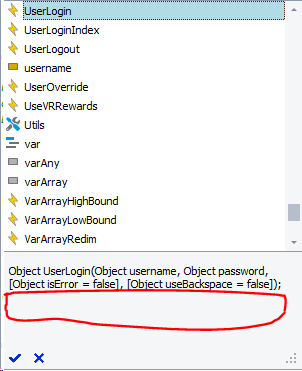
I am attempting to add a description that appears in the AutoComplete Menu for various functions as can be seen with many of the built in functions/methods for a Javascript file. How would I go about doing so? So far I have attempted creating a description.xml file for one of my JavaScript Files and put the file in the same directory with my JavaScript files (./Scripts/). Is there a process I need to perform to actually import this file into the project? Also, assuming this description.xml file can perform the my desired action, can it be used to add descriptions to functions/methods for multiple JavaScript files? I would assume this is by having multiple of the <Script> tags in the xml, though want to confirm before further proceeding down this route. Below are images of what I am trying to accomplish, in case I am going down the wrong route entirely: Current state: Desired State: I have also attached the description.xml file I am using in attempting this. Please let me know if any additional information is required!Solved197Views0likes9Comments
Support for Automated Script Extension Installation and Updates in Azure Pipelines
Feature Request: Support for Automated Script Extension Installation and Updates in Azure Pipelines Problem Statement: Currently, there is no way to automatically install or update script extensions in TestComplete or TestExecute during Azure pipeline runs. This results in a manual and repetitive process of updating script extensions on multiple machines, which can be time-consuming and error-prone. Our team manages script extensions in a source control repository, and we pull them onto the machines as part of our pipeline workflow. However, after the files are updated, we must manually open the "Install Script Extensions" UI on each machine to reload the extensions. Occasionally, we also need to re-add the script extensions folder, particularly after updating TestExecute. This manual process creates inefficiencies, especially when managing multiple machines or frequently updating script extensions. Current Workaround: Pull script extension files from source control to the appropriate folder on the machine. Open the "Install Script Extensions" UI manually to reload them. Re-add the script extensions folder if it gets removed (e.g., after a TestExecute update). Proposed Solution: Introduce a mechanism to install or update script extensions automatically during pipeline runs, without manual intervention. Command-Line Interface Support: Add a command-line option for installing or updating script extensions. Example: TestExecute.exe /InstallScriptExtensions "path\to\script\extensions" Example: TestExecute.exe /ReloadScriptExtensions (mimics what clicking the Reload button in the Install Script Extensions folder does) Benefits: Streamlines the automation workflow for teams using TestComplete and TestExecute in CI/CD pipelines. Reduces manual effort and human error associated with installing/updating script extensions. Improves consistency and reliability when running tests across multiple self-hosted agents. Impact: This feature would significantly enhance the usability of TestComplete and TestExecute for teams integrating with CI/CD tools like Azure Pipelines. It would be particularly beneficial for teams working in large-scale environments or frequently updating script extensions.56Views0likes0Comments
Managing Execution Plan with Scripts
Hi everyone, For projects with a large number of scripts (e.g., ~100 or more), manually adding and configuring them in the Execution Plan can be a time-consuming and tedious process. The ability to manage the Execution Plan directly from the script would greatly simplify this task and improve overall efficiency. Description: Add the ability to access the Execution Plan directly from the script, and provide controls to shift the execution plan up, down, left, or right. Also, allow updating of the "On exception" and "On error" settings from within the script. Rationale: This would give users more control and flexibility in managing the test execution flow, making it easier to optimize and maintain complex test suites. Best regards görenekli66Views0likes1Comment