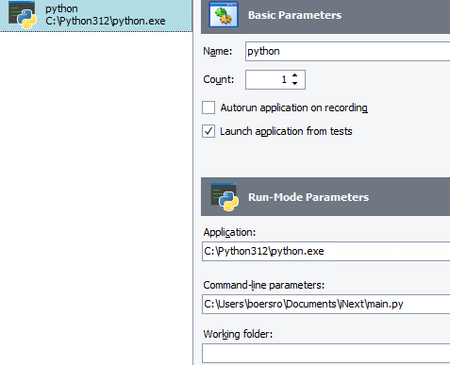
ContributionsMost RecentMost LikesSolutionsRe: How to wait for TestedApp to Finish and get Exit Code I just called my testedApp "python". The python script it calls works fine from testComplete. The issue is just how to wait for the app to finish and how to get the exit code of "main.py". How to wait for TestedApp to Finish and get Exit Code I have a tested app called "python". Application path: C:\Python312\python.exe Command-line parameters: C:\Users\jondoe\Documents\iNext\main.py The testedApp is called in a python function, which works well: def runTestAppPython(): myApp = TestedApps.python pyProcess = myApp.Run() What needs to be done to make the function wait for myProcess to finish. And how can I access the exit value of the testedApp in this function. What I tried was pyProcess.Wait() to wait for the testedApp to finish, but does not work. pyProcess.ExitCode to get the exit value of the testedApp, but does not work, too. Help is very appreciated. Thank you. SolvedRe: SAP Crashes During Tests Seems not to be a problem of my test machine. I run the tests on a VM and nothing else is running on the VM. But I also tried it on my local PC and there it crashes, too. My local PC has: Processor: 11th Gen Intel(R) Core(TM) i7-11850H @ 2.50GHz, 2496 MHz, 8 Kernel(s), 16 logical Processors Installed physical Memory: (RAM) 32,0 GB B.t.w.: Colleagues of mine are facing the same issue and therefore decided to test SAP via WEB-GUI. Re: SAP Crashes During Tests All my tests for themselves are working fine with TC. So it is not specific tests that lead to the issue, it is that after a while of running any tests that SAP crashes. SAP Crashes During Tests Hello, while executing tests on the SAP GUI it happens that after a while SAP crashes. The log-file says: The saplogon.exe process crashed. Has anyone else experienced this issue and can somebody help me to solve this? Testcomplete: Version: 15.51.4.7 x64 Testexecute: Version: 15.51.4.11 x64 SAP Logon for Windows, 770 Final Release, 7700.1.11.1161 2187274 Operating system: Windows 10 Enterprise 10.0 (19045) Re: How to work on a SAP ShellTree object and where to find SAP methods documentation? Hi rraghvani, the first screenshot shows the object browser tree and the object typ "ShellTree": The following screenshot shows the methods I want to use (or should I say, that I think I can use for my purpose 😉 ) : And finally, this is the GUI I want to work on, e.g. select a node or enable a checkmark: Re: How to work on a SAP ShellTree object and where to find SAP methods documentation? Thank you rraghvani, but I know this page. My SAPGui is supported and I automated already a couple of things with SAPGui. However, I cannot operate on the ShellTree and I cannot find any instructions on that. How to work on a SAP ShellTree object and where to find SAP methods documentation? I have bee using SAPWebGui for testing but I found that the SAPGui is more reliable and I am trying to switch over. But here I am facing issues with addressing objects. I am testing SAPGui Release 800 with Quartz theme. I want to work on a ShellTree object with a couple of lines and columns. In the object browser, there are a lot of SAP methods for the ShellTree and my assumption is that I can use them for example to select items. I tried the SelectNode(NodeKey) in the assumption that the node is highlighted. But I don't know how the NodeKey is composed, so I took just simple integer values. Nothing is highlighted. Then I executed shelltree.SelectedItemNode. This returned an object, but I cannot get a sensible content of the object and I don't know what I could expect from it. The bottom line of my question is how can I use the SAP methods in TC and where to find the documentation for them. Thank you very much for supporting me. SolvedFind Element with part of a string Maybe it is a silly question, but I am new to testcomplete and I cannot solve the following problem: In the code I want to find an object which works like this: Aliases.browser.displayContracts_changeAndReleaseOrders_ZSD_COR_CHANGE.frameItsframe1.FindElement("//div[.='Purchase Order 0650143798']").Click() The problem is, that I do not know the number in the string in advance so I need something that can find the element by only giving the fix substring 'Purchase Order'. I tried ...FindElement("//div[.='Purchase Order .*']") ...FindElement("//div[contains(@contentText,'Purchase')]") but none of them works. Solved