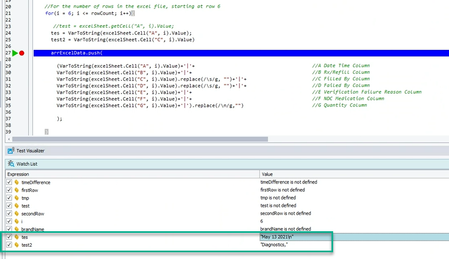
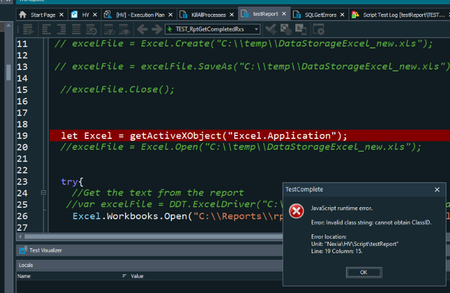
ContributionsMost RecentMost LikesSolutionsRe: Not able to grab data from Excel using TestComplete with wrapped text using Excel.Open("filename").. Seems like having excel not installed might be causing this problem? I haven't figured out how to use the ODBC connection yet. Do you have an example of that method? Re: Not able to grab data from Excel using TestComplete with wrapped text using Excel.Open("filename").. We can't have Excel installed on the machine in this test environment. Re: Not able to grab data from Excel using TestComplete with wrapped text using Excel.Open("filename").. So the license won't be required for Excel? I think we can try out the Driver={Microsoft Excel Driver (*.xls, *.xlsx, *.xlsm, *.xlsb)}; method you mentioned above. Re: Not able to grab data from Excel using TestComplete with wrapped text using Excel.Open("filename").. I'm not trying to have Excel installed unfortunately. This is due to license concerns. Re: Not able to grab data from Excel using TestComplete with wrapped text using Excel.Open("filename").. 15.51.18.7 x64 is the version. Can you try to use the newly updated file named : rptFailedRxVerifications.xlsx ? Re: Not able to grab data from Excel using TestComplete with wrapped text using Excel.Open("filename").. I just updated the file that should fail. Not sure where to go at this point. Not able to grab data from Excel using TestComplete with wrapped text using Excel.Open("filename").. We are using the Excel.Open("FileName").SheetByIndex(0).Cell("A",6).Value to grab data from excel. The method works overall, but does not capture the wrapped text from Excel. The result of the data gets only the top row of data in the cell if the data has multiple rows within the cell due to format wrapping. https://s3.amazonaws.com/webtocasefiles/2023/df50c321-d7a4-01b4-c9a0-3b2a829a6f9f/2023_05_09-11_49_36_666/excelissue.mp4?AWSAccessKeyId=AKIAILZDL6PV2PCURZRA&Expires=1770013186&Signature=GBZ9WeGGTp0bTutP5NyxxLPuD%2Fw%3D https://s3.amazonaws.com/webtocasefiles/2023/df50c321-d7a4-01b4-c9a0-3b2a829a6f9f/2023_05_11-12_19_12_914/excelissuenew.mp4?AWSAccessKeyId=AKIAILZDL6PV2PCURZRA&Expires=1770187774&Signature=5KJMXKJV0BMv%2B2XvPg2Alz4LSHg%3D I also want to include that we are not using the full version of Excel. We are only using the runtime available from Microsoft: https://urldefense.com/v3/__https://support.microsoft.com/en-us/office/download-and-install-microsoft-365-access-runtime-185c5a32-8ba9-491e-ac76-91cbe3ea09c9__;!!LYp-Ckqeseg!RnQdRJpIZ_U3BXwueZnyhZzwK1WbfXTY1vJbK_jyYaWyXmatNdV0bKgcbRZOc3PgTEaO4hOey4O-vGNPpD-ytTU$ <https://urldefense.com/v3/__https://support.microsoft.com/en-us/office/download-and-install-microsoft-365-access-runtime-185c5a32-8ba9-491e-ac76-91cbe3ea09c9__;!!LYp-Ckqeseg!RnQdRJpIZ_U3BXwueZnyhZzwK1WbfXTY1vJbK_jyYaWyXmatNdV0bKgcbRZOc3PgTEaO4hOey4O-vGNPpD-ytTU$ > We are also referring to the example provided in the SmartBear documentation: https://urldefense.com/v3/__https://support.smartbear.com/testcomplete/docs/testing-with/working-with-external-data-sources/excel/read.html__;!!LYp-Ckqeseg!RnQdRJpIZ_U3BXwueZnyhZzwK1WbfXTY1vJbK_jyYaWyXmatNdV0bKgcbRZOc3PgTEaO4hOey4O-vGNPELd9-Fc$ <https://urldefense.com/v3/__https://support.smartbear.com/testcomplete/docs/testing-with/working-with-external-data-sources/excel/read.html__;!!LYp-Ckqeseg!RnQdRJpIZ_U3BXwueZnyhZzwK1WbfXTY1vJbK_jyYaWyXmatNdV0bKgcbRZOc3PgTEaO4hOey4O-vGNPELd9-Fc$ > Specifically, the section about Excel Object. Re: Not able to grab data from Excel using TestComplete with wrapped text using Excel.Open("filename").. We are trying to not have Excel loaded onto the VM and use the Excel method from SmartBear. We have already used the "Excel.Application" before and it was working. Re: Not able to grab data from Excel using TestComplete with wrapped text using Excel.Open("filename").. Here is another file that shows the data. Re: Not able to grab data from Excel using TestComplete with wrapped text using Excel.Open("filename").. I would think that the WordWrap is causing the issue. Not sure we can go about fixing this problem at this point. We tried to remove the \n carriage return, but it was more related to the wrap.