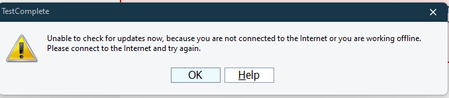
gshaikhOccasional Contributor2 years agoSolvedUnable to update TestComplete to latest version from Help option I want to update TestComplete to latest version. Currently i am on 15.40.421 .When we go to 'Help' -> 'Check Updates' it is giving error How can i update to latest version? Show Morerraghvani2 years agoYou might be sitting behind a firewall which is preventing access to SmartBear Update. Check with your IT. See How to Check for Available Updates for more information.
rraghvani2 years agoYou might be sitting behind a firewall which is preventing access to SmartBear Update. Check with your IT. See How to Check for Available Updates for more information.
rraghvani2 years agoYou might be sitting behind a firewall which is preventing access to SmartBear Update. Check with your IT. See How to Check for Available Updates for more information.
Recent DiscussionsSupport for Oracle Forms Standalone Launcher (FSAL)Application url change managementDelphi Mainmenu items is not clicked
Related ContentUnable to install TestComplete Trial VersionTestComplete Version-15.75 : Unable to Launch and interact with Chrome version-137.Unable to install TC/TE version 15.79