Forum Discussion


krupa_luke
11 years agoOccasional Contributor
Hello guys,
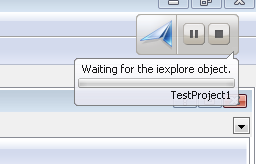
for some weeks I had the same problem. At the start (at the very beginning) of EVERY single test execution, even when it was simplest function which calculates 2+2 (simplest mathematical operation,... so it did not identify nor performed any operation on any object from IE or any other application), testComplete waited for iexplore object.
I checked settings, unit references, ... everything. No matter what routine I run, testComplete always waited for iexplore and only after that continued.
I had no idea why, but after creating new project in testComplete, I found out that this does not happen. Piece by piece, I kept copying parts of testComplete project, where I had this problem, and I found out that the problem was my mistake.
During debugging I left this piece of code in between 2 functions:
function a()
{smth}
Sys.Browser("iexplore").BrowserWindow(0).Restore();
function b()
{smth}
Since testComplete always checks syntax in every routines (scripts), it logically always tried to execute this part of code, apparantly because it did not belong to any function and was just hanging there.
So if, for any reason, you experience testComplete hanging and waiting for some process (for no known reason), you might have done the same mistake as I did and left some code somewhere.
Hope it helps somebody :-)
for some weeks I had the same problem. At the start (at the very beginning) of EVERY single test execution, even when it was simplest function which calculates 2+2 (simplest mathematical operation,... so it did not identify nor performed any operation on any object from IE or any other application), testComplete waited for iexplore object.
I checked settings, unit references, ... everything. No matter what routine I run, testComplete always waited for iexplore and only after that continued.
I had no idea why, but after creating new project in testComplete, I found out that this does not happen. Piece by piece, I kept copying parts of testComplete project, where I had this problem, and I found out that the problem was my mistake.
During debugging I left this piece of code in between 2 functions:
function a()
{smth}
Sys.Browser("iexplore").BrowserWindow(0).Restore();
function b()
{smth}
Since testComplete always checks syntax in every routines (scripts), it logically always tried to execute this part of code, apparantly because it did not belong to any function and was just hanging there.
So if, for any reason, you experience testComplete hanging and waiting for some process (for no known reason), you might have done the same mistake as I did and left some code somewhere.
Hope it helps somebody :-)