Forum Discussion


Colin_McCrae
9 years agoCommunity Hero
Ah well. Was just a guess.
Although, just because enabled is set to true, is no guarantee it is actually enabled. I have controls like that. They report they are enabled (and also sometimes visible) when they're not. It depends on the methods the devs have used to disable/hide something. In my experience, they can come up with all sorts of weird and wonderful ways of doing it! Just to confirm, if you try and use the control manually at the point you're inspecting it, it is definitely active and enabled yes?
(Reason I'm persisting with this line is a "Closed" type textbox is often closed/hidden/disabled/locked until the "Start" field contains a valid value ... and they may have done this in some funky way which TC is not picking up .... it happens.)

BrianAlford
9 years agoOccasional Contributor
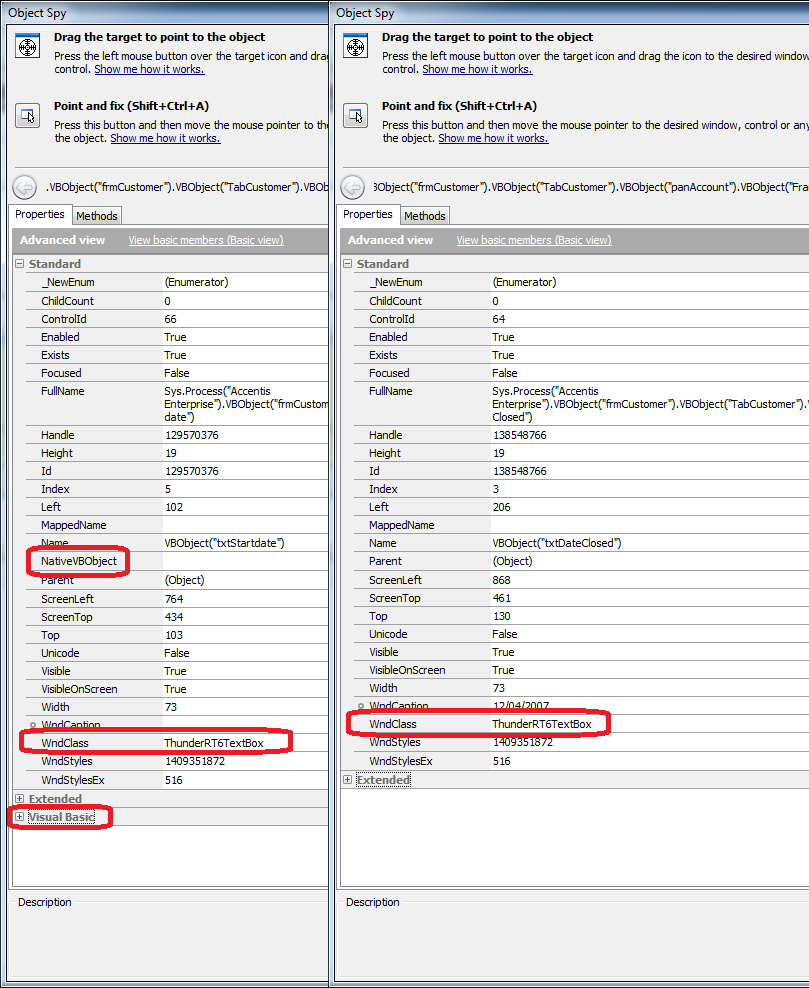
In the case of the textboxes in the screenshot, both were enabled and not locked (I was able to put data in them).
The problem is not so much the values of the properties and whether they are being accurately reported is that TestComplete is simple not detecting that these properties exist - the algorithm for determining an objects native type must be slightly off.
Maybe I should try aliasing them to access the properties instead of accessing through the Sys.Processes.
- Colin_McCrae9 years agoCommunity Hero
Don't think mapping them should make an difference. But you never know I suppose.
The only thing that turned up which sounds sort of similar was this:
Don't suppose any of that applies to yours? (it sounds like yours only do this intermittently as well .... which does sound more like a TC problem if it's not due to the current state of the control)
- BrianAlford9 years agoOccasional Contributor
That looks promising. I'll have a look at it tomorrow (its 5:25pm where I am).
- Colin_McCrae9 years agoCommunity Hero
Down under testing? :smileyhappy:
I lived in Aus for a few years in the 80's (in the middle of nowhere in eastern Victoria). Back in the UK these days.