Forum Discussion

kcsahu777's avatar
kcsahu777
Contributor
14 years ago

problem with AFX application

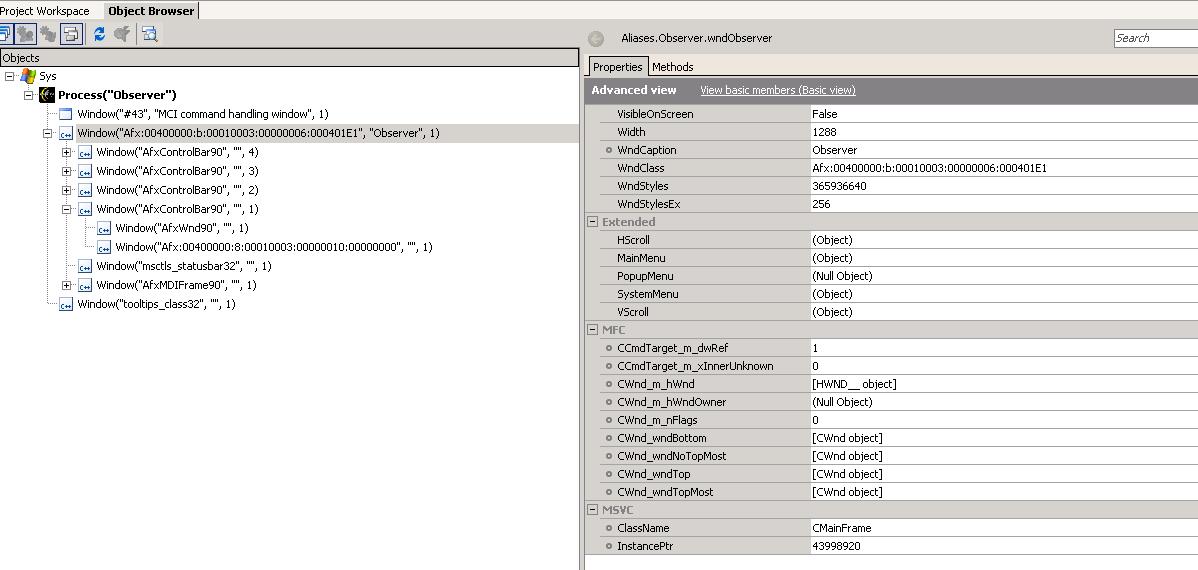
This application I am trying to automate is not an open application as seen from attached screenshot.


Please check how to access various objects in it?


When I try to record script for a control bar item, it records something like below


   Call Aliases.Observer.wndObserver.AfxControlBar90.Afx.Click(71, 17)


I am expecting clickitem here to select a item on the bar.


Two Screenshots is attached.

3 Replies

  • Hi,


    This application I am trying to automate is not an open application as seen from attached screenshot.


    Your application is an Open Visual C++ application. Please refer to TestComplete's help to learn how TestComplete supports testing of Visual C++ applications.

    I am expecting clickitem here to select a item on the bar.


    TestComplete records control-specific actions (such as ClickItem) only for supported controls. Could you please specify the class name of your tested control?


    Thanks in advance.

    Ann

  • Please fins the attached screenshot for the tree control in the application and the object browser screenshot for that.


    Also find the code below when I tried expanding and selecting a particular item from it.


    Sub Test3

      Dim page32770

      Dim afxWnd90

      Set page32770 = Aliases.Observer.wndAfx.page32770

      Set afxWnd90 = page32770.AfxWnd90

      Call afxWnd90.Click(11, 31)

      Call afxWnd90.Click(109, 26)

      Set afxWnd90 = page32770.AfxWnd901

      Call afxWnd90.Click(11, 48)

      Call afxWnd90.Click(107, 135)

      page32770.btnClose.ClickButton

    End Sub
  • Hi,


    TestComplete does not provide control-specific methods for the controls you are using in your application. Try to enable MSAA for the AfxWnd90 class and record your script.


    I hope this helps.


    Ann