We are building a new experience for our SmartBear Community.
This site is now read-only. You can still browse and search as usual. Learn More
This site is now read-only. You can still browse and search as usual. Learn More

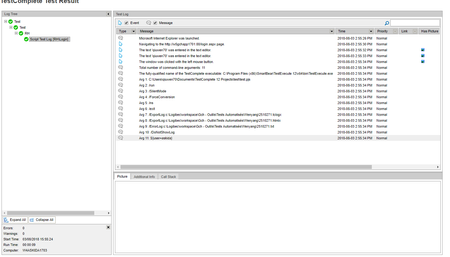

The command line execution of TestComplete/TestExecute does not support custom parameters out of the box. The only parameters it natively supports are documented at https://support.smartbear.com/testcomplete/docs/working-with/automating/command-line-and-exit-codes/command-line.html
In order to have TestComplete read custom parameters, you will need to add script code to you TestComplete project to execute upon running the project. You apparently already have found a way to read those parameters. So, now you need to pass that information into your scripts as well. If you want the userID to be passed in, you should just pass in a string instead of the ${} formatted code you have now.

Ah ok, that makes more sense.
It looks like you're approaching with something like this:
https://support.smartbear.com/testcomplete/docs/working-with/automating/command-line-and-exit-codes/command-line.html
function CommandLineArgs()
{
  var i;
  var nArgs = BuiltIn.ParamCount();
  Log.Message("Total number of command-line arguments: " + nArgs);
  Log.Message("The fully-qualified name of the TestComplete executable: " + BuiltIn.ParamStr(0));

  for (i = 1; i <= nArgs ; i++)
    Log.Message("Arg " + i + ": " + BuiltIn.ParamStr(i));
}
For that way you woul need to do more than just log the parameter, but you need to actually assign the value to a project variable or something similar. Could you provide your code for how you are grabbing the variables?
Alternatively because I don't really like this method myself (there is a lot of extra info and the arguments are more subject to change), so what we do is create a text file with a json string in it to configure environments.
In jenkins you can echo the string to your workspace root with a windows batch command:
echo { "param1" : "%<jenkinsParam1%>, "param2" : "%<jenkinsParam2%> "} > envConfig.json
Then use an on start test event handler to read that info in and parse it to and object.
JSON.parse(aqFile.ReadWholeTextFile(filePath, aqFile.ctUTF8));
Set that to a project variable and then you can call properties off of the object like you would anything else.
Either way works, I find there are is a lot more room for configuration with the config file approach though and is much easier to maintain / extend as well as test locally without having to execute via command line.

I need to pass a temporary variable defined in TestComplete as a parameter in Jenkins. In additonal, I would like to make TestComplete recognize such custom paramters. I tried to make the custom paramter with command line in the Jenkins, but it can't login as the user that I provide.
For example: I put the variable as "abc " in the command line, and it shows like "bbb" in the login webpage. I am not sure if I explain clearly.
Ah ok, that makes more sense.
It looks like you're approaching with something like this:
https://support.smartbear.com/testcomplete/docs/working-with/automating/command-line-and-exit-codes/command-line.html
function CommandLineArgs()
{
  var i;
  var nArgs = BuiltIn.ParamCount();
  Log.Message("Total number of command-line arguments: " + nArgs);
  Log.Message("The fully-qualified name of the TestComplete executable: " + BuiltIn.ParamStr(0));

  for (i = 1; i <= nArgs ; i++)
    Log.Message("Arg " + i + ": " + BuiltIn.ParamStr(i));
}
For that way you woul need to do more than just log the parameter, but you need to actually assign the value to a project variable or something similar. Could you provide your code for how you are grabbing the variables?
Alternatively because I don't really like this method myself (there is a lot of extra info and the arguments are more subject to change), so what we do is create a text file with a json string in it to configure environments.
In jenkins you can echo the string to your workspace root with a windows batch command:
echo { "param1" : "%<jenkinsParam1%>, "param2" : "%<jenkinsParam2%> "} > envConfig.json
Then use an on start test event handler to read that info in and parse it to and object.
JSON.parse(aqFile.ReadWholeTextFile(filePath, aqFile.ctUTF8));
Set that to a project variable and then you can call properties off of the object like you would anything else.
Either way works, I find there are is a lot more room for configuration with the config file approach though and is much easier to maintain / extend as well as test locally without having to execute via command line.
Hi
Thanks for the help, my code is excatly same as yours. I think I need to configure the command line in the Jenkins