We are building a new experience for our SmartBear Community.
This site is now read-only. You can still browse and search as usual. Learn More
This site is now read-only. You can still browse and search as usual. Learn More


Add the Clear method at the beginning of the OnChange event handler to clear the list of Warehouse combobox. Here is my code:
function UserForm1_cxComboBox2_OnChange(Sender)
{
  UserForms.UserForm1.cxComboBox1.Properties.Items.Clear();
  if (UserForms.UserForm1.cxComboBox2.Text == "Frozen")
   {
      with (UserForms.UserForm1.cxComboBox1.Properties.Items)
    {
      Add("100-Warehouse 100");
      Add("200-Warehouse 200");
    }
    }
  if (UserForms.UserForm1.cxComboBox2.Text == "Dairy")
   {
      with (UserForms.UserForm1.cxComboBox1.Properties.Items)
    {
      Add("110-Warehouse 110");
      Add("210-Warehouse 210");
    }
    }
}
Does it help?

Thank you, Tanya. This looks promising.
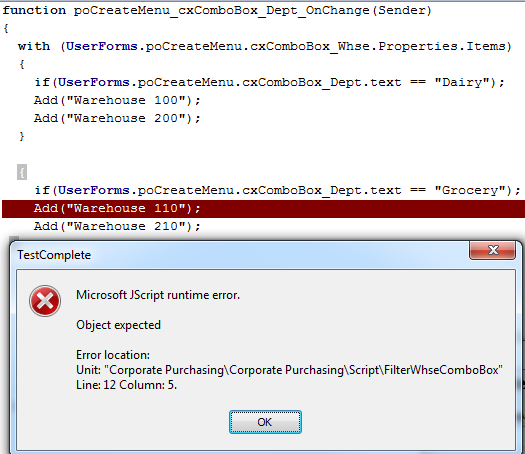
I am getting an error and can't seem to triage this. Please see attached screenshot.
What am I doing wrong here?
 Alumni
Hi,
You need to call Add inside with. The with operator allows you to define an object where Add will belong. Take a look at your script where you fill in the combobox based on Dairy.
Hi Tanya... Thank you for your help. I'm getting closer.
Regardless of the department I select in the dropdown, all warehouses display. Code and screenshot attached.
Again, what am I missing here? Unfortunately I'm not a developer so coding is trial and error for me. I suspect the issue lies in the IF statement but I'm certain.
Again, thank you so much for your assistance.
AlumniAdd the Clear method at the beginning of the OnChange event handler to clear the list of Warehouse combobox. Here is my code:
function UserForm1_cxComboBox2_OnChange(Sender)
{
  UserForms.UserForm1.cxComboBox1.Properties.Items.Clear();
  if (UserForms.UserForm1.cxComboBox2.Text == "Frozen")
   {
      with (UserForms.UserForm1.cxComboBox1.Properties.Items)
    {
      Add("100-Warehouse 100");
      Add("200-Warehouse 200");
    }
    }
  if (UserForms.UserForm1.cxComboBox2.Text == "Dairy")
   {
      with (UserForms.UserForm1.cxComboBox1.Properties.Items)
    {
      Add("110-Warehouse 110");
      Add("210-Warehouse 210");
    }
    }
}
Does it help?
That did it. Thank you again Tanya. I really appreciate your assistance!